Trending Story Detail Page Redesign
Helping users gain deeper insights on timely stories and top Twitter authors.
Zignal Labs
06/2020 – 09/2020
What is Zignal Labs?
Zignal Labs is the world’s leading impact intelligence company, helping users measure opinion in real time and identify the topics, networks and people that shape it. Used by the world’s largest companies and public sector organizations, Zignal lets users measure and shape their corporate brand, drive improved marketing performance, understand impactful product features, and identify risks and opportunities as they emerge.
Who uses Zignal Labs?
Understanding the conversation
Zignal users can be quite varied but all center around understanding the conversation around a particular topic or brand. Our users come from the communication, public relations, marketing, brand management, and crisis management spaces, each with very specific needs and goals.
For example, Zignal users may be responsible for tracking and monitoring negative stories about their company during a crisis event and preventing those stories from getting out of control. Other users may be responsible for compiling reports on sentiment and total mentions and understanding the changes in these metrics over time. Other users may want to understand their share of voice compared to their competitors and explore options to increase their share.
The problem
Our problem begins with Pendo (data analytics tool) which we had recently implemented at Zignal Labs. We wanted to use Pendo to track the engagement of Zignal Labs’ extensive library of widgets. One of the widgets we thought was being used to accomplish many of our users’ goals was the Trending Stories Detail Page. However using Pendo data, we noticed many users were adding the widget to their brand monitoring dashboards but a very low percentage of users were clicking into the Trending Story Detail Page.
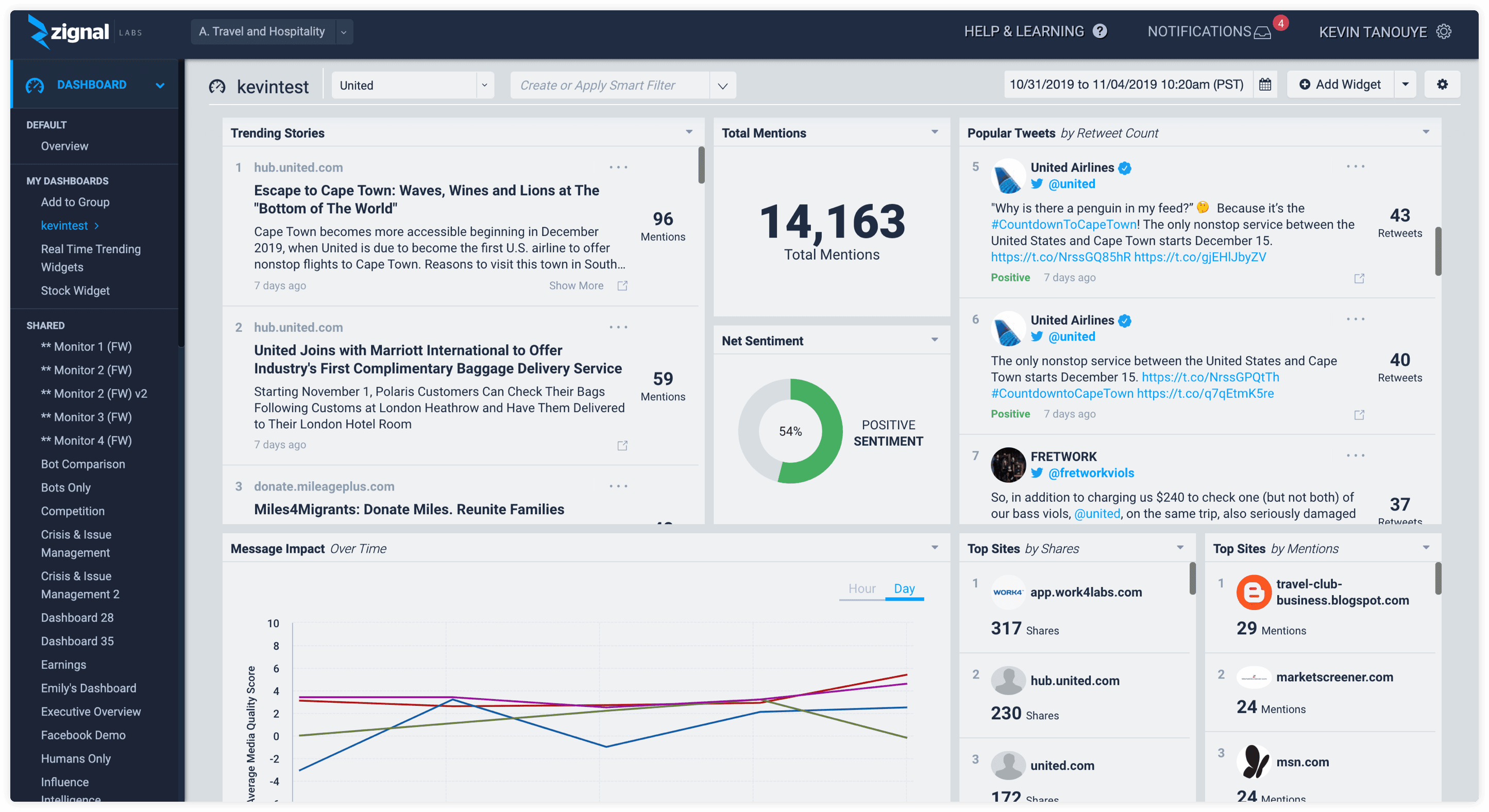
The Trending Stories widget tracks the shares of a link on Twitter. Users can see the number of shares/mentions and then open the Trending Story Detail Page for more in-depth information.
Trending Stories Widget
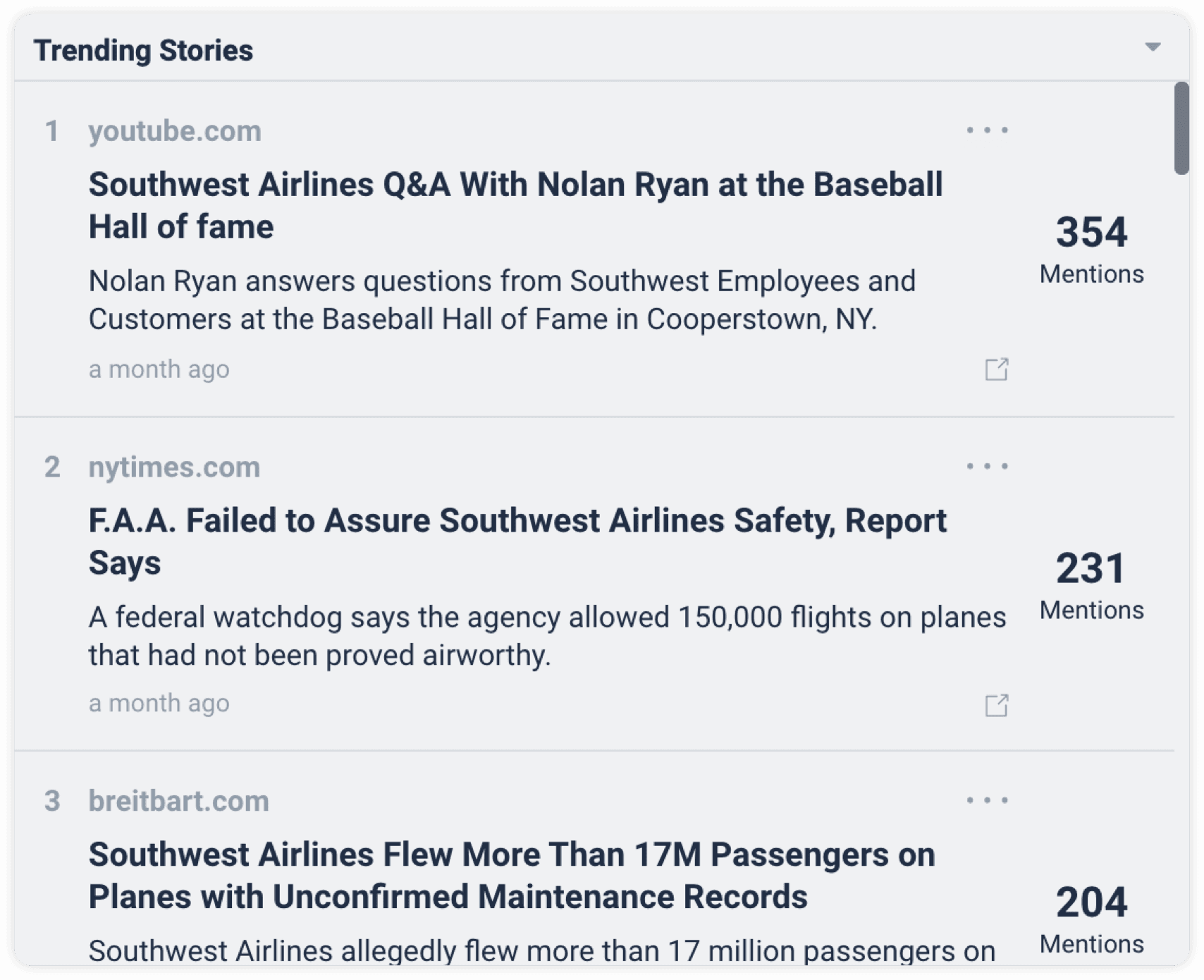
This is the Trending Stories Widget. The mentions count on the right side is the number of shares on Twitter. Users can access the Trending Story Detail Page by clicking external link icon.
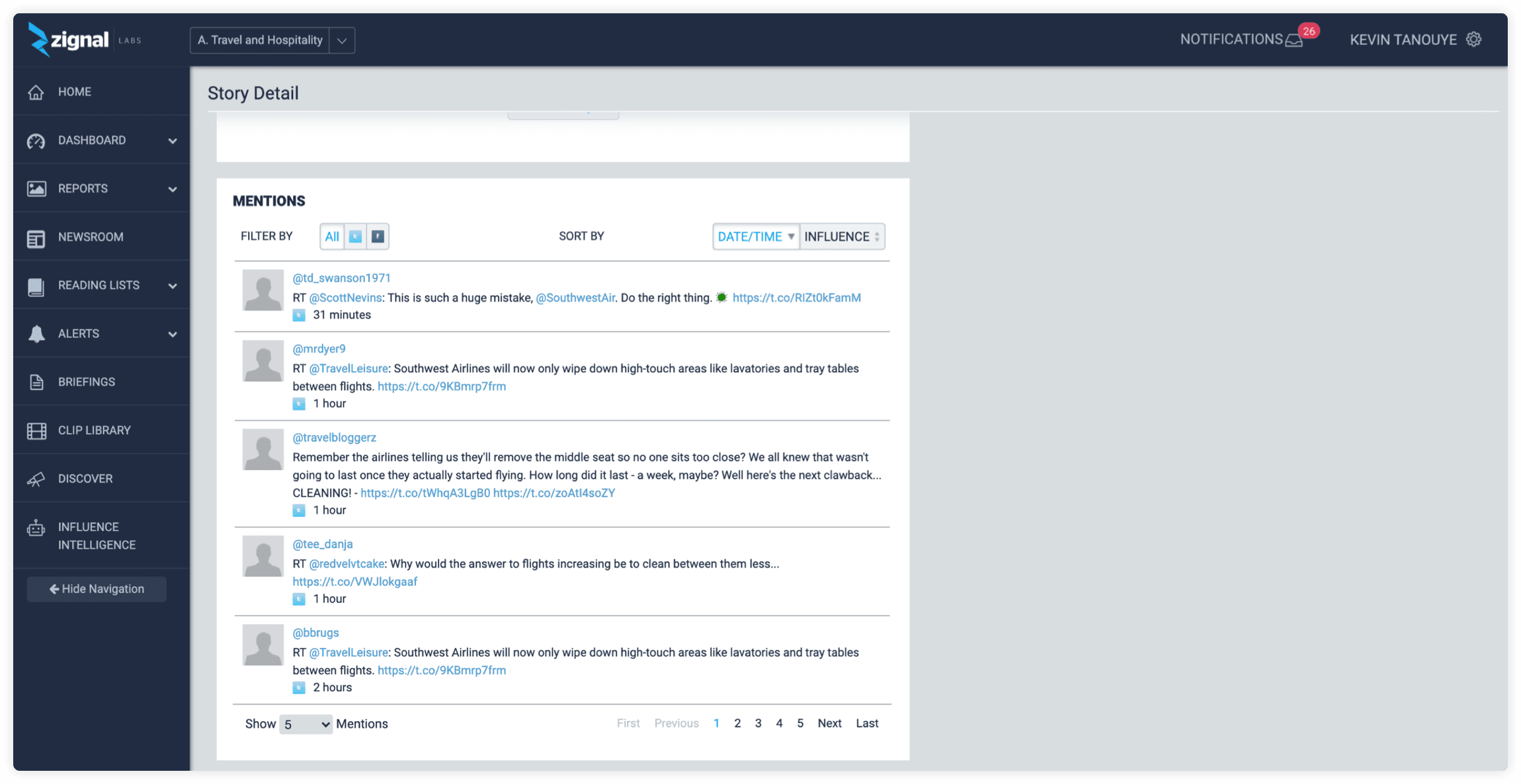
Trending Stories Detail Page
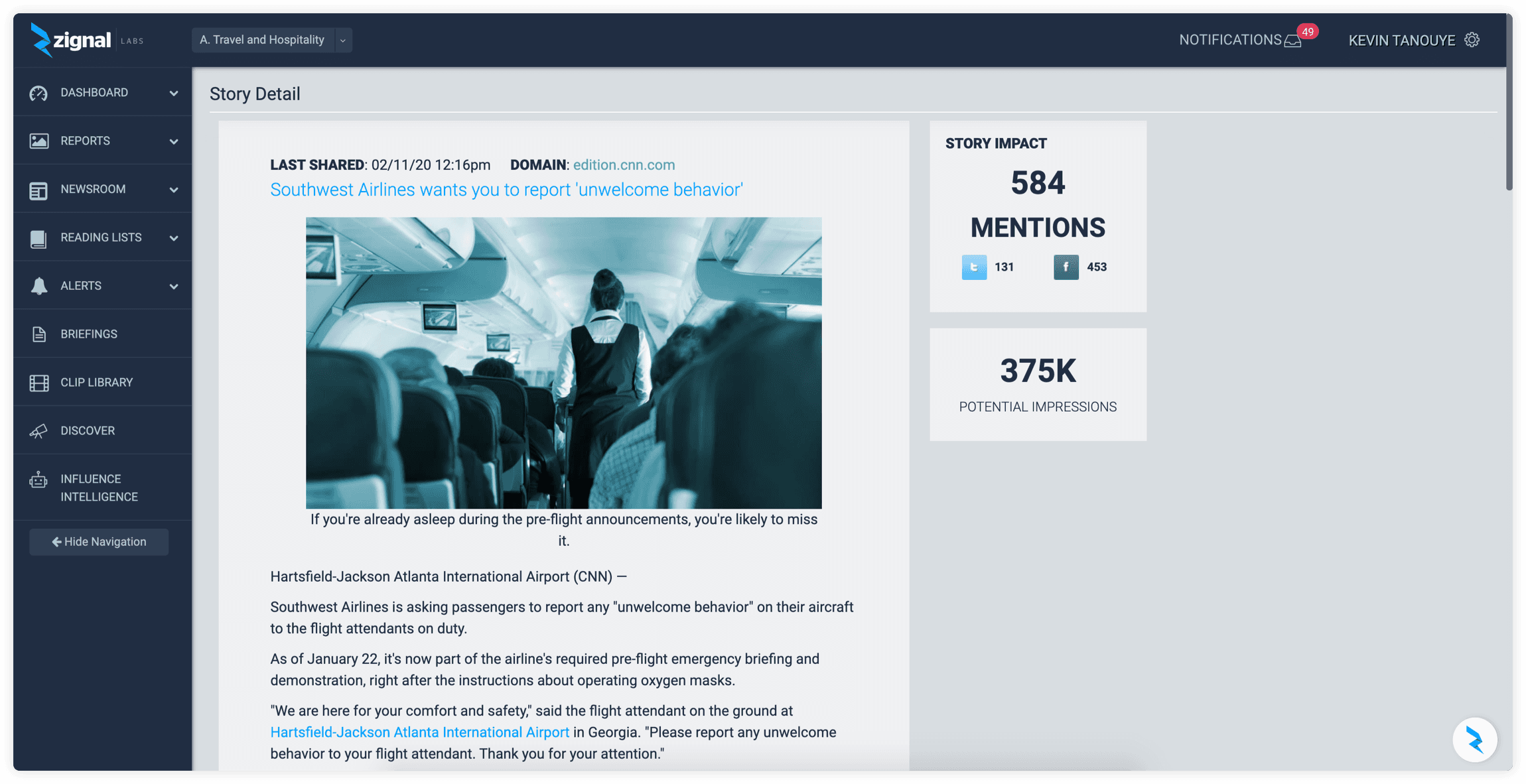
Here, the user can read the story and view mention counts (Twitter and Facebook) and potential impressions. At the bottom of the page, the user can view Twitter and Facebook shares and sort by time and influence.
So…what is this feature used for?
Great question! This feature was designed to help users quickly discover stories gaining traction, mainly on Twitter, and then surface who was sharing or driving the velocity of the story. For our users, this can be incredibly helpful around crisis events or general brand monitoring to understand the larger conversation.
Why is no one using it?
We decided to figure out why no one was clicking into a fairly important widget (from our perspective at least). One of the main challenges was finding users to talk to who were using the feature. Most external users we spoke with did not know the point of the Trending Story Detail Page. Their experience had been clicking on the external icon in the Trending Stories widget and then not understanding what they were seeing. After that, users never clicked on it again because they assumed the Trending Story Detail Page was just the article and nothing else.
We finally realized we should be speaking with internal users who were frequently interacting with the page. We used Pendo to track internal power users of the page. These internal users were advanced data analysts helping our clients uncover insights around trending stories. We asked them how they were using the page.
Advanced analyst workflow
As we interviewed these internal power users, we realized they had created their own incredibly advanced workflow to extract insights from the Trending Story Detail Page, a workflow average users could not do on their own. Their multi-step process started with:
- Exporting list of Tweets from the detail page out to excel
- Sorting and looking for highest retweeted Twitter user
- Plugging Twitter handle into Discover and Influence Intelligence
- Analyzing Twitter user further (automated? credible?)
- Adding Twitter user to Top Authors widget
- Further monitoring the Twitter author
- Searching story in the Newsroom
So why were they doing this?
Identify top authors
The reason our advanced users were doing this was to identify top authors around a trending story. Who is sharing and talking about this article the most? Do they have many followers? Are they authentic or automated? They could then add these authors to different widgets to keep track and monitor them further.
Story timeline
Our advanced users also wanted to learn about the story timeline. Did this story coincide with a special event? Did it begin trending when the article was written or did it trend later after a certain event? Was there a spike in sharing? The current design made this very difficult and our advanced users would have to dig through the Newsroom (raw data page) to find these connections.
New communities
Lastly, they wanted to learn about the communities these top authors were connected to. How can our customers gain access to these communities? Are there other important authors in these communities we don’t know about?
The opportunity
With all this research done, we finally realized the opportunity for this project. Without doing all this necessary research in the beginning, we would have gotten off on the wrong foot.
Opportunity
Rethink the trending story feature to help users quickly discover key points around a trending story.
User goals
Quickly gather important metrics about trending stories and find important Twitter authors to monitor or interact with.
Business goals
Increase user engagement throughout the platform and decrease time to value for users. Upsell our two new Twitter focused features, Discover and Influence Intelligence.
The solution
For our solution, we created a central location for our users to investigate a trending story and identify important Twitter authors
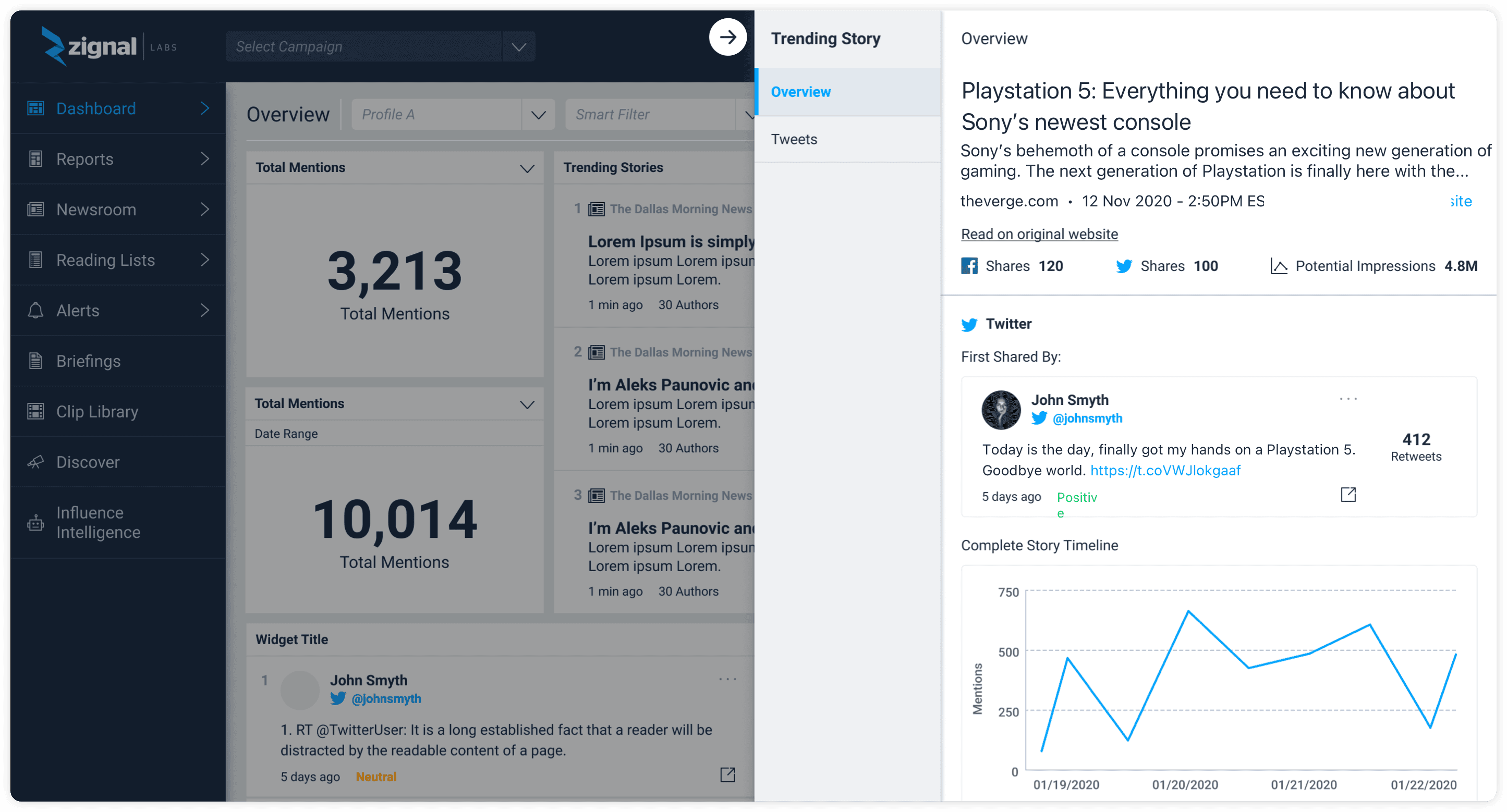
Overview tab
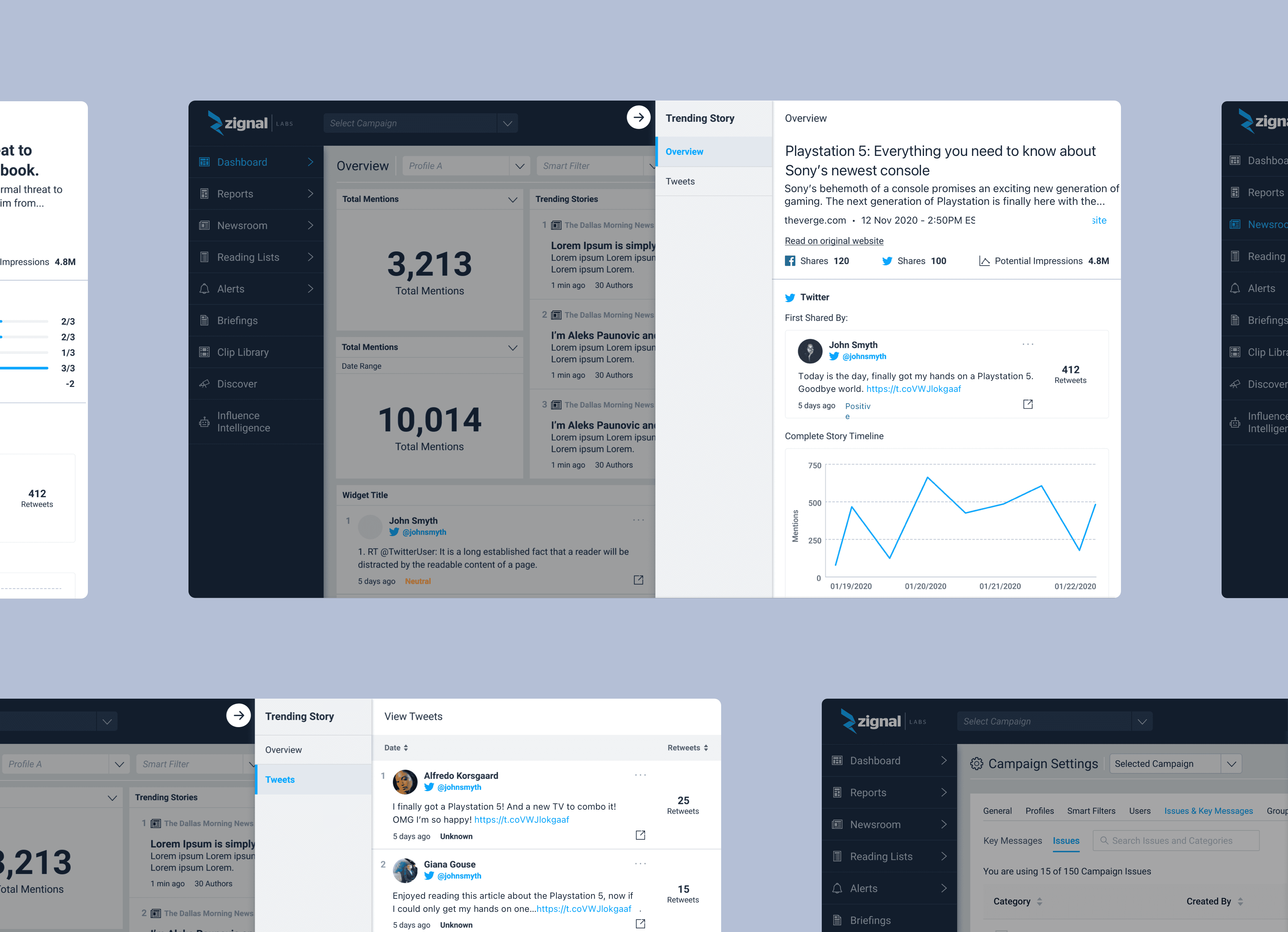
We designed a central location to learn about a trending story where users could see a quick overview of the contents and then navigate to the original website if needed. Users could quickly see the first sharer of a story and either add this user to a widget for further monitoring or input this into Discover or Influence Intelligence. They could see the complete story timeline and interact with the chart where it would bring the user to the Newsroom.
Tweets tab
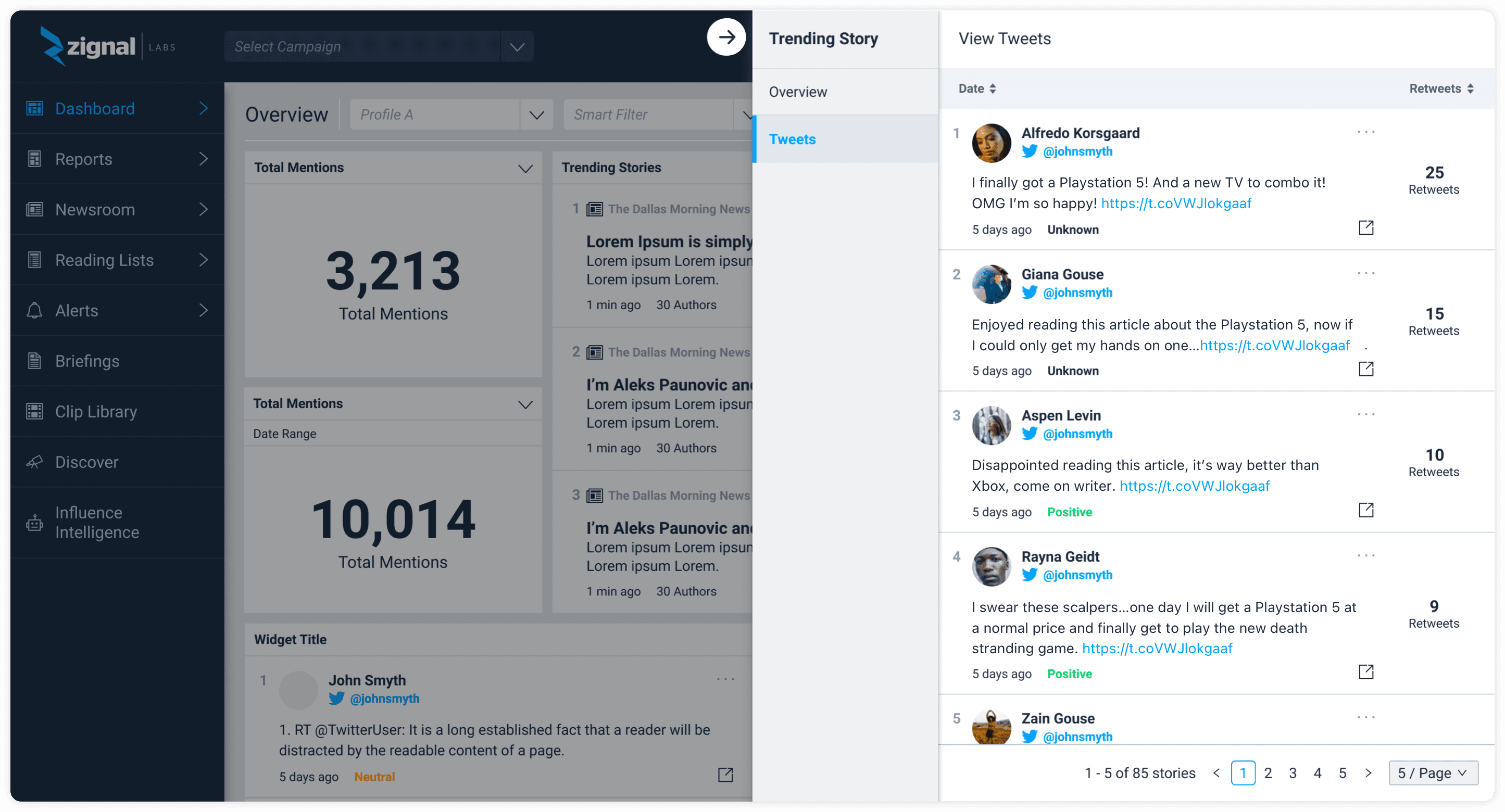
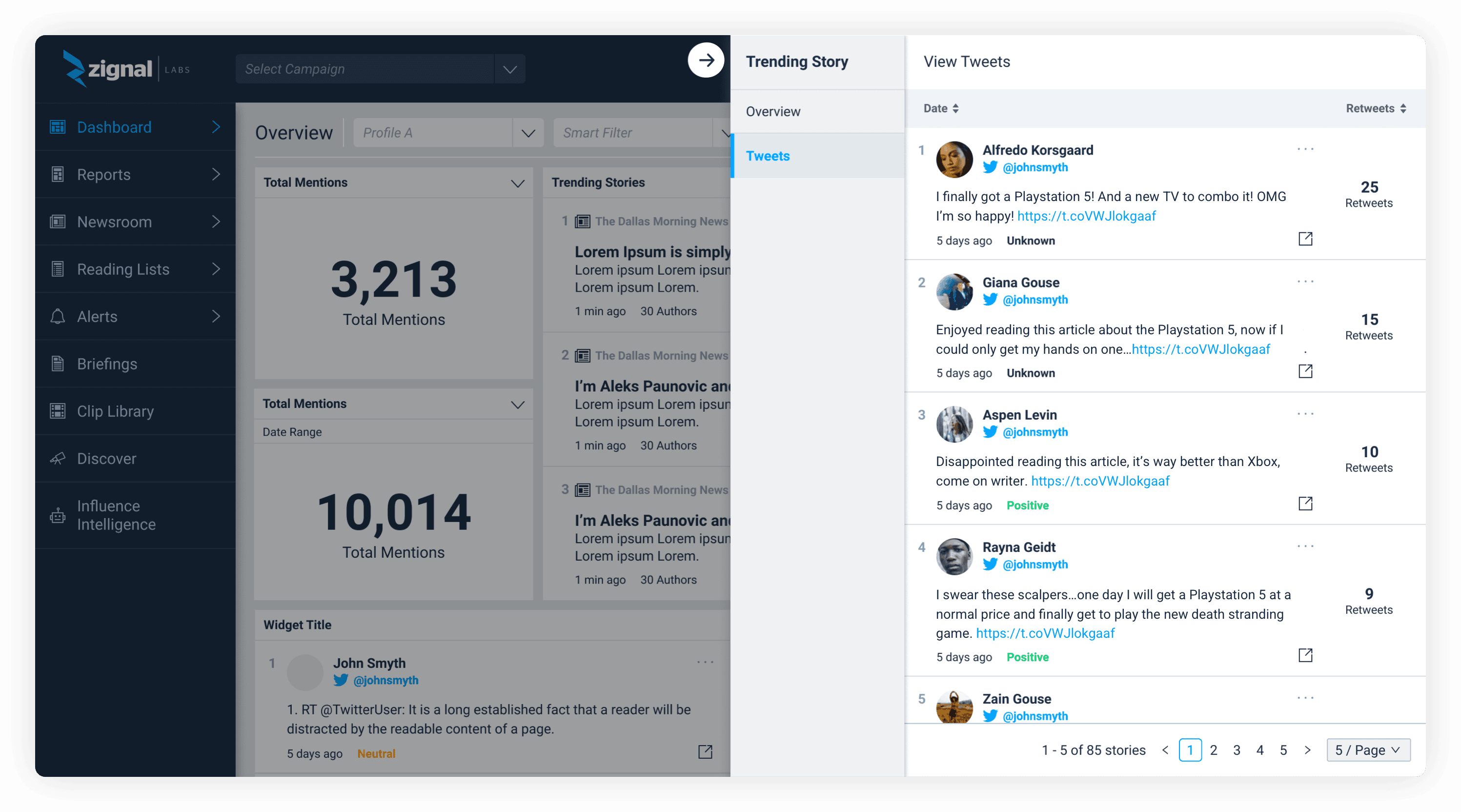
On the Tweets tab, users could quickly sort by retweet count to identify Twitter authors with the most retweets, an important metric in figuring out how important a Twitter author was. The user could view the tweet on Twitter, add the user to a widget, or sort the tweets by date.
Team & timeline
Design
I was the Lead Product Designer for this project and my responsibilities included:
- User research
- Low fidelity designs
- Usability testing
- High fidelity designs
Engineering
Engineering Lead
2 Platform Engineers
1 Frontend Engineer
Product
Senior Product Manager
Timeline
June 2020 - September 2020
Process
Additional research
Our process began with revisiting our earlier research, what else was missing from the current Trending Story Detail Page experience?
Designs & iterations
We started designing different ideas with our research and newly created design pattern in mind.
Usability testing
We tested our new designs and received very positive feedback.
Final changes
We finalized our design, making slight tweaks due to engineering and product feedback.
Solution
Our newly revamped Trending Stories Detail Page, designed to simplify an advanced user workflow and surface important findings for our users.
Additional research
While learning our internal power users’ workflow was very important (and overwhelming 😵💫), we went back and did some additional research on the current experience. What else was possibly missing that we could add to the new design?
Aggregated retweets
Users wanted to see the aggregate counts of retweets. This number would help them identify top authors quickly.
Media Quality Score
Users wanted to see the Media Quality Score (MQS), a powerful metric created by Zignal.
Original website
Users would rather read the article on the original website, not the Zignal platform.
Designs & iterations
With all this information in mind, especially our initial research, I started some very low fidelity designs.
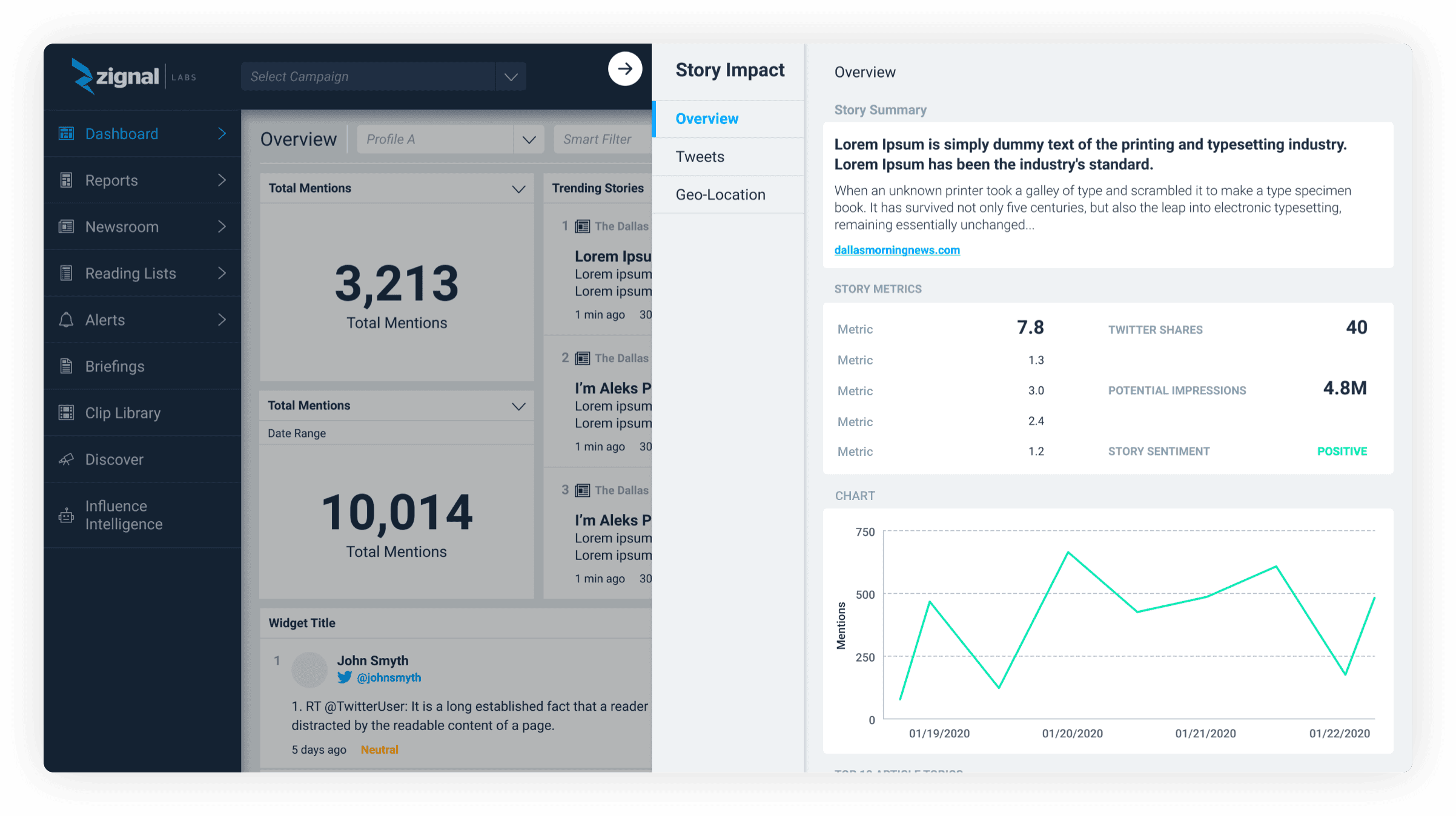
Overview page
This was the first iteration I designed. Currently the majority of the real estate on the current design was taken up by the article but users expressed they would rather read the article on the original website. I decided to reduce the real estate of the actual article and focus attention to the metrics and other Zignal Labs features. We had also recently implemented a new side panel design to the platform that we wanted to test and see if this pattern would work here. We wanted to keep users on their dashboard and in the proper context versus navigating them to an entirely new page.
Tweets page
I designed another page based on our analyst workflow which centered around understanding Twitter authors and retweets. With this design we wanted to give Twitter its own section and focus versus keeping it on the same page as the overview details. We added a Tweets section and totaled the counts in tabs on the top.
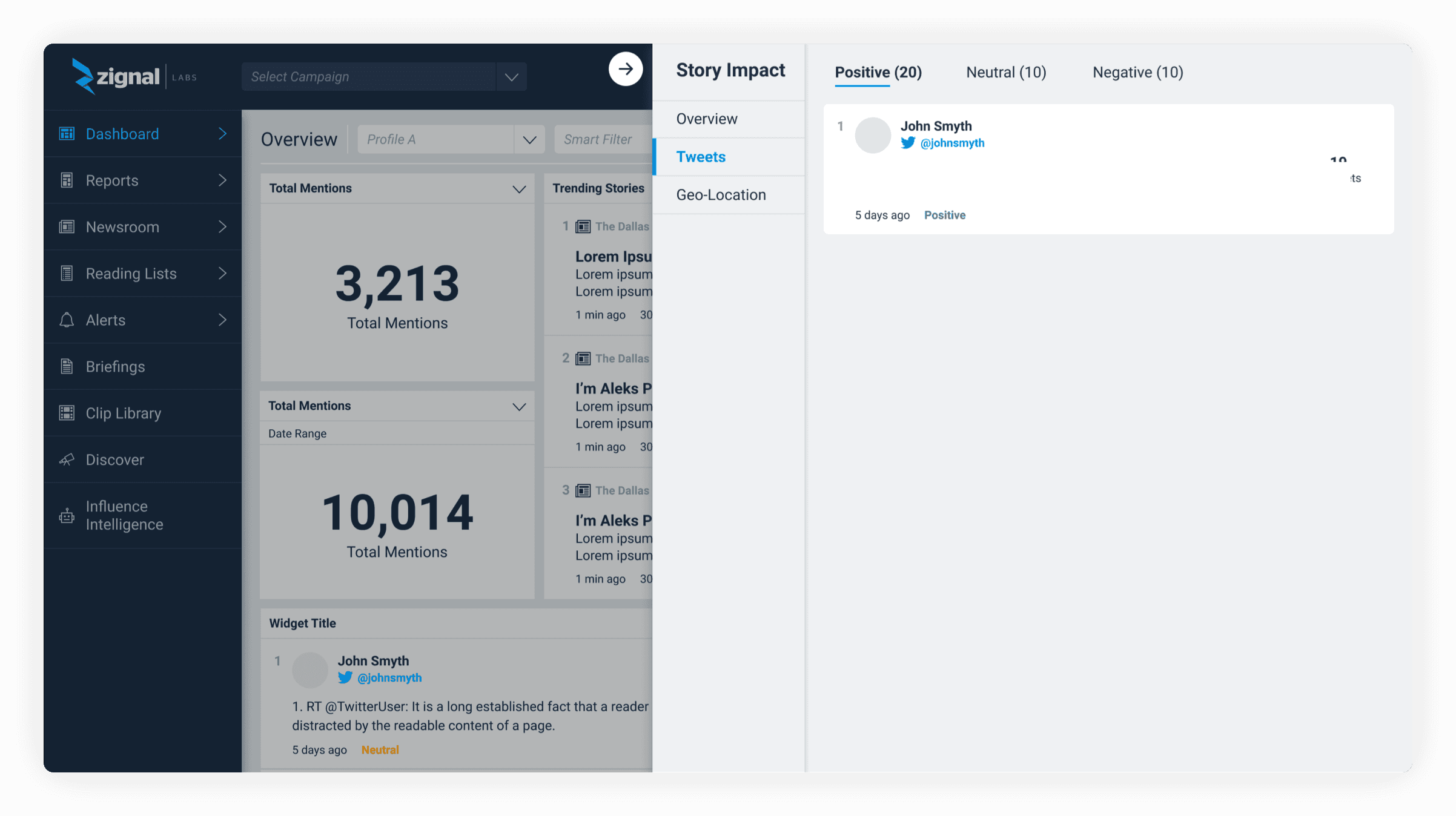
Further iterations
In this design, I explored increasing the hierarchy of the story summary at the top of the page followed by a larger emphasis on the story metrics. When we got some quick feedback on the previous design, the users were missing some of the key metrics we had added.
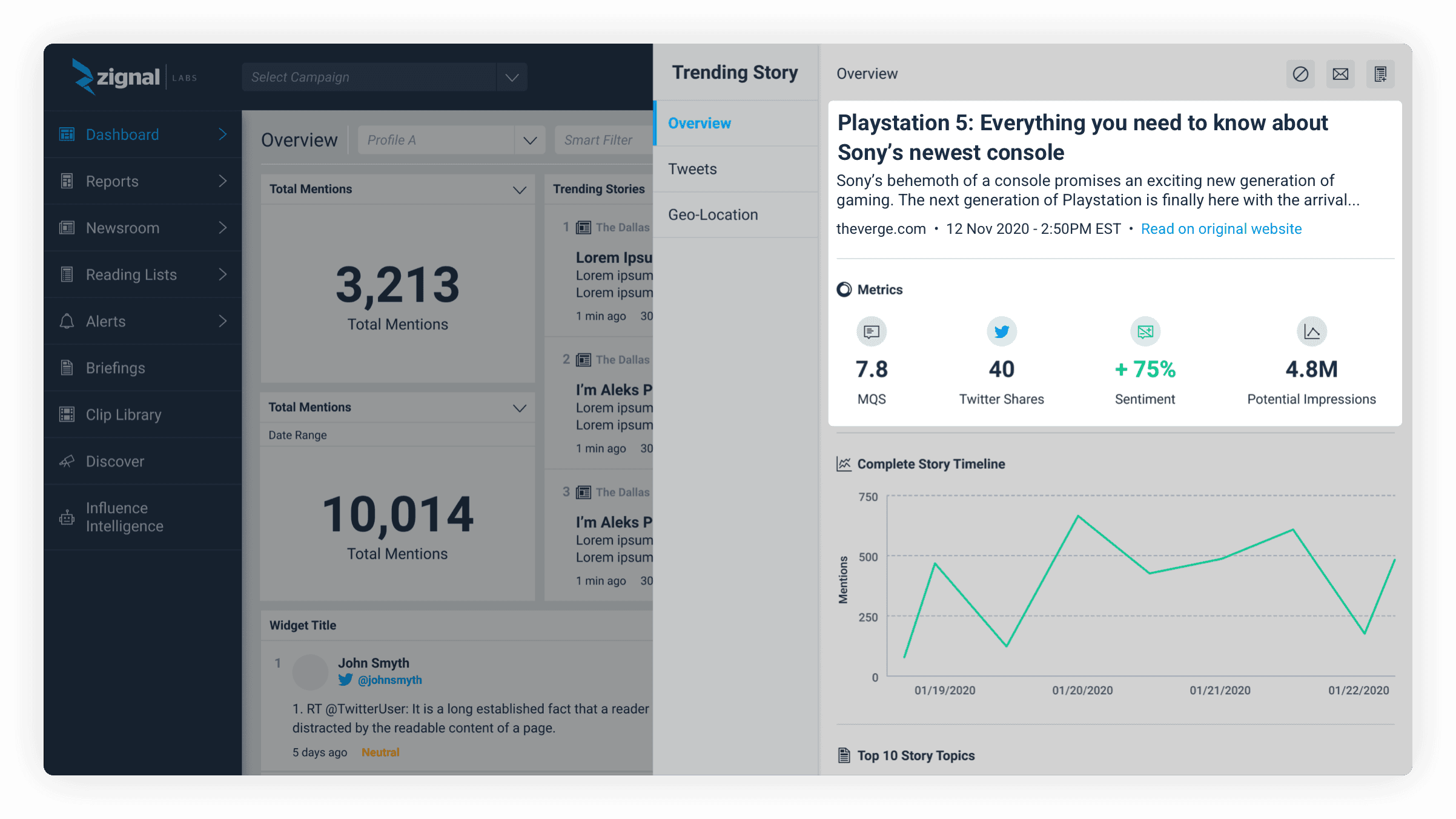
MQS focus
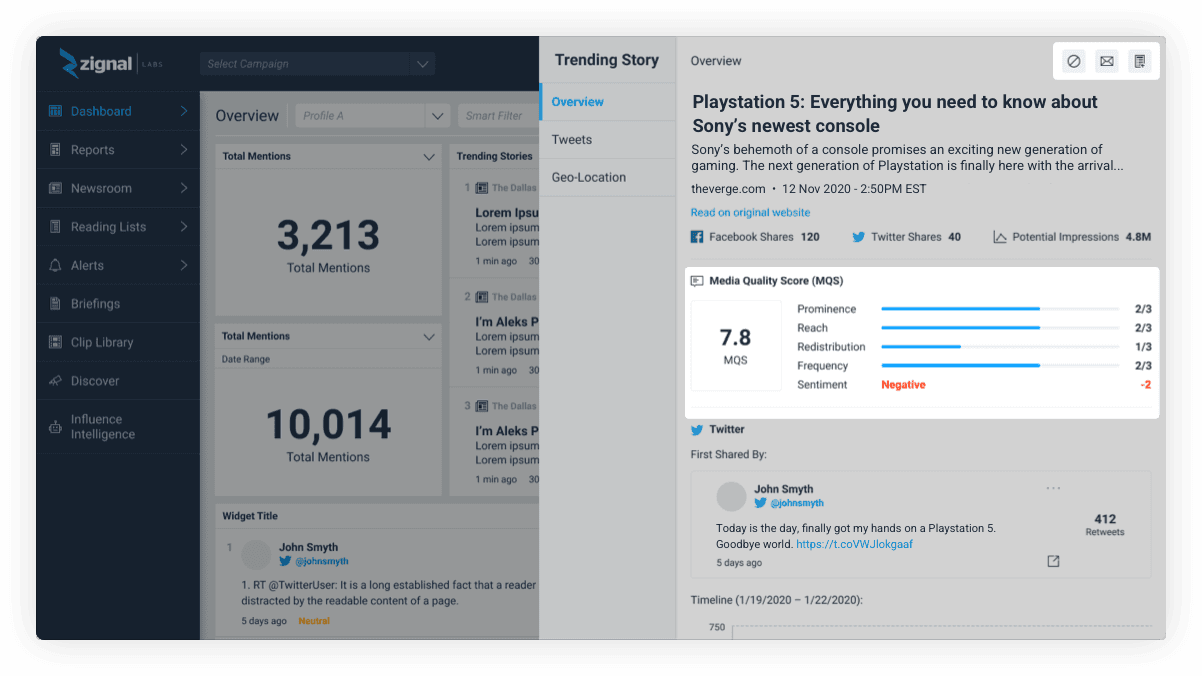
This iteration focused on our user feedback around the Media Quality Score which is a proprietary Zignal Labs’ metric used by some of our larger customers. Users expressed they didn’t just want to see the score (which is how we presented the MQS on the platform), they wanted to see the score of each element that comprised the score. This design explored that feedback.
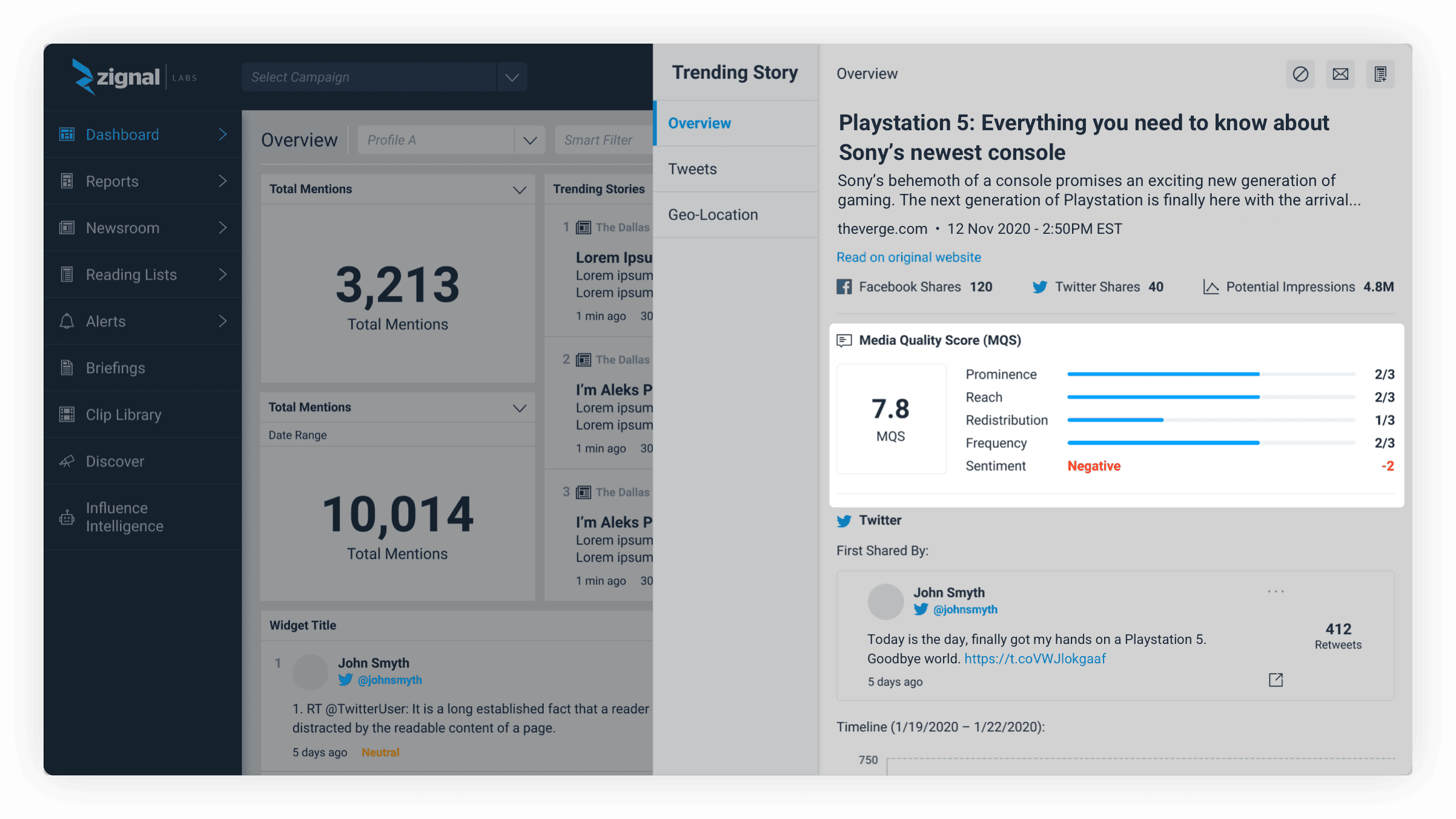
First sharer
One of the most important aspects of understanding the impact of a trending story is who is sharing the story. With this design we explored showing who first shared the story on the overview page. We were debating between the first sharer or the author with the most retweets but we decided to focus on the user who first shared the story as the user could easily find who had the most retweets on the next tab.
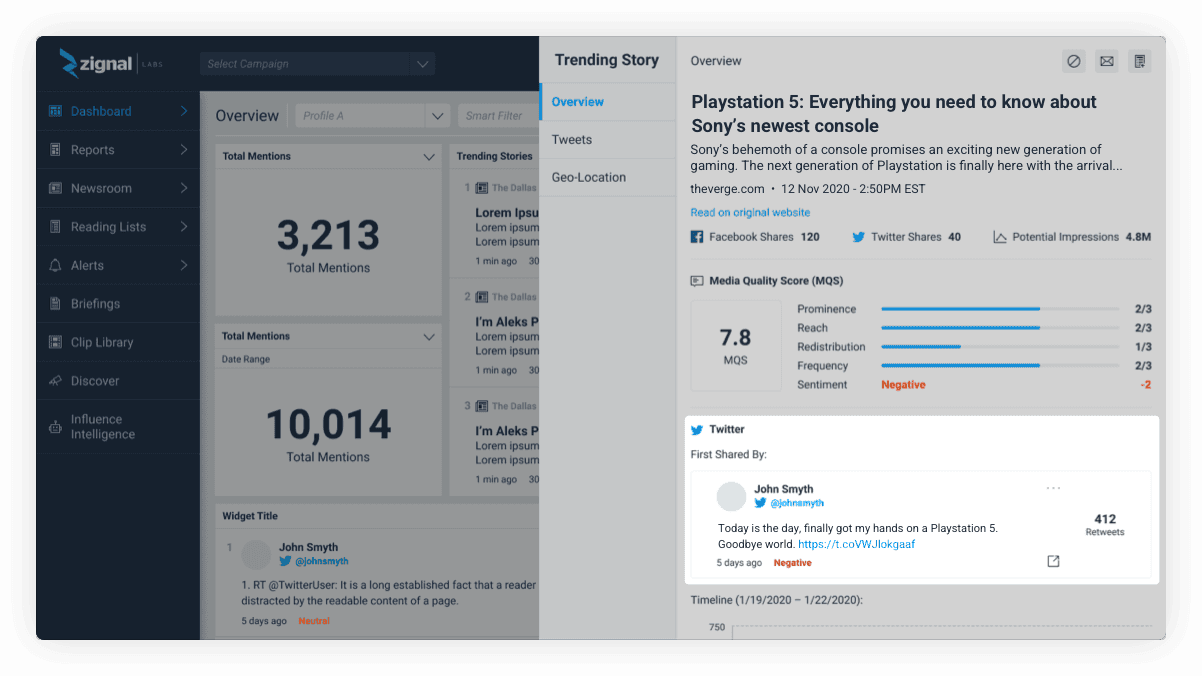
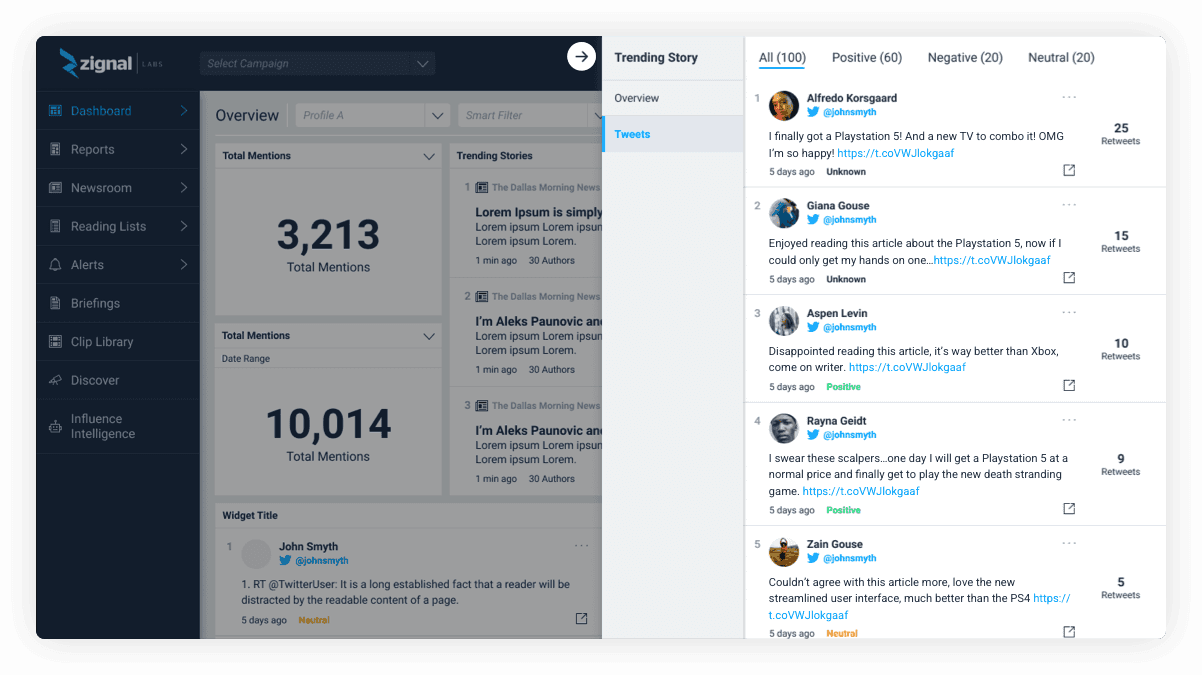
Aggregate retweets
We brought aggregated tweets to our design so users could quickly see which user had the most retweets.
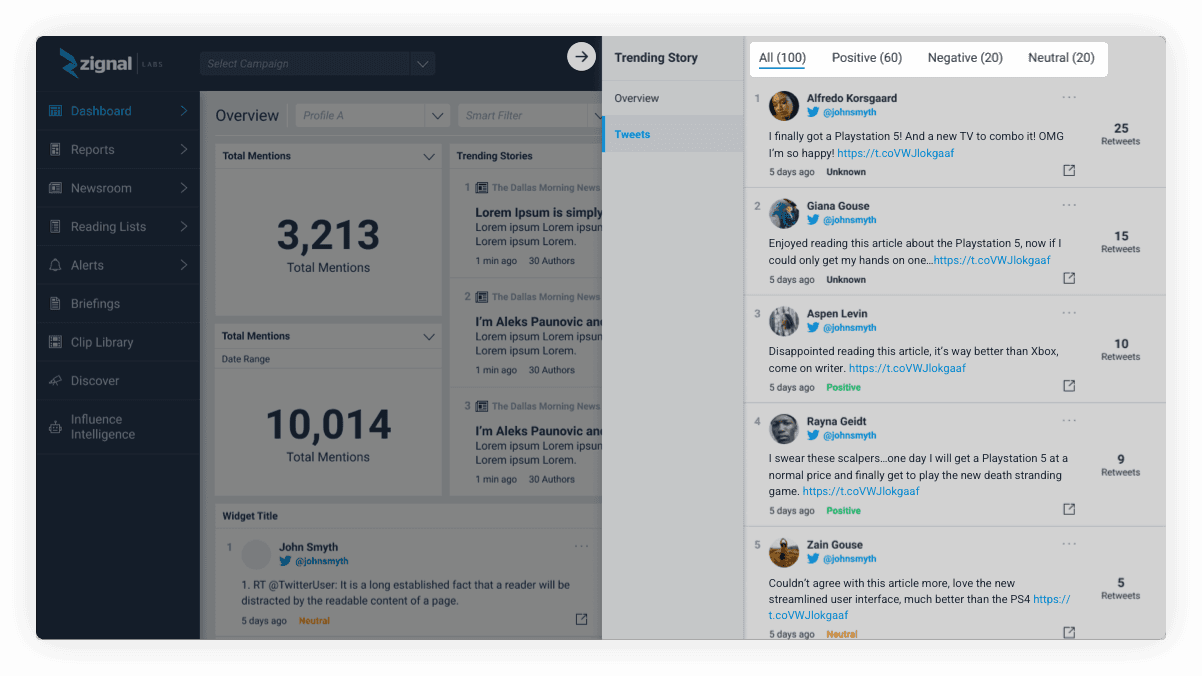
We broke up the tweets further into 4 sections based on sentiment: all, positive tweets, negative tweets, and neutral tweets. This would help users quickly identify who was speaking positively about a story versus negatively.
Feedback
We conducted usability tests with internal and external users over two weeks. The feedback was overall positive!
Quotes
“I love seeing the MQS and the breakdown of the different categories.”
“I’ve never seen sentiment sorting before…”
“Oh why did that company retweet their competitor? That’s really interesting.”
Final changes
Actions and Media Quality Score
We had to remove the actions in the top right corner due to engineering time. Our larger product team wanted us to remove the Media Quality Score as we cannot always generate a Media Quality Score for every story. Rather than an empty MQS section, they wanted to remove it.
Sentiment sorting and pagination
We decided to remove this tabbed sentiment design because we did not have this pattern on the rest of the platform and it would have been challenging for engineering to implement. We also had to introduce pagination due to the amount of tweets that could be generated around a trending story.
Solution
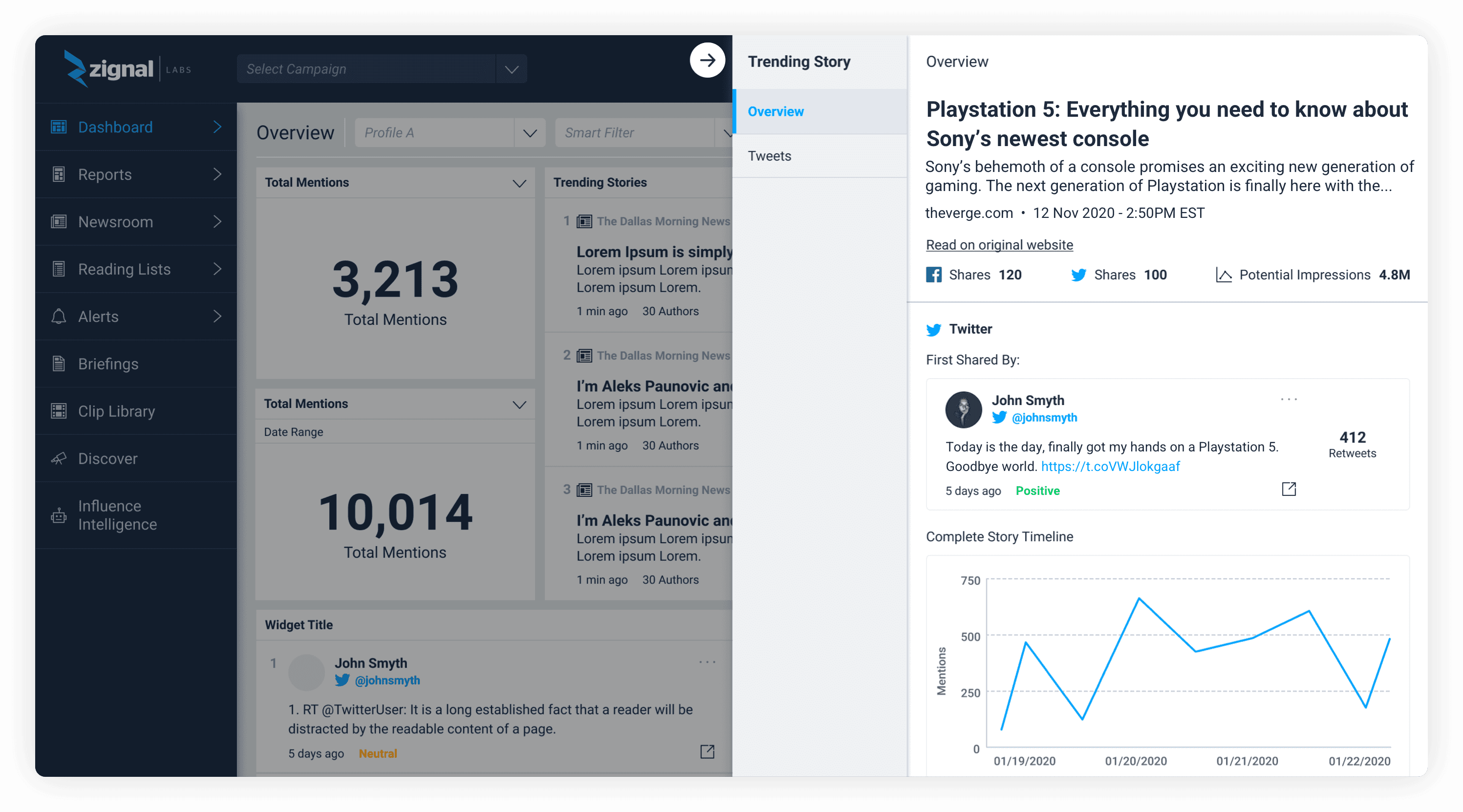
We designed a central location to learn about a trending story and its top sharers. Users could see a quick overview of the story contents and then navigate to the original website if needed. They could quickly see the first sharer of a story and either add this user to a widget for further monitoring or input this Twitter user into Discover or Influence Intelligence.
Here users could quickly sort by retweet count and focus on different Twitter users, who was most important and least important? They could view the tweet on Twitter, add the user to a widget, and sort by date.
Business success metrics
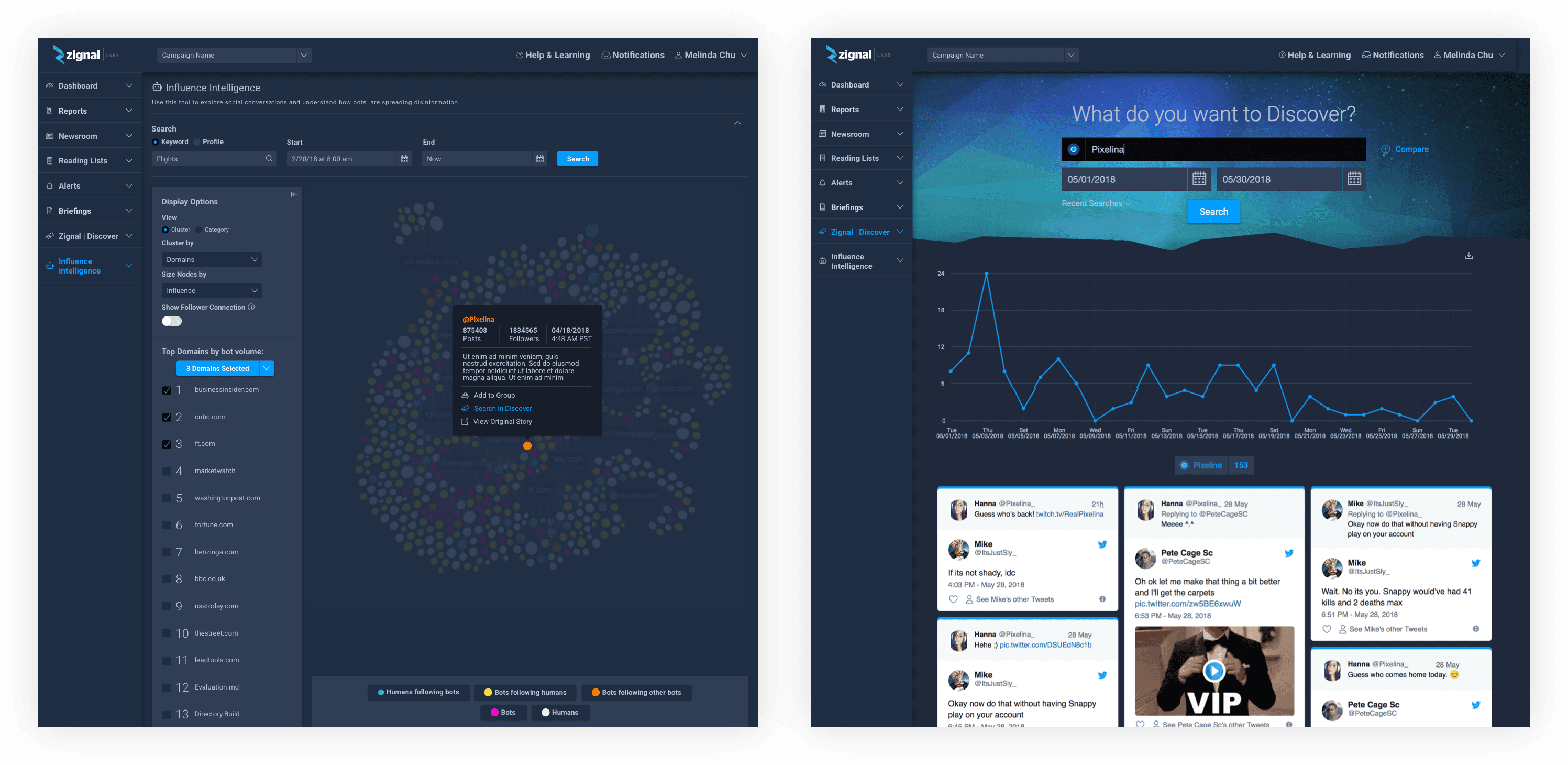
One strong business metric we wanted to improve with this redesigned feature was displaying the power of other Zignal Labs features. Two of those features were Discover and Influence Intelligence, tools solely focused on learning more about Twitter authors that we wanted to upsell to our customers.
Discover kept a history of all of a Twitter author’s tweets. Were they an important author or did they just have one tweet that was highly retweeted?
Influence Intelligence could provide complex automation scores and node charts around Twitter authors and the likelihood they were a bot or not.
User success metrics
Decrease time to value
Help users find important information around trending stories faster and allow all users to be able to find the same insights our advanced users were finding.
Identify top authors
Zignal users will be able to quickly identify important Twitter users responsible for sharing stories about a particular topic, brand, or industry and monitor them further.
Analyze trending stories further
The new design will help our users understand the true impact of trending stories with updated metrics and connections to the Zignal platform.
Learnings and takeaways
Establish success metrics
Working on this project taught me the importance of establishing success metrics early on. I don’t believe success metrics were established for the first version of the Trending Story Detail Page, leading to the misunderstanding of how users were interacting with the feature. If we had, we could have addressed these issues earlier.
Importance of a design system
Having an established design system really helped the velocity at which we designed and released this feature. Once we had figured out the problem and what users needed to see, all we had to do was figure out which components to plug in from our design system.
© 2026 Kevin Tanouye