Visualization Library
This case study covers my work creating a new visualization library to help users quickly understand their application redundancy and expense spend.
Zylo
11/2021 – 03/2022
What is Zylo?
Zylo is the leading enterprise SaaS management platform, helping companies manage and optimize their SaaS. It provides a single system of record for all cloud-based software purchased across a company and helps users discover, manage, and optimize their applications through real-time spend, utilization, and feedback data.
Who uses Zylo?
IT/Security
These users care about managing application access, application settings, configuration, users, licensing, and security. For example, they would manage Zoom licenses: who gets a pro license versus a basic license, who gets a webinar license, etc.
Procurement
Procurement users care about managing software purchasing, application renewals, and rationalization. Procurement’s main goal is to drive savings. So for the Zoom example, they might investigate cheaper video conferencing tools compared to Zoom.
Chief Information Officers
The last group is chief information officers. These users wants to understand their SaaS data at a glance. For example, how is their SaaS spend changing over time? How is their application count changing over time? How do they compare to similar companies? They want to see a quick glance and are not in Zylo as much as IT and Procurement.
The problem
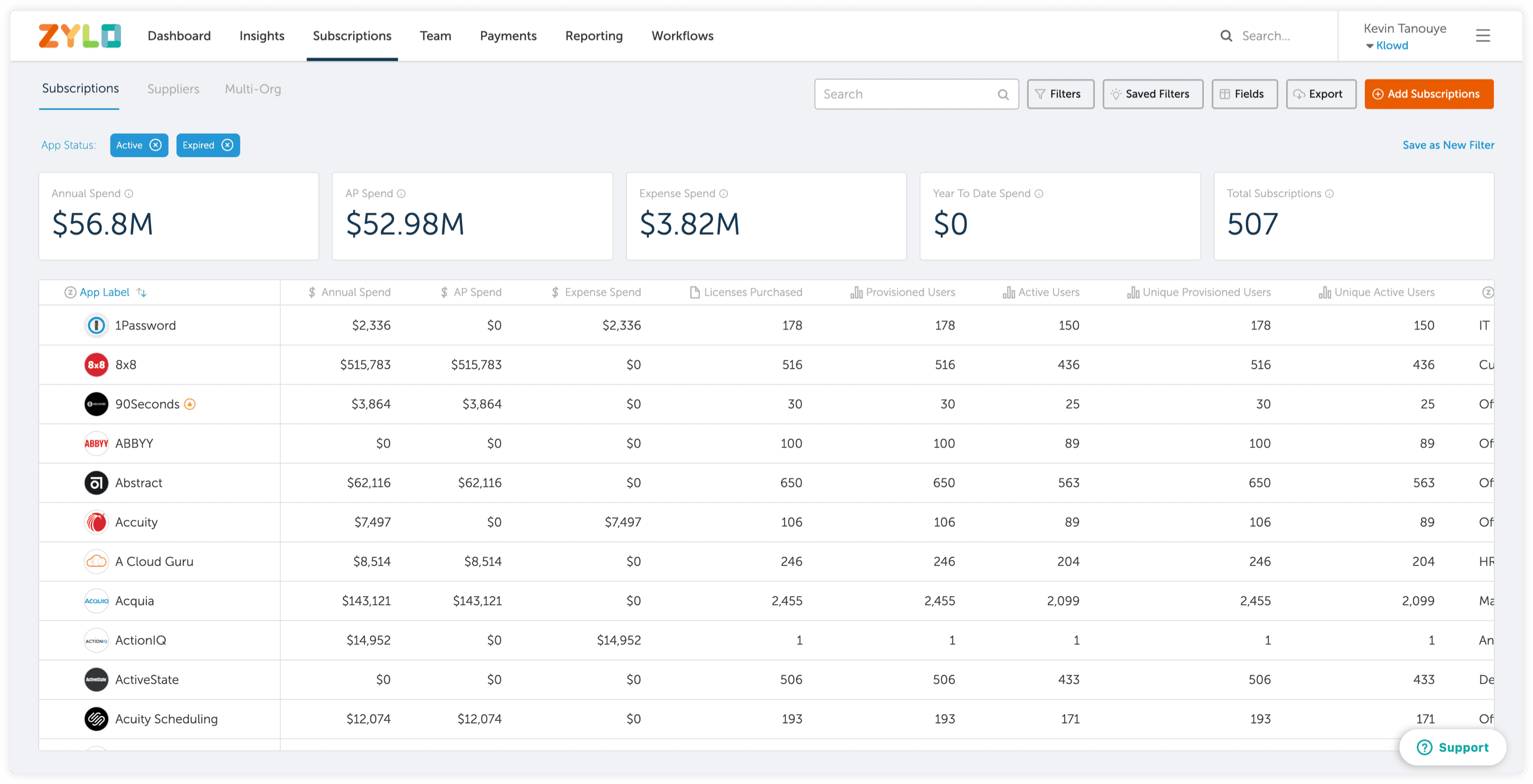
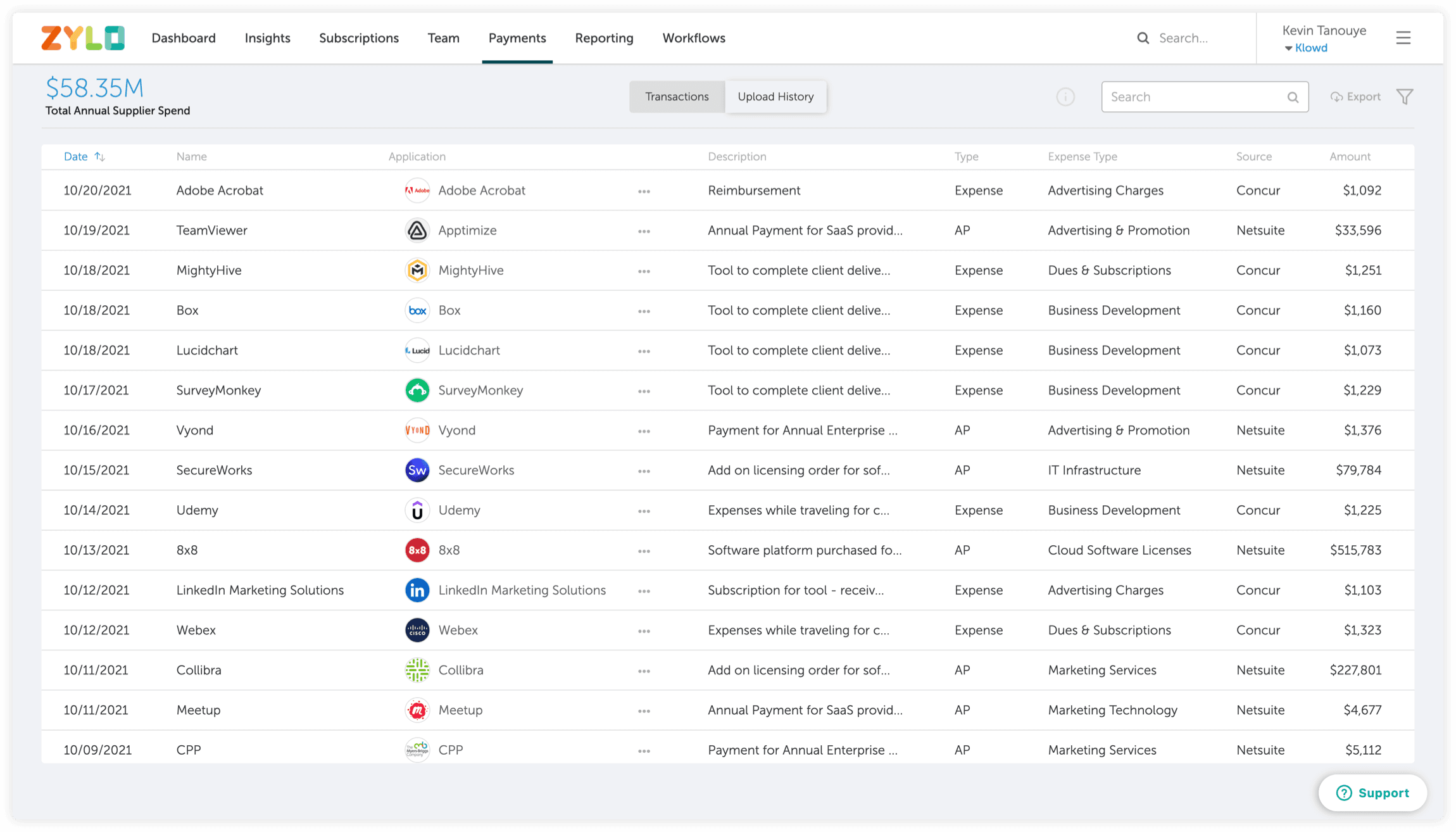
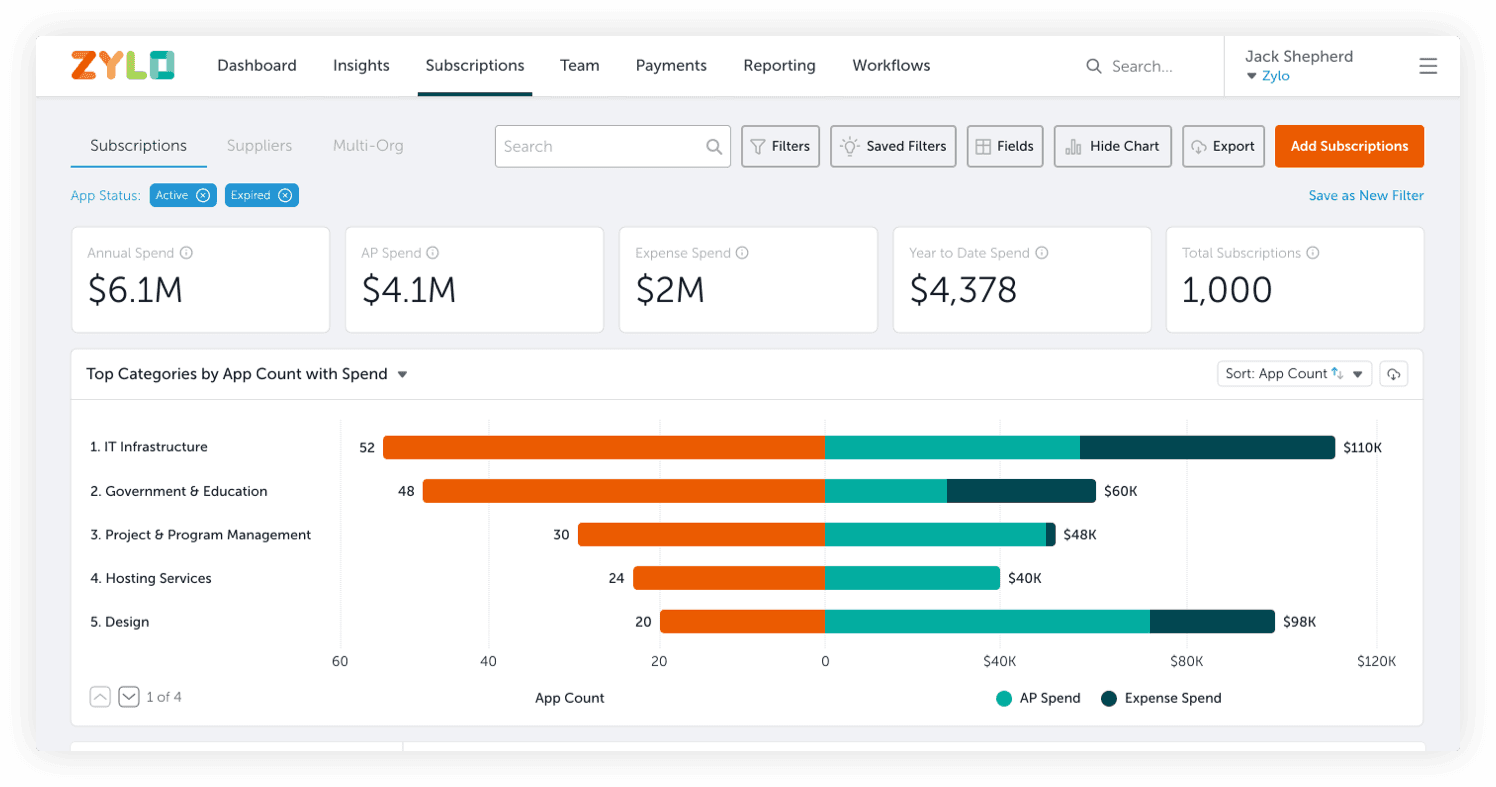
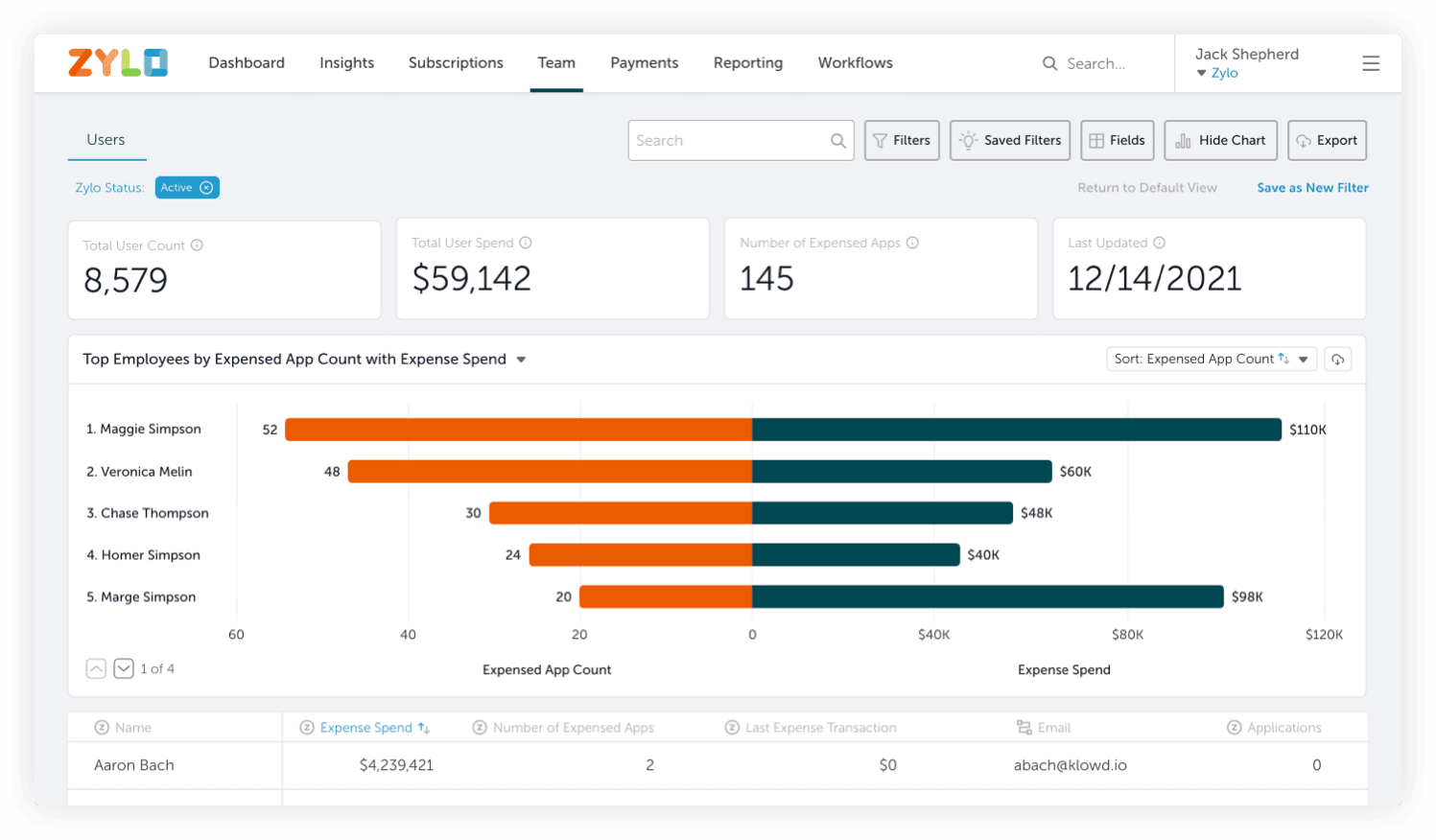
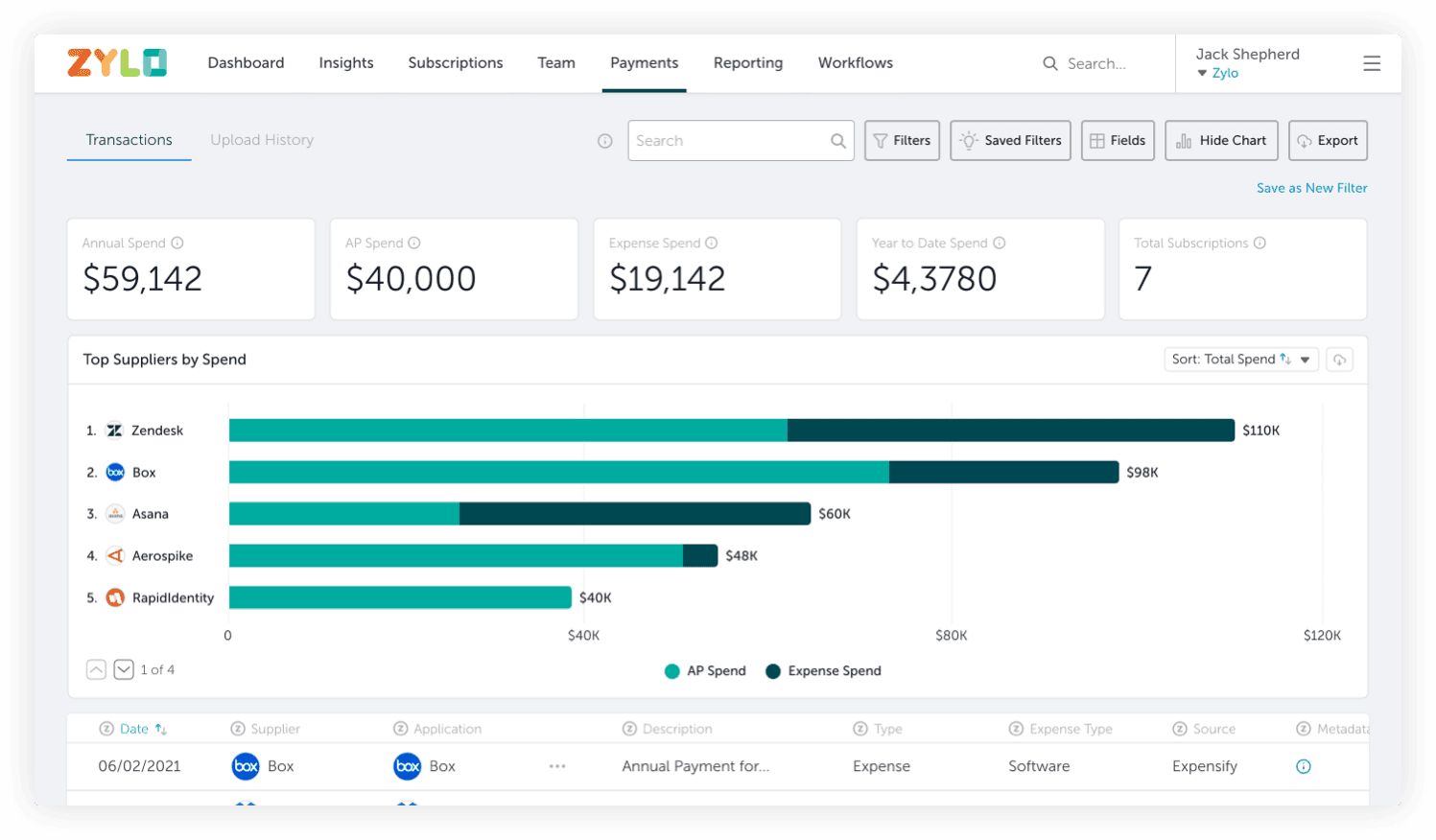
This project arose because Zylo had lost a couple major deals to our main competitor. We got the very rare opportunity to speak with one of our potential customers and ask why we weren’t chosen. Their key piece of feedback was Zylo lacked visuals when compared to our competitor. Even though this customer hadn’t used our platform long enough (proof of concept phase) to get a true understanding of our capabilities, there was a grain of truth in what they said. If you look at our main three pages - subscriptions, team and payments, visuals are missing throughout and the user is primarily greeted by a table full of data.
Subscriptions page
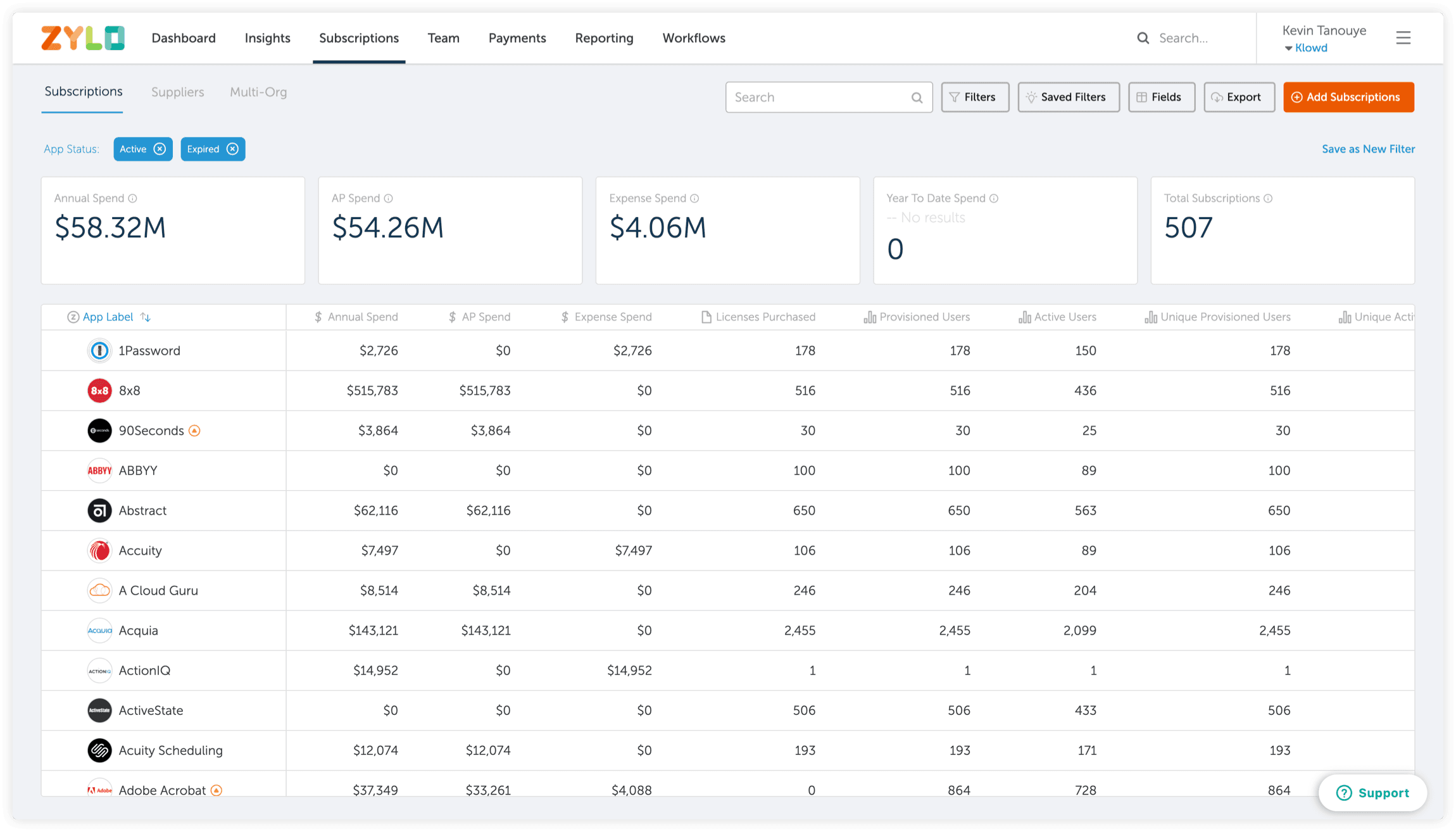
Team page
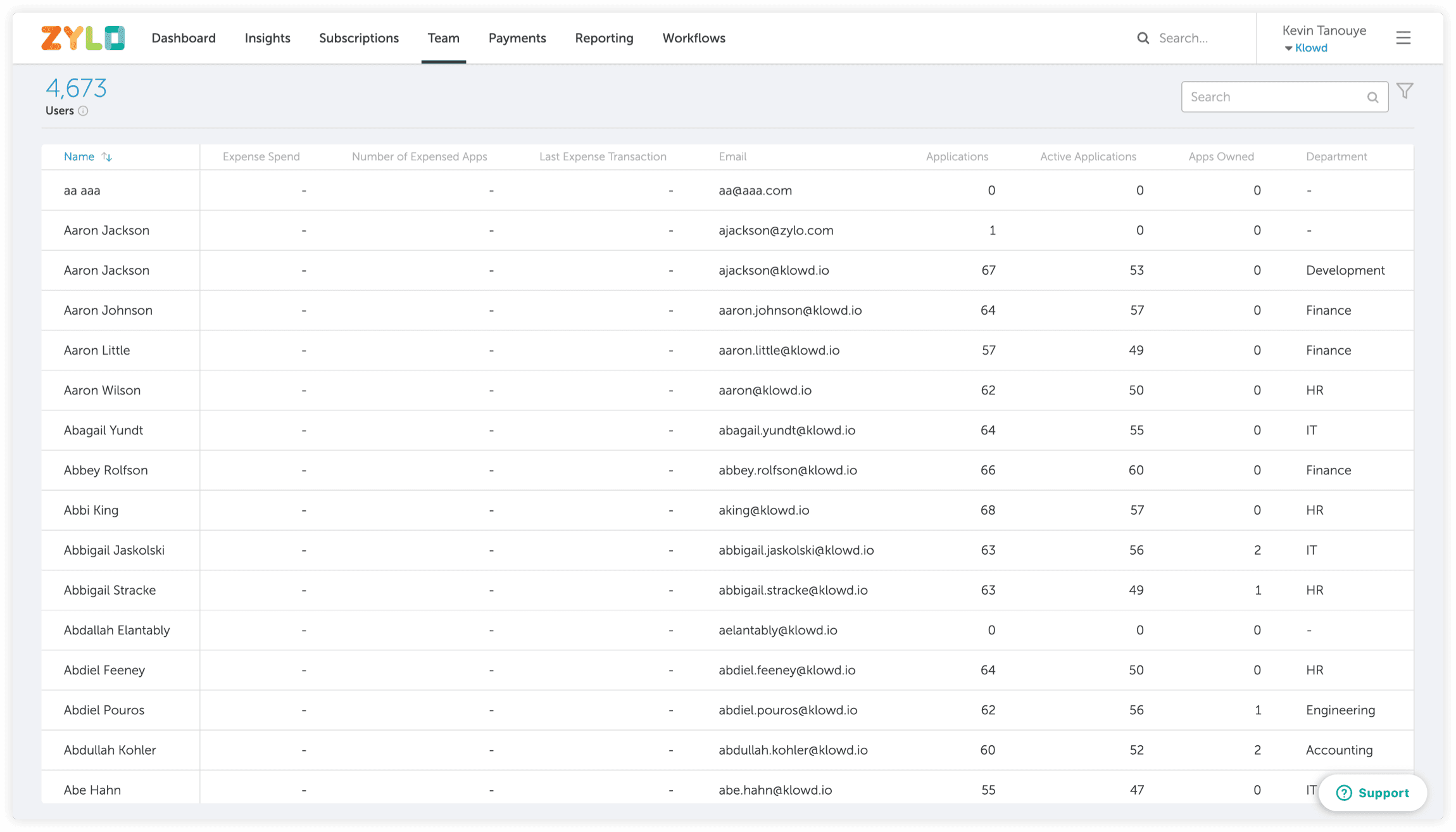
Payments page
The opportunity
I want to make an important note, Zylo has visualizations. We have dashboard visualizations as well as user activity and contract visualizations. So, what is the real problem affecting our potential customers?
I came to the conclusion that the “lack of visualizations” feedback about Zylo was not the true problem potential customers were encountering. We hypothesized the true problem was our new users did not know how to interact with our table heavy design and could not make sense of what they were seeing. Could we help our users better understand and interact with their data in a visual way, specifically around two of their major pain points, expense spend and application redundancy?
Opportunity
Create new data visualizations to help users understand their expense spend and application redundancy in a simpler, faster, and more intuitive way.
User goals
Quickly and effectively interpret and interact with their SaaS portfolio data to take the appropriate cost saving actions and uncover rogue expensing patterns.
Business goals
Help Zylo win against competitors, land new deals, increase revenue, and increase customer retention.
The solution
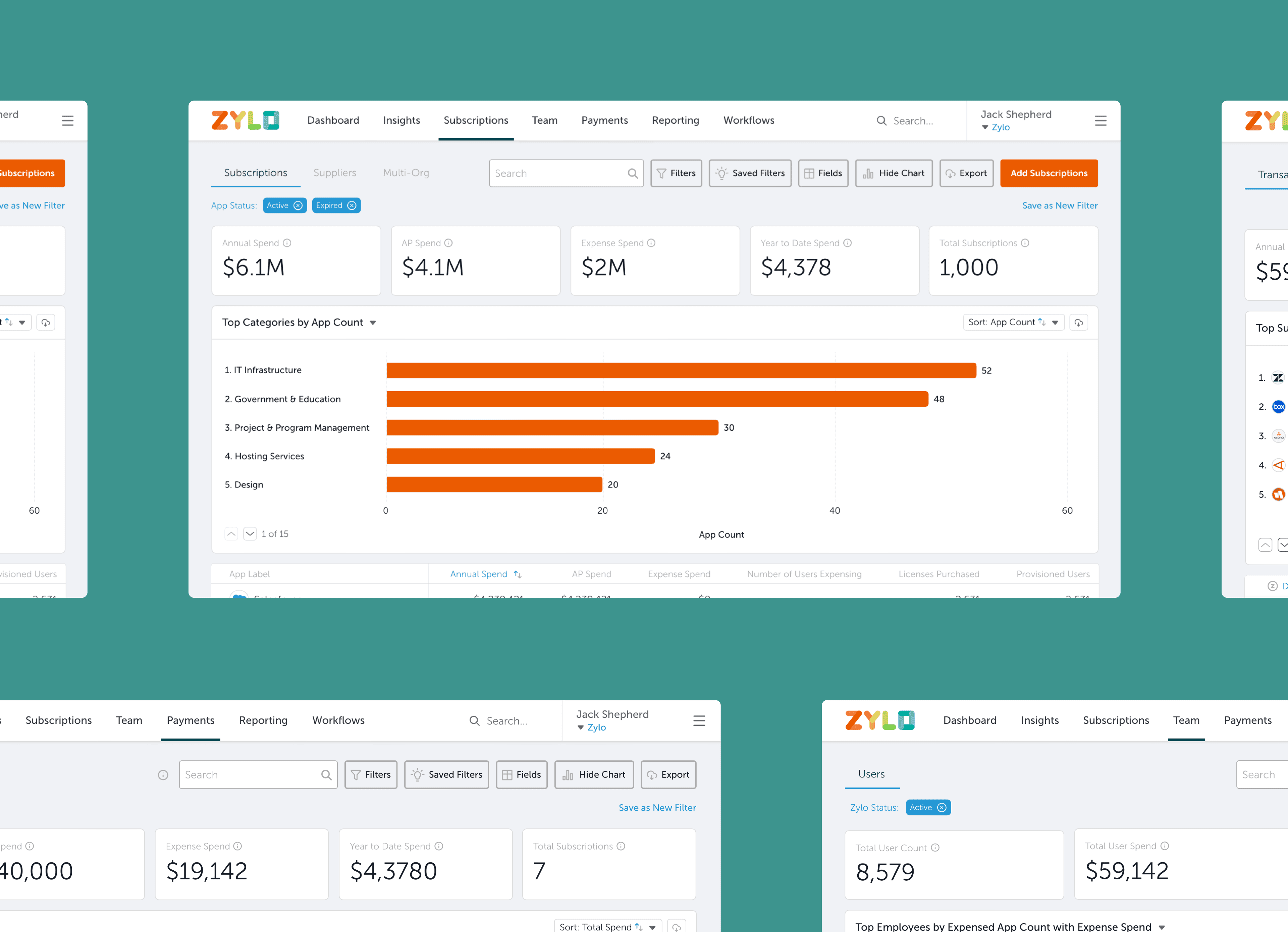
For our solution, we created a library of visuals for our main pages (subscriptions, team, and payments). We created four different visualizations for our subscriptions page, five for our team page, and one for payments. Here is a preview of the visuals:
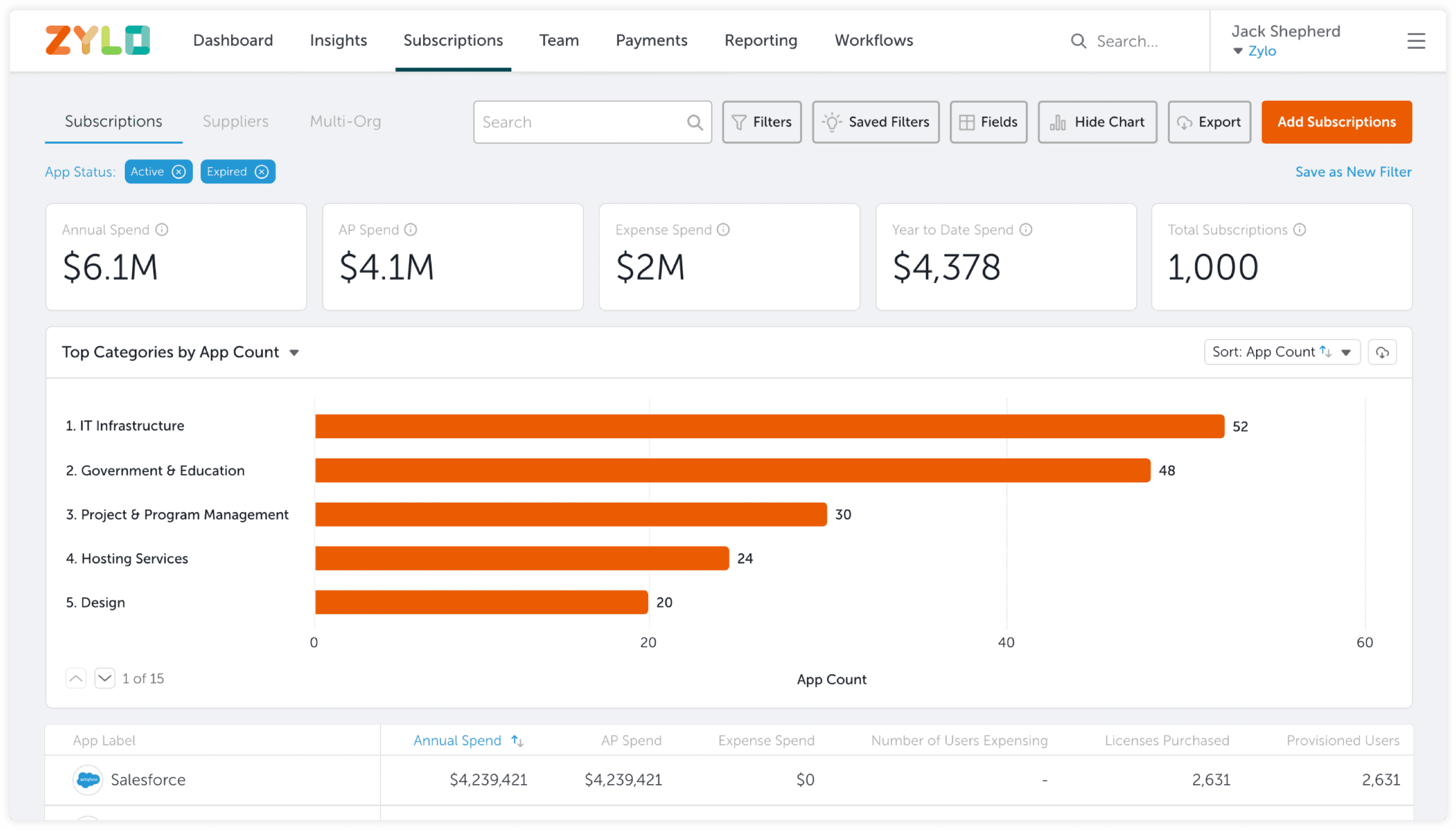
Subscriptions page
For the subscriptions page, we designed Top Categories by App Count, Top Categories by App Count with Spend, Top Categories by Spend, and Top Categories by Spend with App Count.
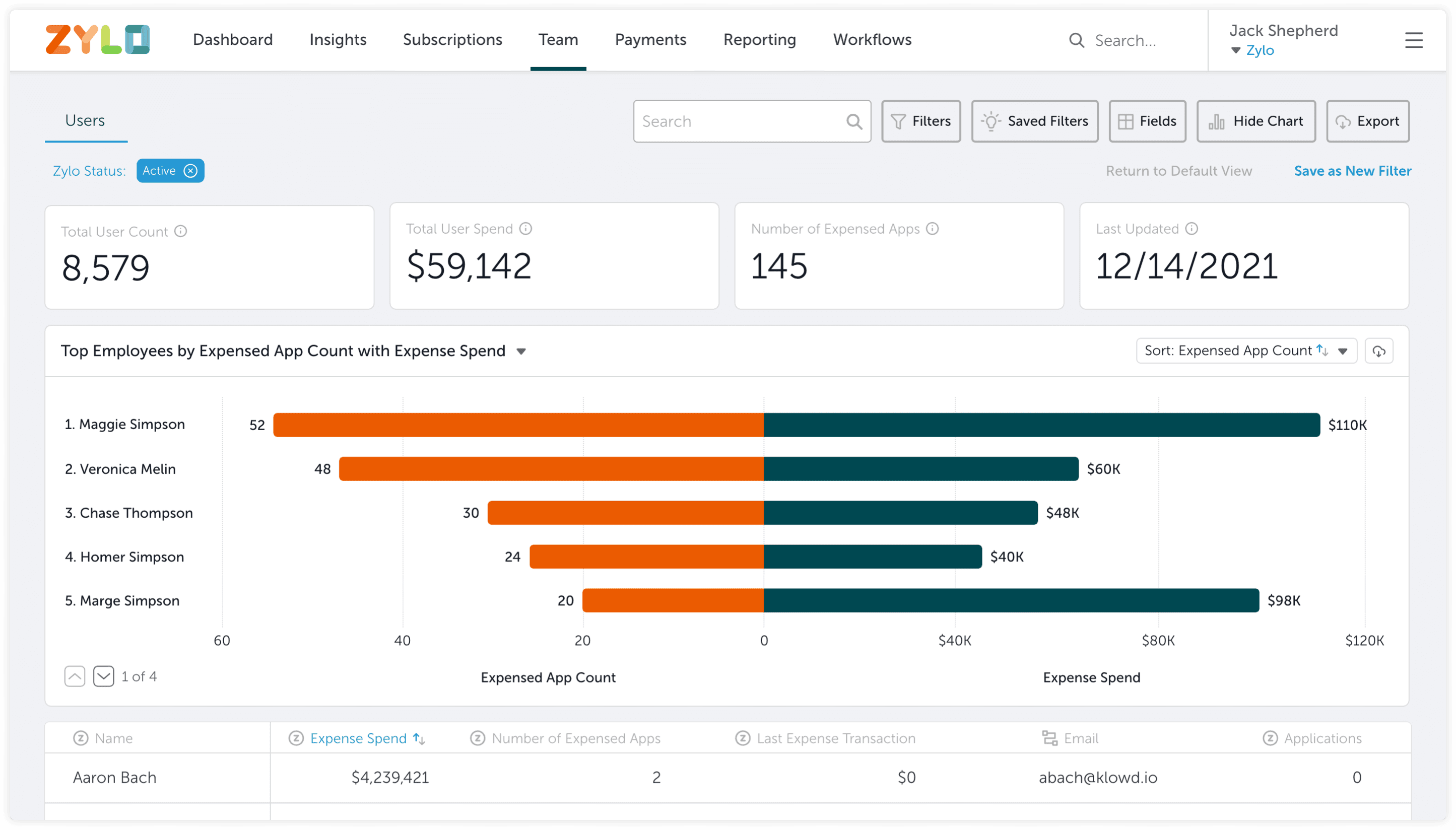
Team page
For the team page, we designed Top Employees by Expense Spend, Top Employees by Expense Spend with Expensed App Count, Top Employees by Expensed App Count, Top Employees by Expensed App Count with Expense Spend, and Top Employees by Apps Owned.
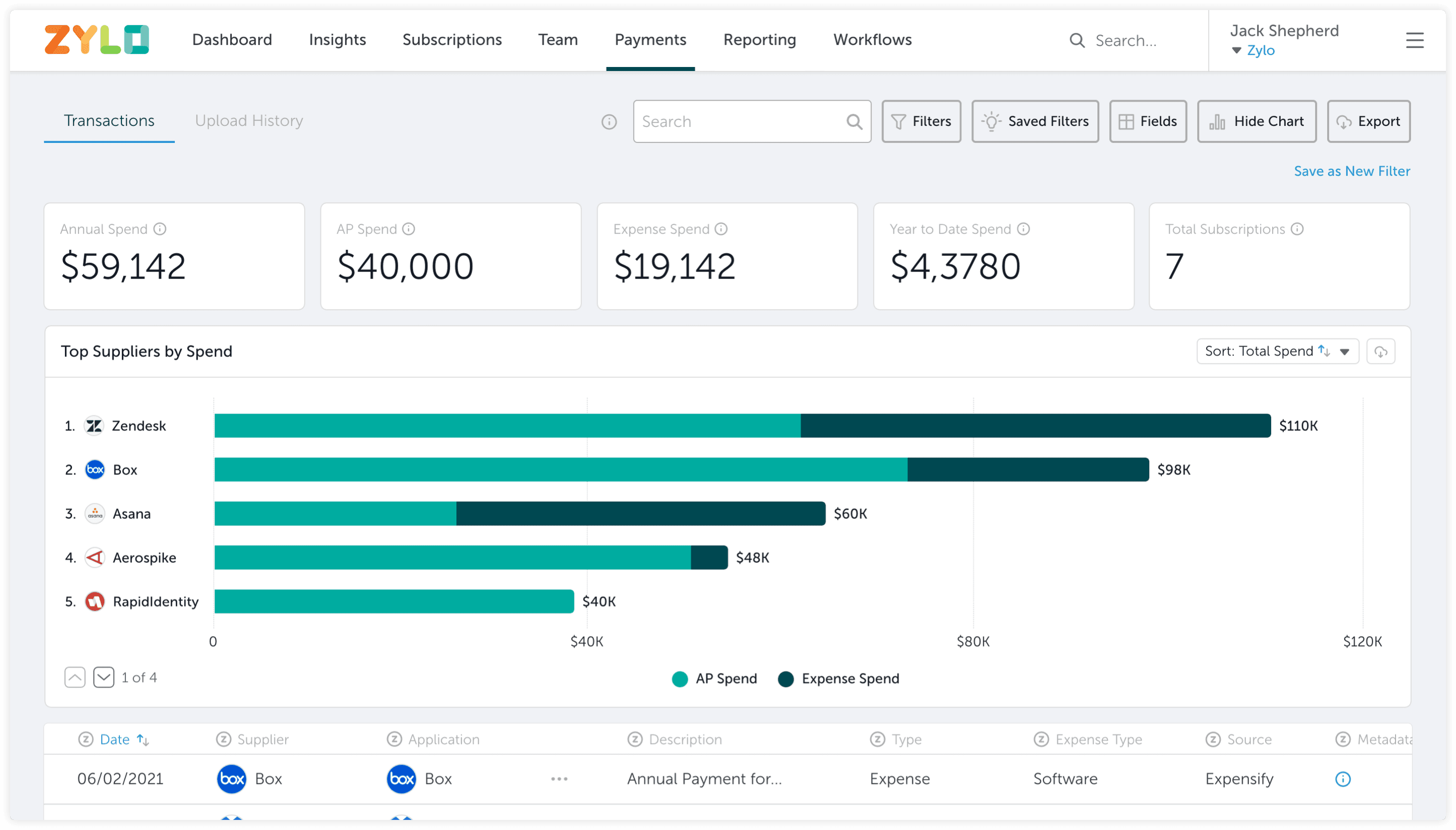
Payments page
For the payments page page, we designed Top Suppliers by Spend.
Team & timeline
Design
I was the Senior Product Designer for this project and my responsibilities included:
- User research
- Coordinating with design agency
- Wireframing
- Usability testing
- Prototyping
- High fidelity designs
Engineering
Engineering Lead
2 Backend Engineers
Frontend Lead
1 - 2 Frontend Engineers
Product
Product Manager
Timeline
November 2021 – March 2022
Process
Research
Our process began with understanding what visualizations were already being created for our users and what our users were doing with these visualizations.
Early designs
We came up with some quick designs based on our research.
Pivot and new designs
We ran into an engineering constraint and had to change our direction. We focused on different themes to help guide our designs.
Feedback, iterations, and testing
We tested our new designs and iterated to include the valuable feedback we received.
Solution
We finalized our visualization library for our subscriptions, team, and payment pages.
Research and takeaways
To kickoff our research phase, we spoke spoke with a handful of customer success managers and customers to learn more about the current landscape of visuals on Zylo. We learned that customers were mainly interacting with visuals created by our customer success team and were not relying on the visuals already on our platform. We also learned the following:
Trending visualizations
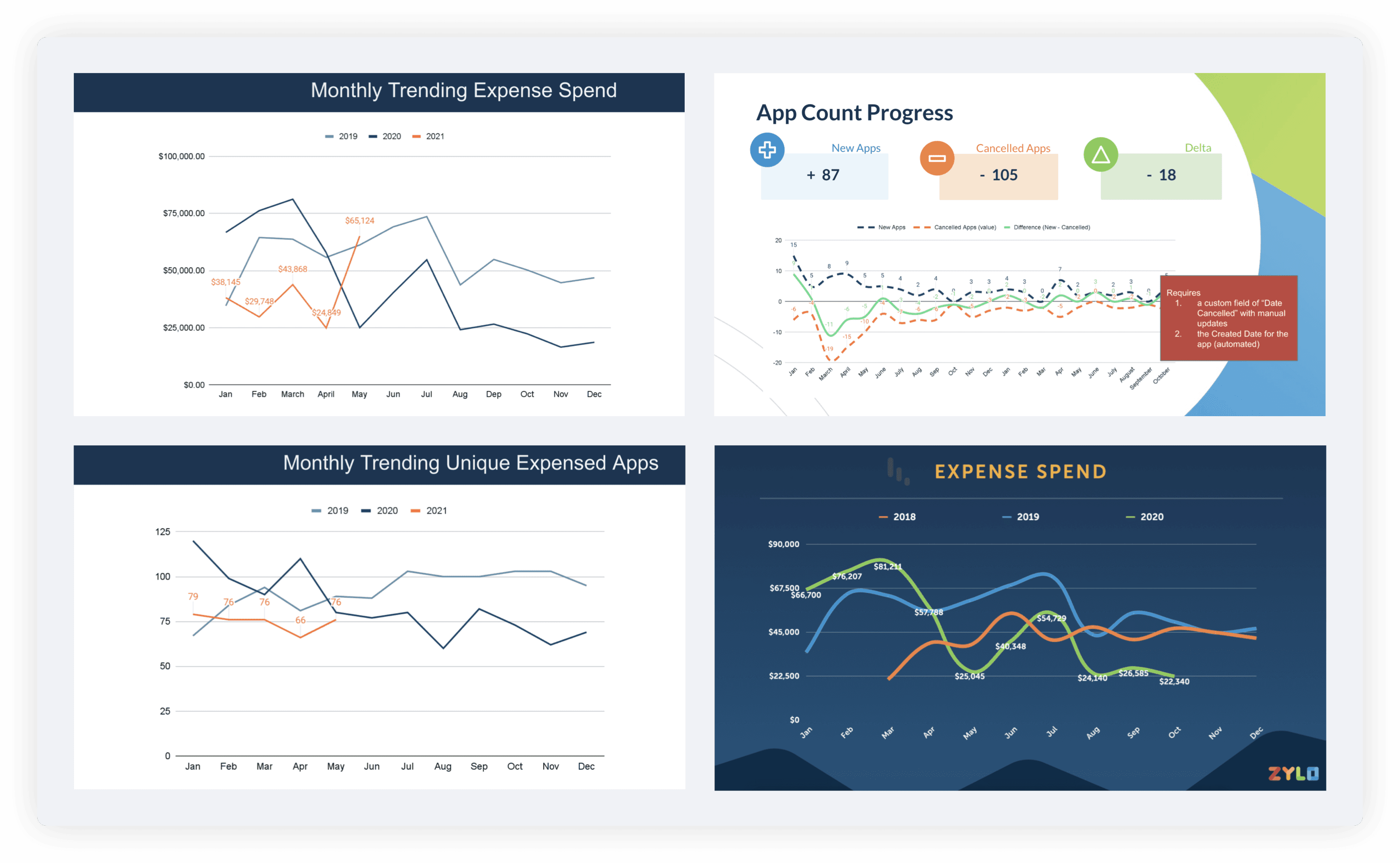
Seeing how a company’s SaaS portfolio and expense spend are changing over time is critical for our users. Users expressed they would want to filter and interact with this data/visualization if one existed. For example, they would want to look at the trending data for a specific department versus the company as a whole.
Large manual lift by CS
We also learned it took on average 2 hours for customer success managers to create these trending visualizations. It required exporting data out of Zylo and then manual work to get to the final visualization.
Similar charts
During monthly syncs with their accounts, our customer success teams presented the same types of charts to customers without too much variety. Here are some examples:
Exporting visuals
Lastly, we learned one of the main actions customers would take after receiving visualizations from our customer success team was to share with other team members and executives.
Early designs
With this research done we established the following design priorities:
Focus strongly on trending visuals, it was clear from our research and the work CS was doing that trending visuals were critical.
We wanted to save our CS team time and create visuals similar to what they were creating for their customers.
We wanted a way to export these images for our users.
At this point, with my bandwidth spread pretty thin, we enlisted the help of a product design agency in Indiana who had ties to Zylo. I provided oversight for the junior visual designer from this agency.
Team and payments page designs
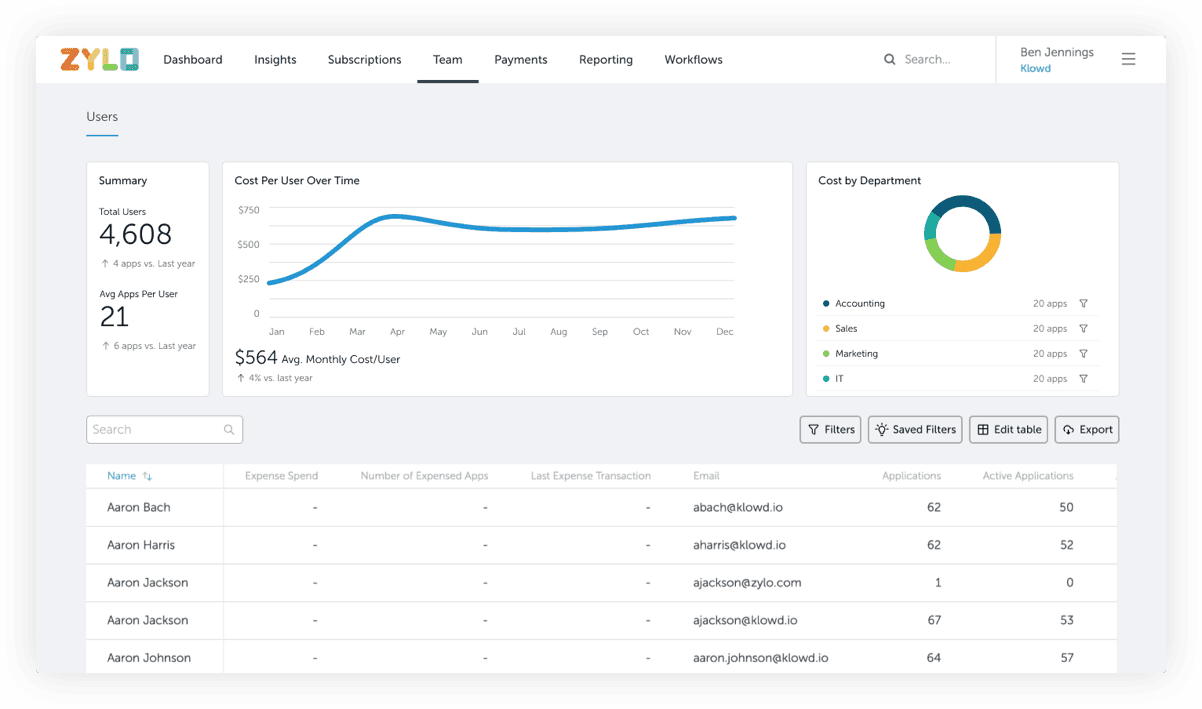
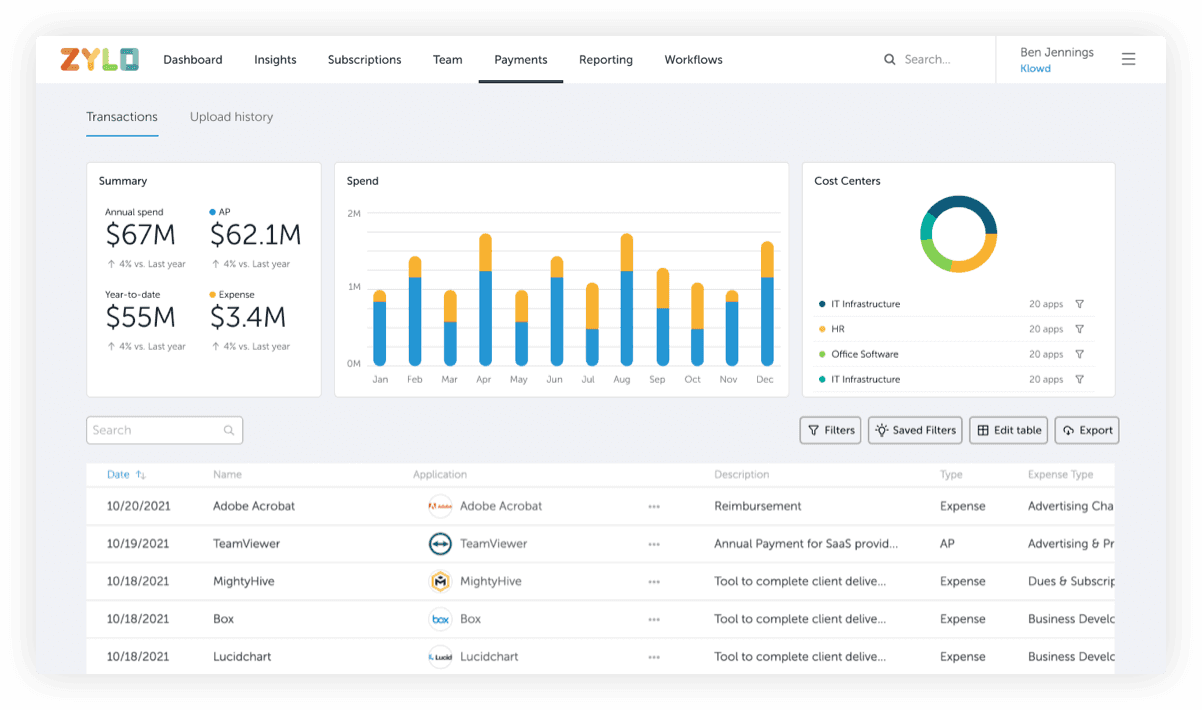
Our designs for our main pages focused on trends over time. On the team page, the designer explored the cost per employee over time. On the payments page the designer focused on spend over time. We brought these designs to our engineering leads and unfortunately there was a pretty big constraint.
Engineering constraint
Currently if we tried to provide these types of trending designs, the backend capabilities would limit the experience greatly and essentially these charts would be fixed images. They would not be performative with our filters which is a huge aspect of our main pages and what users asked for. To provide the trending experience our research uncovered, we would have to restructure our database which was out of scope for this project.
If our trending visualizations would be very limited, what else could we provide our users? We still felt there was an opportunity to add other types of visuals to our platform to help our users take action.
Re-prioritization
The engineering feedback led us to pivot pretty hard for this project and at this point I took the project back from the design agency. The speed and feedback loop with the design agency wasn’t quite where we needed it to be and we decided to shift them to a more blue sky project.
What we realized we could do was visualize parts of the trending charts users were asking for but not the change over time aspect. Instead of showing the larger pattern over time, we could show them the detailed information and themes that powered these trends over time. Those two themes were expense spend and application redundancy.
Expense spend
The first theme, expense spend, was very important to our IT/security and procurement users. They care about expense spend but for different reasons. From an IT/security perspective, expensed applications imply increased risk and management challenges for a company. Not only do they care about this trend over time, they need to know the actual applications that are being expensed. For procurement, expensed applications imply inefficient spending and opportunities for spend consolidation. Procurement needs to know the actual applications that are being expensed. Both personas also need to know who is expensing applications and if such expensing has been approved. We had data on our pages that helped illustrate this theme:
AP spend
Expense spend
Supplier spend
Employees’ expense spend
Application redundancy
The second theme was application redundancy. IT/security users care about redundant applications because it requires more work and effort to maintain a larger stack of applications (license management, off boarding, etc.) Seeing the growth trend over time is important but IT/security users need to target where this growth is occurring. Procurement cares about redundant applications because this means the company is paying for applications with potentially the same functions. Their primary goal is to drive savings, and they don’t want to spend additional money on similar applications. They need to hone in on bloated application categories and functions. We had data on our pages for this theme as well:
Application category
Application subcategory
Employees’ app count
Design principles
At this point, I established the following design principles to help guide my work:
Scalability
One of our main design goals included establishing design patterns that would work with the future vision of Zylo.
Consistency
Our platform suffers from a level of inconsistency that makes it challenging for newer users to get accustomed to our platform.
Simplicity
We wanted to ensure our solution provided the simplest way for our users to achieve their end goals: track down expense spend and redundant applications.
Pivot and new designs
Before focusing on all the different types of content and overwhelming myself, I decided to first lock down the layout and type of the chart that could work for all the data we had. I thought about donut charts and line charts but it all came back to scalability and simplicity. As we stress tested different chart styles, we found moments when they would break. For example, would 40 different categories fit into a donut chart in a legible way? Was a line chart better for trending data? If so, it didn’t feel applicable for designing around our non-trending expense spend and application count themes.
We landed on horizontal bar charts to begin with because they would scale well and passed a lot of our stress tests. For example, with a horizontal line chart, we wouldn’t need to worry as much about the category name length and we could also increase the height of the chart to fit in more categories which would not necessarily work for a vertical bar chart. I started with 2 different charts, Top Categories by App Count and Top Applications by Expense Spend. I worked on one chart to capture each theme based on the data we had. I also explored different colors that matched our brand but I quickly moved away from this because of the complexity of many colors and accessibility issues.
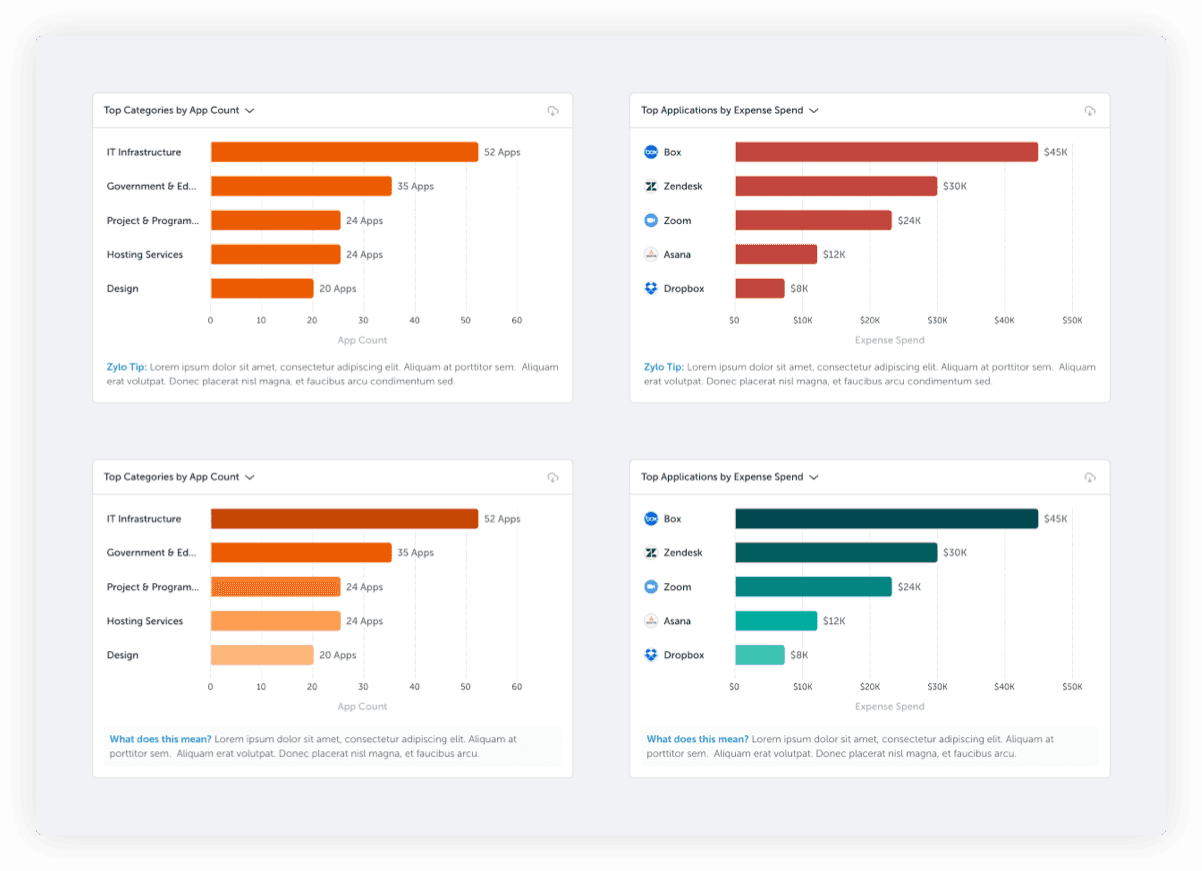
From here I explored seeing how applying a filter looked, so now the chart on the right would also reflect the filter applied. I wont be talking about the trending solution we designed but I was exploring possible ways to still get it to work on this page. It would not be filterable but could we tie it to a Zylo insight and give it a different treatment? Would these look too jarring side by side? The answer was yes 😅.
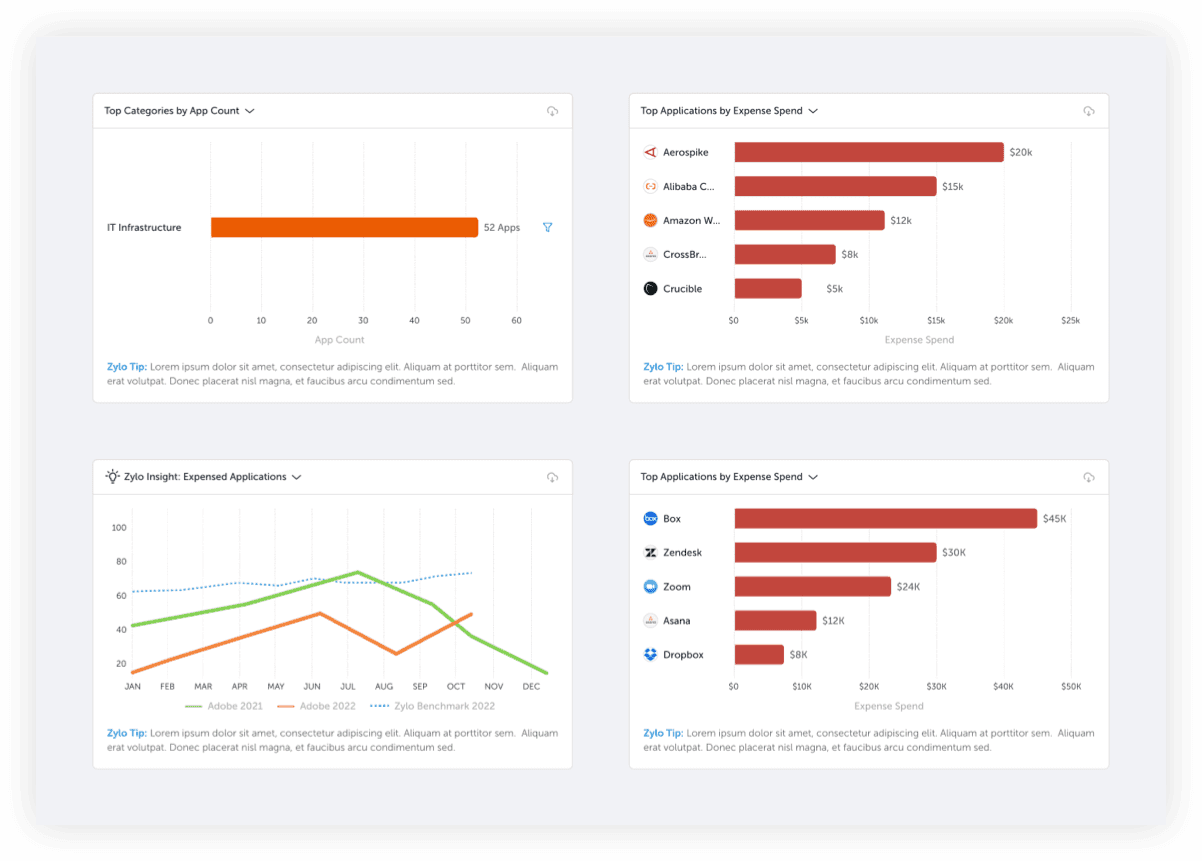
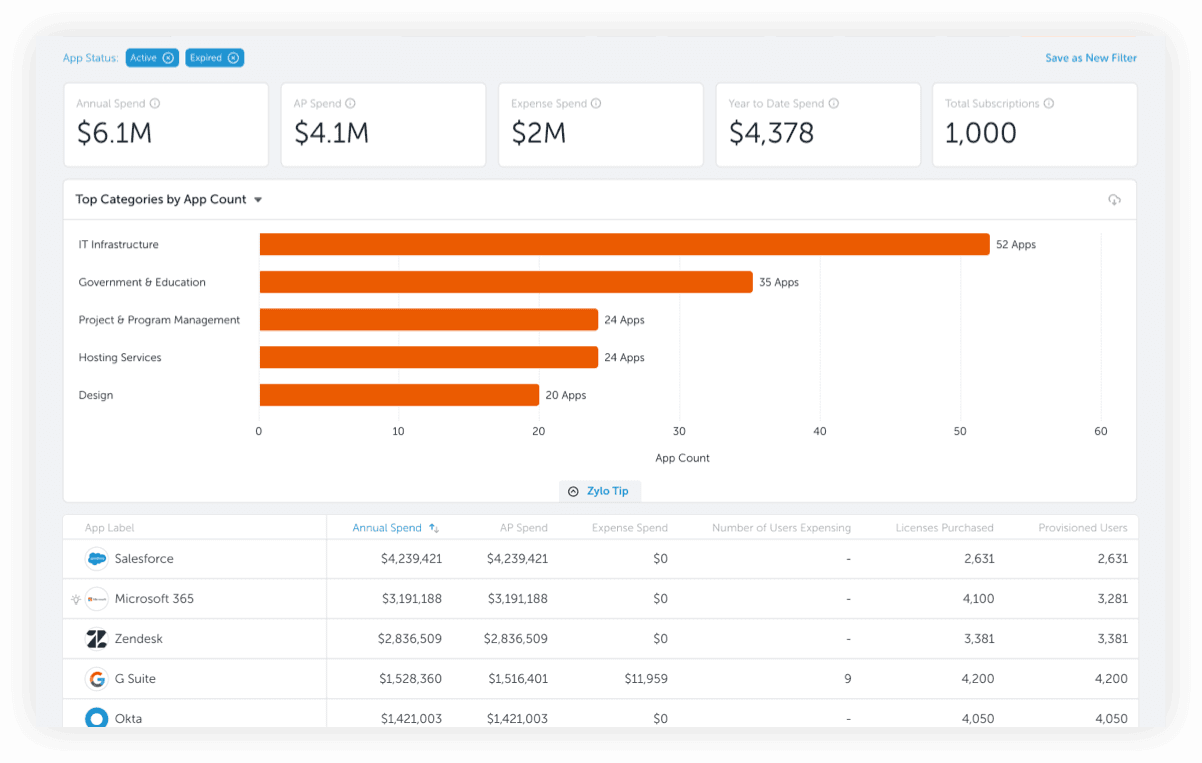
The double charts were getting confusing with the logic for switching between different charts as well as applying filters so we decided to move towards one chart on the page to keep it simple and not confuse our users.
Feedback, iterations, and testing
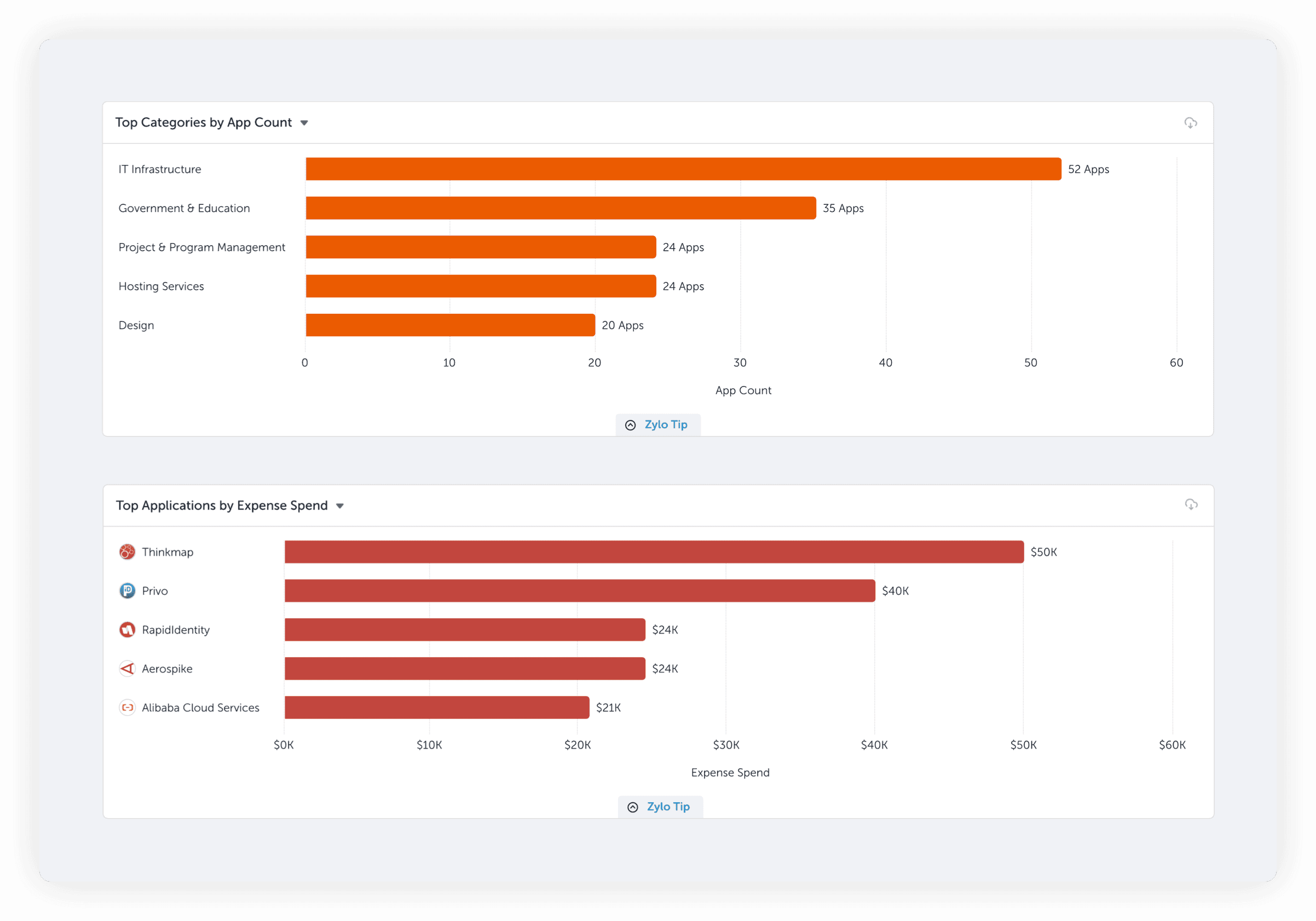
At this point we felt we had a good structure down so we decided to get some feedback from customer success managers and our users. We tested these two charts and we received really valuable feedback.
Where does sales fall?
To keep our visualizations very simple, we decided to only show 5 results in the chart. But many users expressed they would want to see more than 5 options, for example, they would want to scroll and look for where the sales applications were and dive into that category.
Download chart data
We had provided users with the ability to download the visualization but they also wanted to download the data powering the visualization.
Interesting to insightful?
While users expressed these charts were helpful, some expressed something was still missing from these visualizations. This last piece of feedback was very important and we would really take this feedback into account.
Interesting to insightful?
With this feedback, we brainstormed and decided that showing the relationship between app count and expense spend could be a great direction to go in. Before, we had been treating these two themes as separate but what could make it insightful was showing the relationship between them. For example, could we add a pivot to help users get another insight about their app count? In this example, could we combine subcategory and app count to show an insightful relationship? This direction got a bit confusing and engineering also said this would be very difficult to build and not performative. Then one of our engineers suggested putting both values under the category name: spend and app count.Would this help show the relationship between spend and app count?
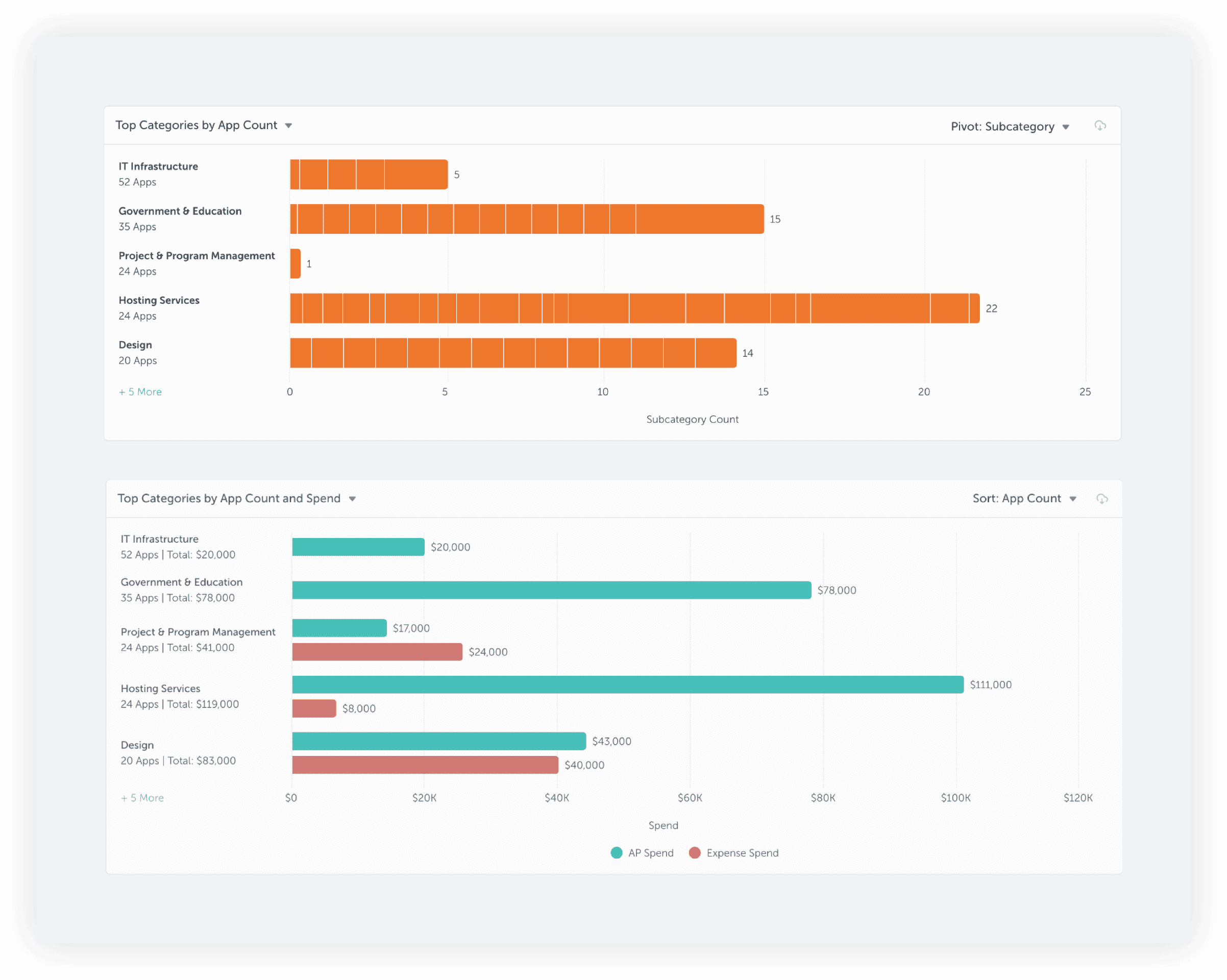
When I started toying around with these designs a bit more, I had a bit of a revelation. When we added the values for app count and spend together below the category name, it felt like it was getting very confusing and messy. The whole purpose of this project was visualizations yet with these labels, it felt like we getting away from that as well as our design principles. It felt like we were just tacking it on and not really showing the visual relationship between app count and spend.
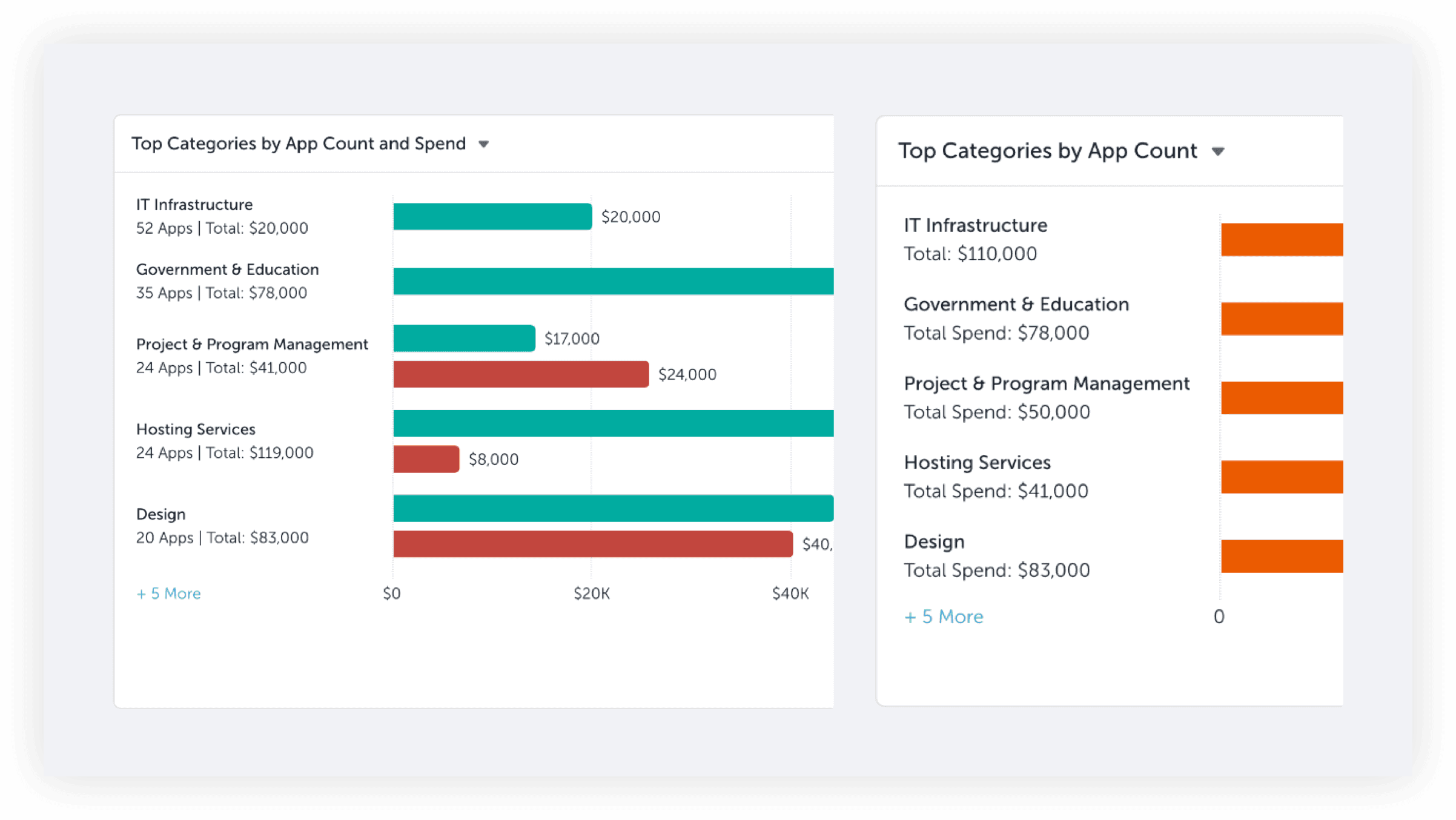
I came up with 2 different chart designs, one that only showed spend numbers below the category and name and a bit more drastic design showing both themes visualized. What I wanted to show in this chart was the relationship between these themes and help our users target which categories to tackle immediately, I called it a combination chart. In this combination chart users could see the relationship between IT infrastructure’s app count and its spend. With so many apps and so much spend, there could lots of opportunities to reduce the app count and spend. I was a bit scared this design was too complicated or drastic for users so I decided to test it through an AB test.
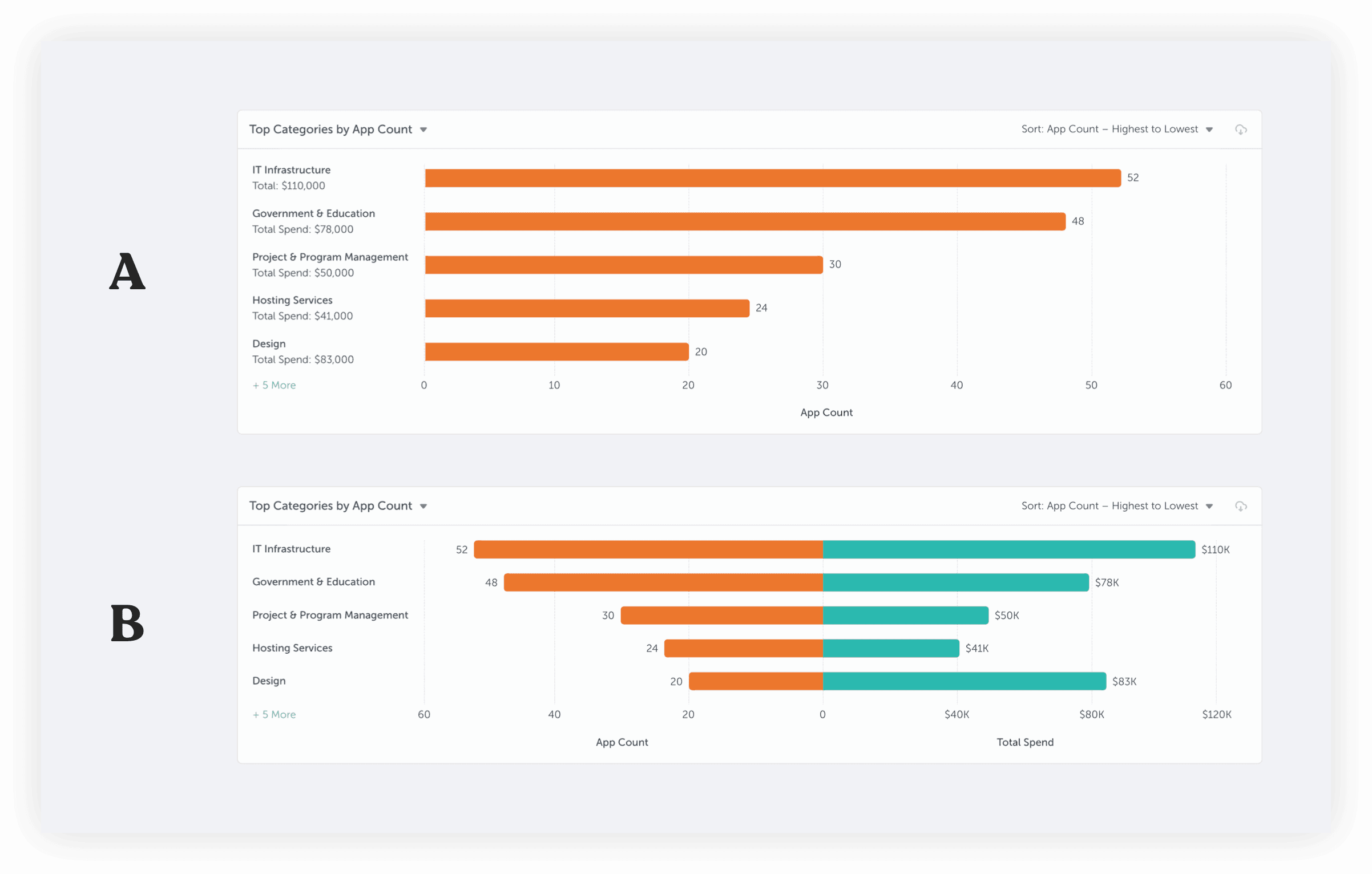
AB Testing feedback
Users liked both A and B designs - with A being better for newer and novice users while B better for power users looking to dig into the relationships between spend and application count.
Quotes
“B is hard to process but I like it.”
“I had to acclimate to B but you can see the relation between in B. We would want to drive down both but firstly spend, this gives you an idea of what category to start with.”
“I had to acclimate to B but you can see the relation between in B. We would want to drive down both but firstly spend, this gives you an idea of what category to start with.”
Finalize chart content
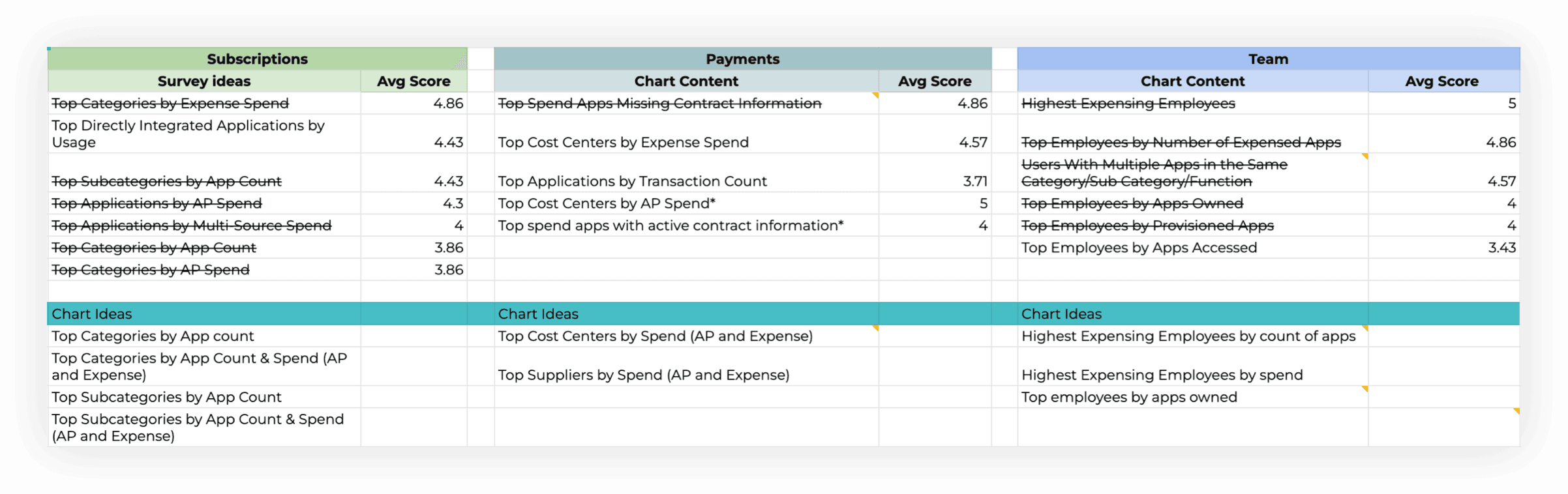
With the positive feedback from our AB testing, we felt like we had finally locked down our chart structure and unlocked new chart patterns as well. While I was wrapping this up, the product manager was working on a survey of some of our brainstorms for different chart ideas. With the survey results we realized we could add additional charts to the survey results based on the new combination pattern!
Our engineering leads also looked at our brainstorms, survey results, and my working designs and called out certain charts that might be out of scope.
This is a screenshot of our working survey responses and brainstorms for each page and the different types of content on each in relation to expense spend and application count.
The solution
Below is the final list of charts for our visualization library. We had to cut some due to engineering time such as cost centers and subcategories. We came up with 10 different charts for our visualization library.
Subscriptions
Top Categories by App Count
Top Categories by App Count with Spend
Top Categories by Spend
Top Categories by Spend with App Count
Team
Top Employees by Expense Spend
Top Employees by Expense Spend with Expensed App Count
Top Employees by Expensed App Count
Top Employees by Expensed App Count with Expense Spend
Top Employees by Apps Owned
Payments
Top Suppliers by Spend
Subscriptions page
On the subscriptions page, IT/security and procurement users could quickly see what categories had the most applications and dive in and begin investigating which applications were necessary or unnecessary. IT might dive into the IT infrastructure category to begin auditing whether all these applications were still needed.
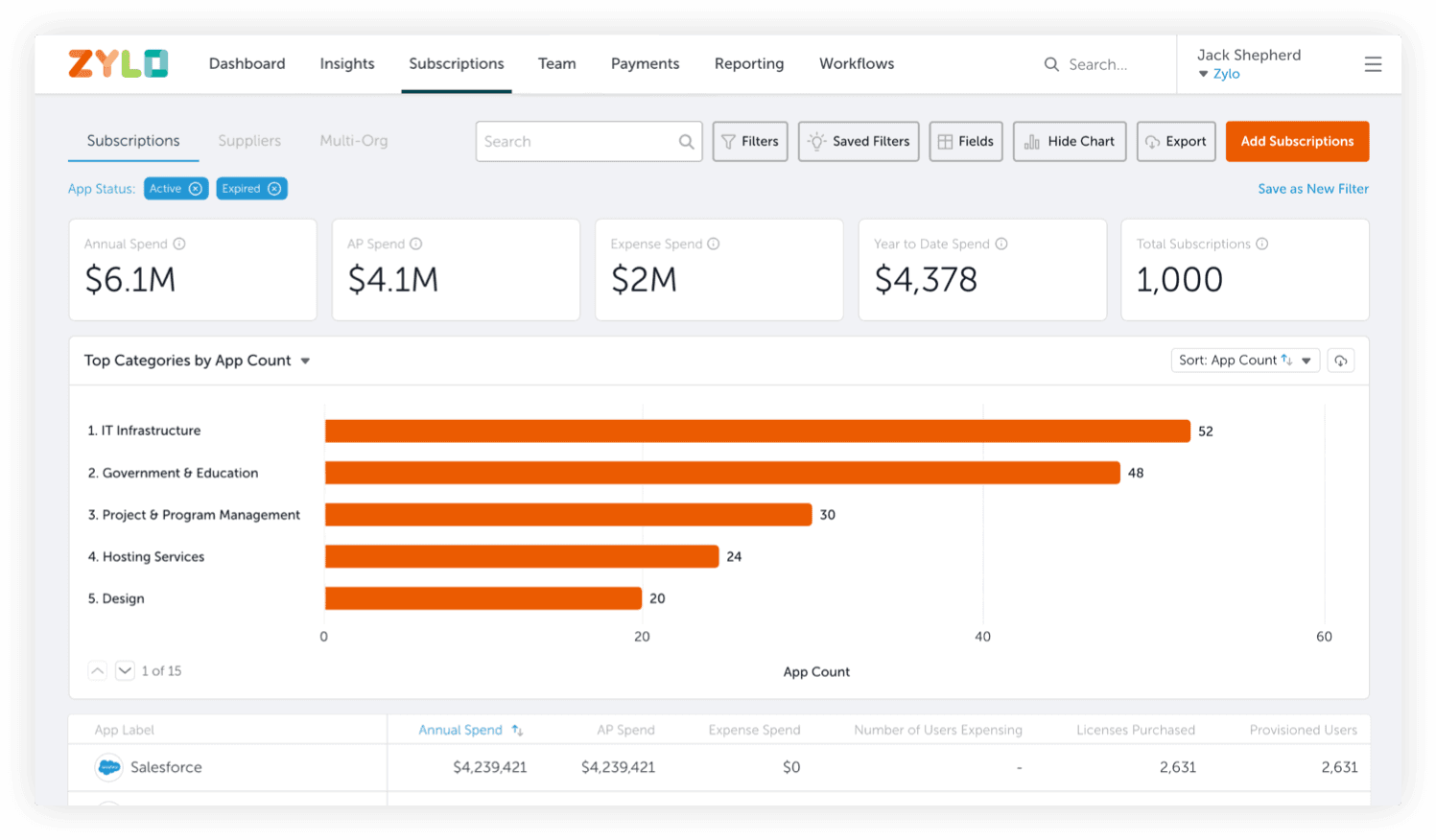
Here’s a combination chart showing the relationship between app count and spend (this chart shows the added breakdown of AP and expense). A procurement user might dive into the category with the most expense spend and begin locking down employee expensing patterns or explore getting these all onto one agreement to save money.
Team page
This combination chart on the team page shows the relationship between employees’ expensed apps and expense spend. This would be a good chart for procurement to look at and see if any employees need to be reminded of the proper expensing policies the company has.
Payments page
This chart shows which supplier the company is spending the most money on and the breakdown between expense and AP spend. A supplier with a large amount of expense spend could be brought onto a new agreement or consolidated into their AP spend.
Platform success metrics
Increase session duration
With the implementation of our new visualizations, we expect to see the average session duration increase as users interact, explore, and uncover insights on their own.
More users
We hope with these new visualizations, more users from the same company will begin logging in and interacting with the Zylo platform. Currently we see about 20% of users at a company with a Zylo account log in. These visualizations have been designed with newer users in mind so hopefully they can log in and not feel overwhelmed.
Increase Zylo visibility
With the implementation of chart downloads, different departments will be able to quickly share Zylo data to each other. They will be able to collaborate on the actions needed to drive savings. We’ve also branded all our chart downloads with the Zylo logo to increase our visibility.
Chart engagement
With the introduction of our visualizations, we expect to see user activity balanced across four events: app details view, appcues, other events, and chart interactions.
User success metrics
Decrease expense spend
By quickly surfacing expense spend visualizations, procurement users will be able to quickly identify problem applications that need review.
Identify expense patterns
IT/security and procurement users will be able to quickly identifying employee expensing patterns and remind employees of the correct policies.
Consolidate SaaS portfolio
Our users will be able to easily understand which categories have the most applications with potential for quick and easy clean up opportunities.
Dependency timeline
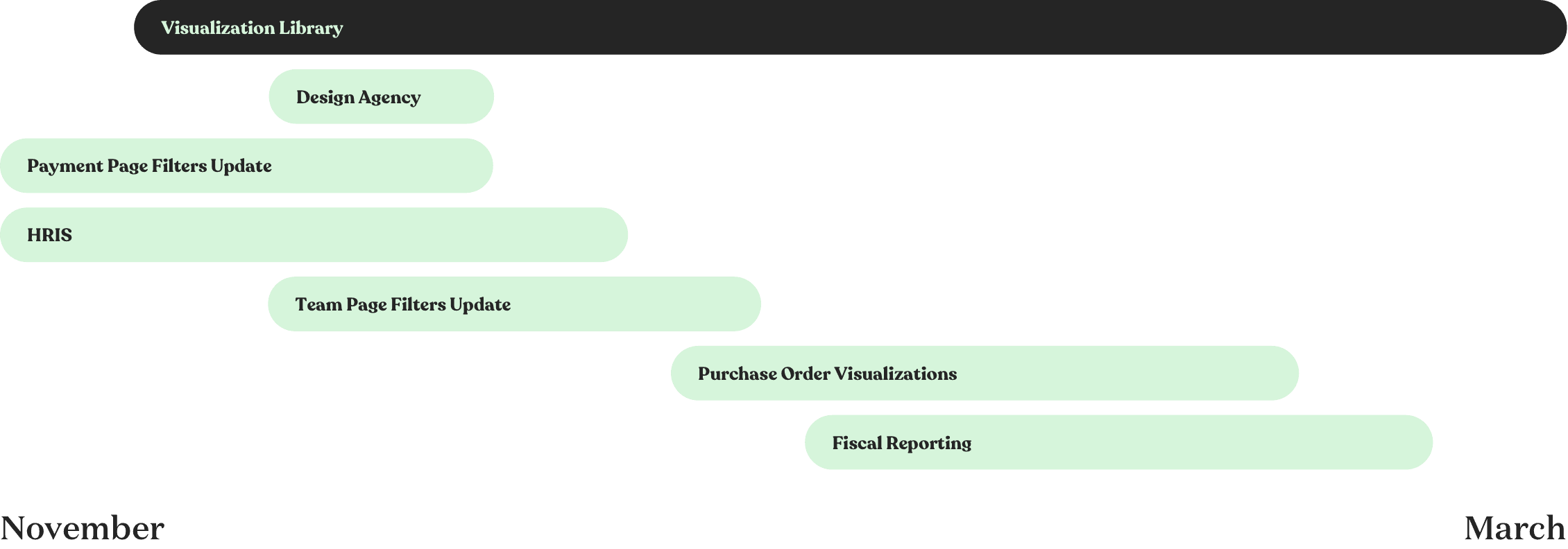
This is a illustration of all the projects that were occurring at the same time as the visualizations project. I was involved in all of these projects as the sole designer so it was a bit overwhelming at times.
Learnings and takeaways
Seeing all the moving parts
Being involved with so many different projects that all tied into this project was very challenging but also very helpful. I was able to call out alignment issues and help our teams stay on track.
More than just “visualizations”
What started as adding visualizations to prevent losing deals deals to competitors became much more.
Design principles
The design principles I established really helped guide my work by always tying it back to our users and the product we want to build at Zylo.
© 2026 Kevin Tanouye