Enter Password
Designed an end-to-end testing environment for users to observe and refine their Breeze Customer Agent, improving quality and performance while reducing deployment risk.
Role: Senior Product Designer I
Company: HubSpot
Timeline: April 2025 - September 2025
Overview
Background
HubSpot is a B2B SaaS platform that provides CRM, marketing, sales, and customer service software within a shared data infrastructure. The Breeze Customer Agent automates customer service, sales, and lead generation, functioning as a 24/7 front-office assistant that resolves support tickets and qualifies prospects without human intervention.
The problem
Our activation data showed users were reluctant to deploy their Customer Agent, wary of the inherent risks of putting AI in front of their customers.
The opportunity
Create an environment where users could test, refine, and understand their Customer Agent, improving its performance and giving them the confidence to deploy.
The solution
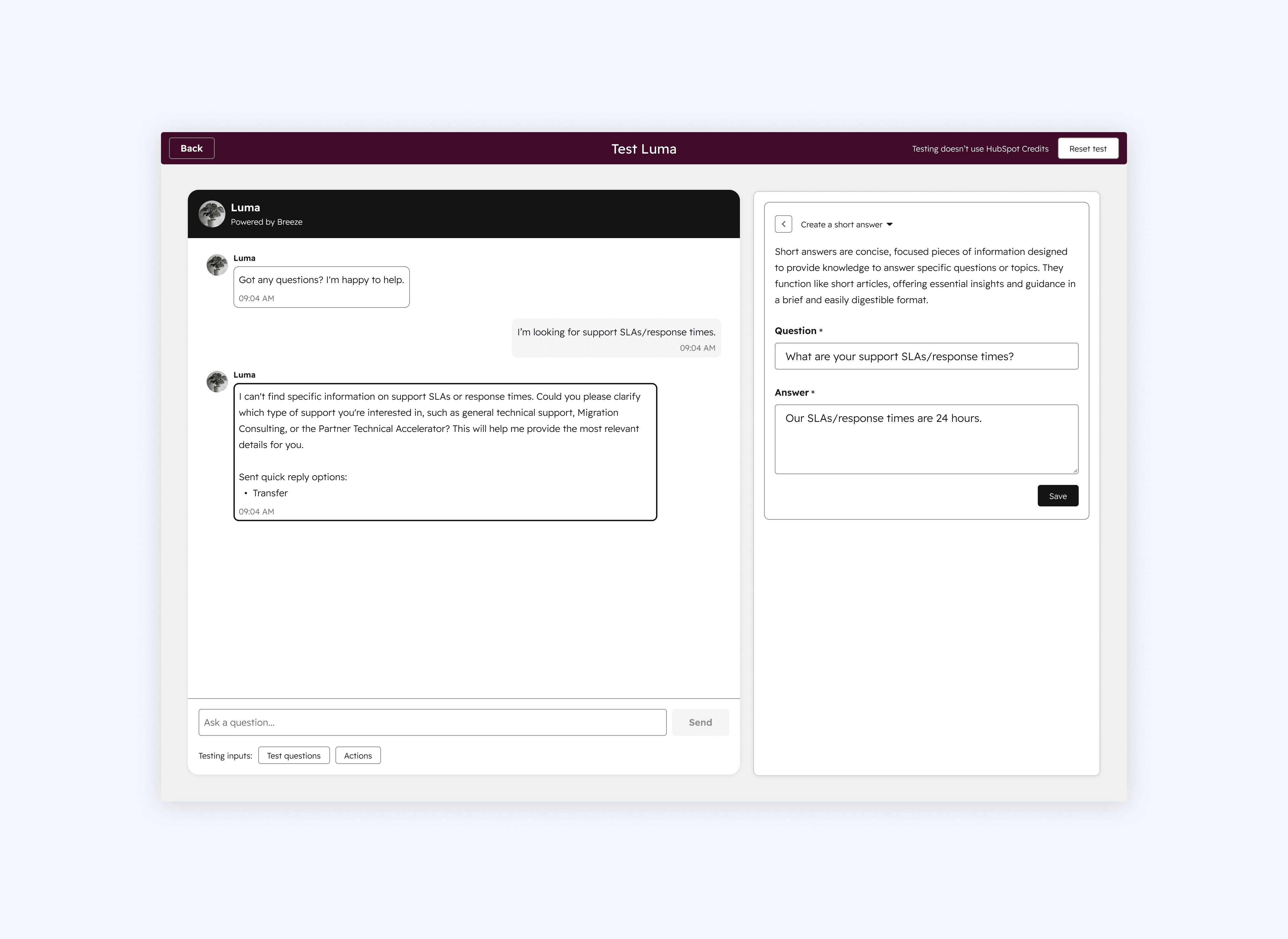
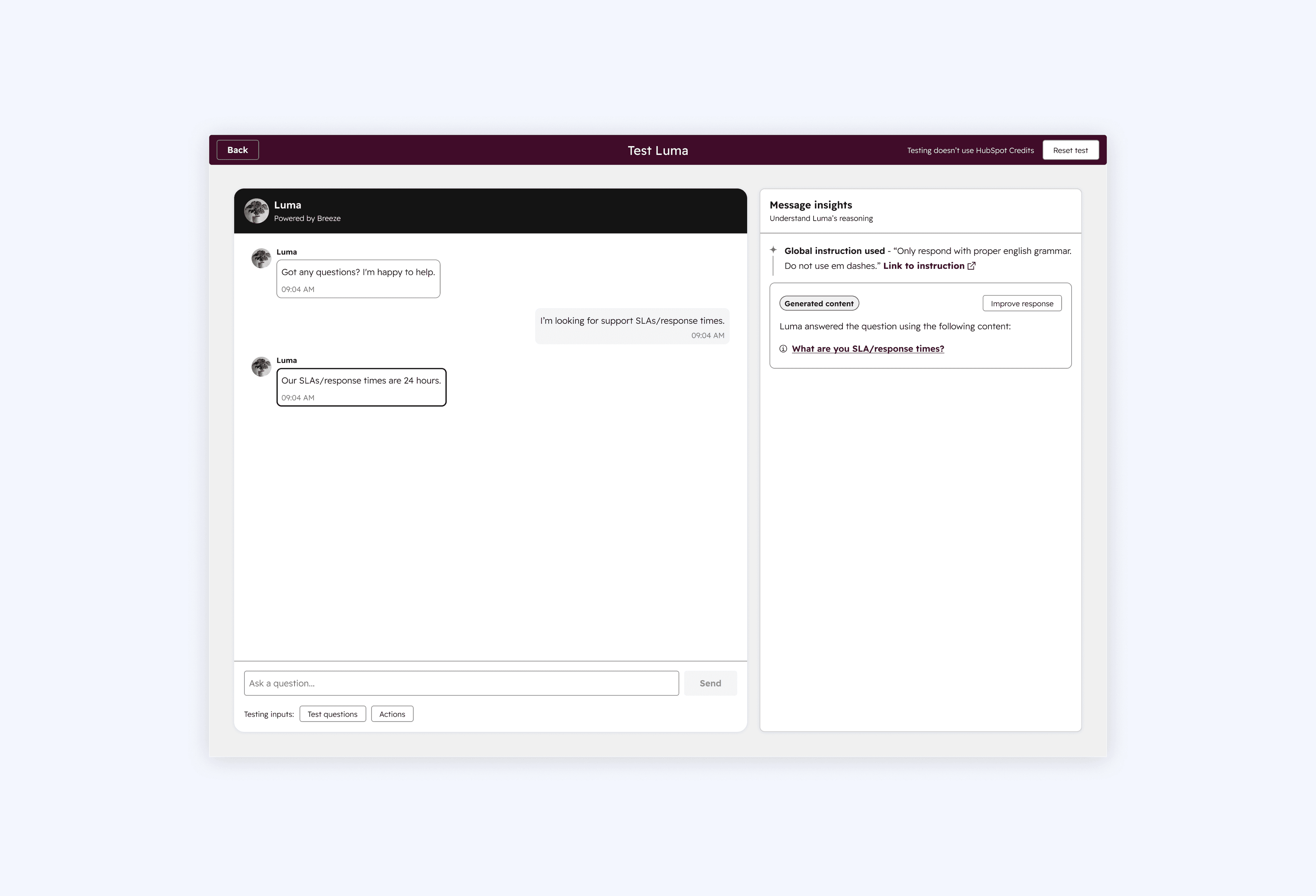
The Customer Agent Tester consists of two interconnected panels. Users interact with their Customer Agent through a chat interface on the left hand side that mirrors the end customer experience. Clicking into the agent's response shows the message insights in the right hand panel. The user can view cited sources, fix responses the agent couldn't generate, fine-tune existing ones, or even edit and add handoff triggers, all without leaving the experience.
Process
Getting our bearings
With a newly formed team and a brand new mission, the first challenge was simply figuring out where to begin. There was no established roadmap and no prior work to build off of.
User research
To help guide our direction, we interviewed early adopters about why they decided to actually deploy their Customer Agent. We wanted to understand their thinking, what factors mattered most to them, and any hesitations they had before going live.
AI and early designs
Armed with our research and key takeaways, we jumped into early design concepts, using AI as our jumping off point and iterating from there.
Feedback and iterations
We refined the designs through iterative feedback from users and stakeholders.
Trellis & UX updates
We updated the designs using our new design system, Trellis, and adjusted the UX.
Solution
The final solution for this phase, ready for launch at Inbound 2025.
Getting our bearings
Team & timeline
The Customer Agent Coaching team was made up of nine people across design, product, and engineering. I led the design work as the Senior Product Designer, partnering closely with a Senior Product Manager and a team of FE and BE engineers. The project ran from April 2025 to September 2025, just in time for HubSpot's INBOUND event.
Team mission
Our mission was to improve the Customer Agent's resolution rate, the percentage of conversations resolved without human intervention. At the time, admins primarily relied on Knowledge Gaps, which surfaced unanswered questions and enabled them to add content to address them. While useful, this only improved a subset of the agent's performance. Issues like missed actions, poor decision-making, tone problems, and successful behaviors worth repeating were buried within conversation history. Uncovering these insights required manually reviewing hundreds of conversations, making agent improvement slow, reactive, and difficult to scale.
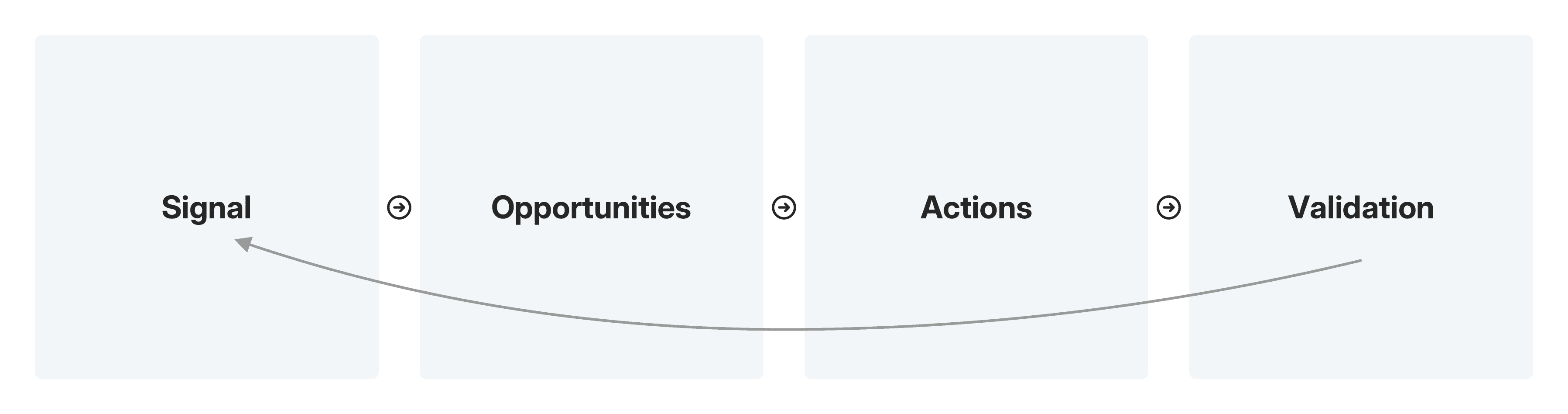
Introducing the Customer Agent Coaching Loop, a feedback system designed to continuously improve agent performance over time. The loop consists of four stages: Signals, Opportunities, Actions, and Validation. Signals identify potential issues in agent behavior, opportunities surface areas for improvement, actions allow admins to make targeted changes, and validation confirms those changes had the intended impact without introducing new problems. The mission of the coaching team was to implement different types of feedback loops so our users could continuously improve their agent's performance.
Product group goals
But two important questions I always like to ask are why this and why now? The Customer Agent product group had two goals for 2025, a 60% average resolution rate and 15,000 weekly active users by the end of the year. By March 2025, we had already reached an average resolution rate of 60%, which was a great sign. But weekly active users told a very different story, sitting at just 1,000 out of 15,000.
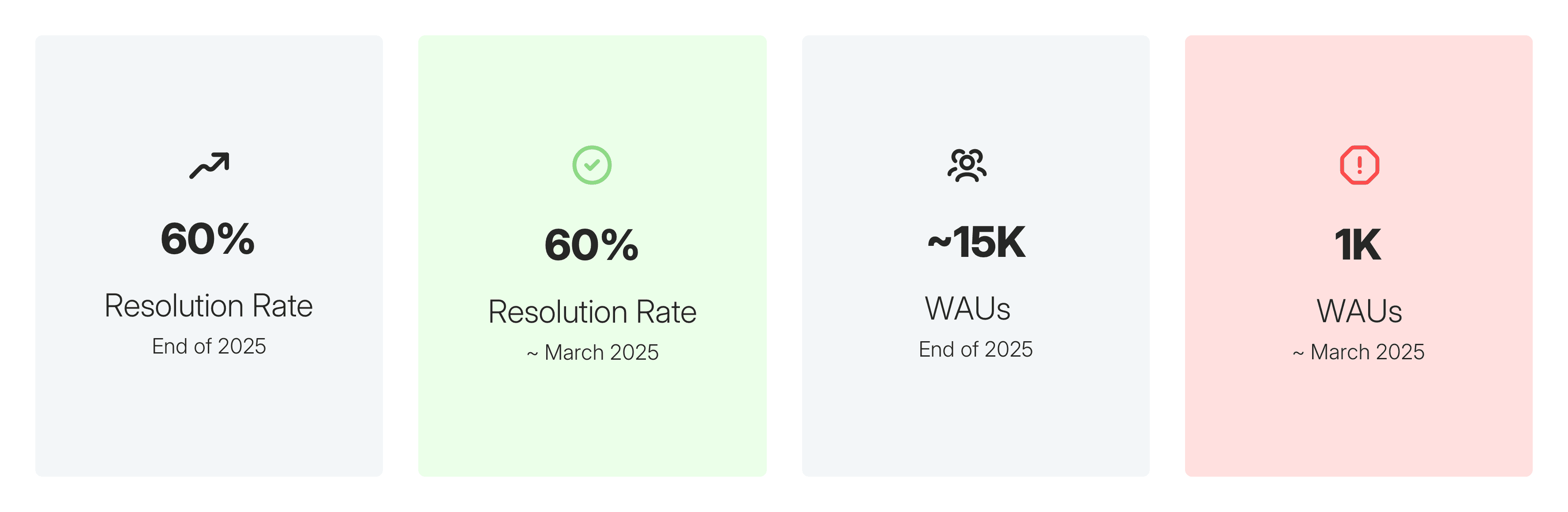
While the coaching loop aligned with our long-term vision, activation, not resolution rate, was the group's most pressing challenge. With INBOUND approaching and several foundational capabilities still on the roadmap, we chose to focus on helping non-activated users successfully adopt the Customer Agent.
But why such low activation?
We knew users weren't adopting the Customer Agent because it didn't quite fit their workflows and many features were missing. It was limited to live chat, with no email or calling support, and lacked the customization tools needed to handle real-world scenarios, like specific instructions for tone or better built-out actions. But what else was going on?
User research
Four core values
Our user research revealed four core values for Customer Service users and the use of AI: cost and efficiency, speed and consistency, scale, and the human agent experience.
Cost and efficiency: AI agents reduce operational costs by handling high volumes of conversations without adding headcount and remain available around the clock.
Speed and consistency: Admins value instant responses with no hold times or queues and answers that stay on-script.
Scale: AI agents can manage thousands of simultaneous conversations and deploy seamlessly across multiple different channels.
Human agent experience: AI frees human agents from repetitive, low-value tickets so they can focus their expertise on more complex and challenging situations that actually need a human touch.
The three R's
Our research also surfaced three themes, risk, refinement, and reasoning or what I call the "the three R's," that were causing hesitation and preventing teams from fully activating their Customer Agent.
Risk: Companies, especially those in regulated industries like healthcare, hesitate to deploy because a wrong, off-brand, or mishandled answer carries real consequences.
Refinement: Even when teams previewed their agent, our experience made it difficult to actually fix any mistakes that were found. It was sometimes easier for users to deploy their Customer Agent and let it make mistakes in the wild and then use our Knowledge Gaps feature to make adjustments. Mind blowing 🤯, I know.
Reasoning: Users had come to expect transparency into how and why their Customer Agent reached its answers. Without the visibility into the agent's line of thinking, where assumptions were made, and where things broke down, trust was hard to build.
Together, these three themes formed a clear design direction: we needed to make deployment feel safer, allow for intuitive refinement, and surface agent reasoning.
AI and early designs


Feedback and iterations
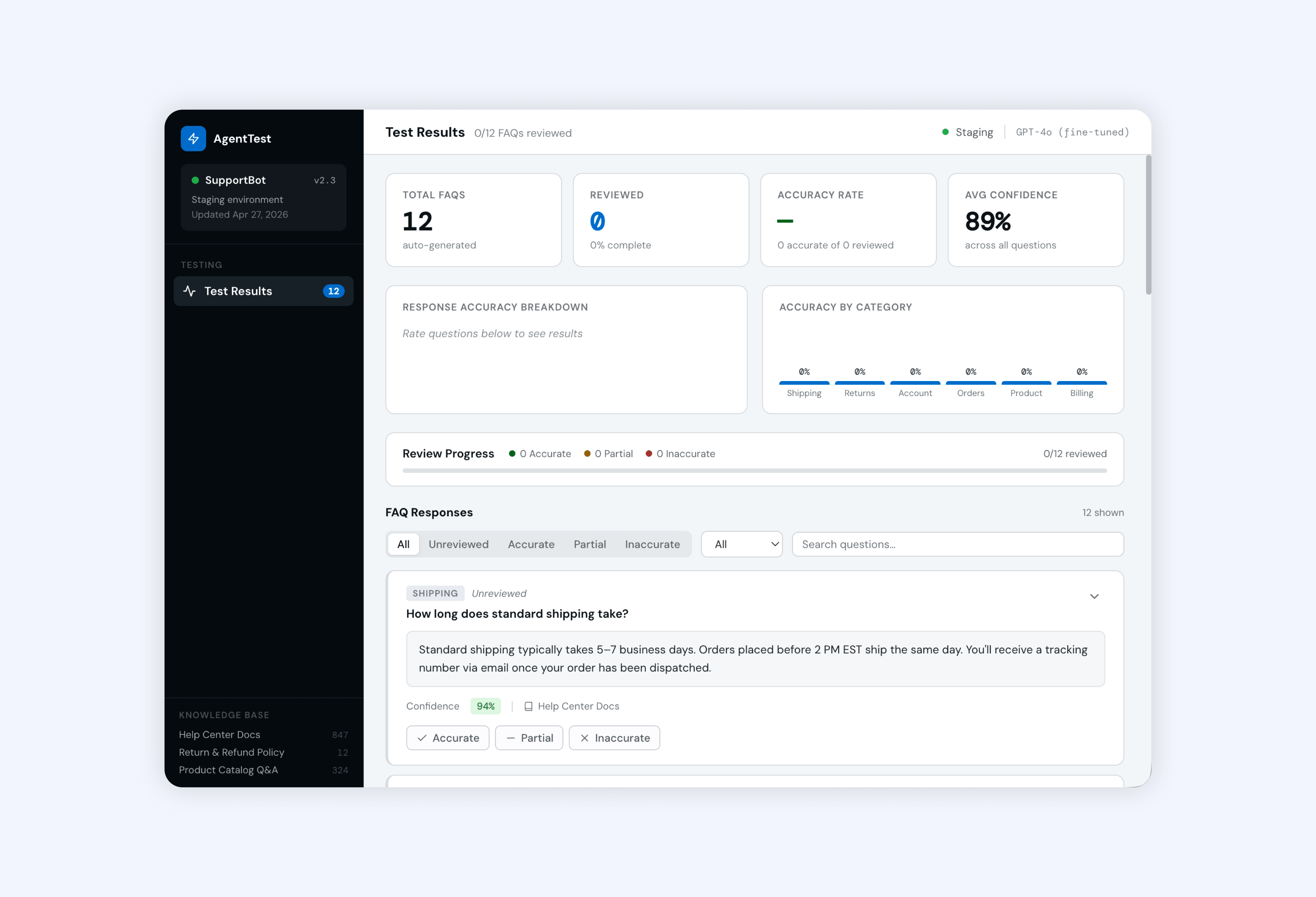
As part of a broader redesign of HubSpot and the Customer Agent experience, we moved testing into a dedicated full-page workflow that could be accessed throughout the product. To help users get started quickly, I reintroduced FAQs and continued exploring response-level coaching patterns that made it easier to identify and improve agent behavior.
This phase also marked a shift away from Help Desk-inspired layouts and toward the card-based patterns emerging in HubSpot's new Trellis design system. Influenced by feedback from a fellow designer, I began exploring an audit-log approach that surfaced agent behavior chronologically, making issues and improvement opportunities easier to discover.
A major focus of this exploration was bringing Knowledge Gaps into the testing experience. Previously, Knowledge Gaps could only be addressed after deployment, leading some users to deploy their agent simply to uncover areas for improvement. By surfacing and resolving these gaps during testing, users could refine their agent before going live, reducing risk and increasing confidence in deployment.


Trellis & UX updates
This iteration coincided with HubSpot's transition to the Trellis design system, requiring us to evolve the experience alongside a rapidly changing set of design standards. We also shifted the testing experience to mimic the end customer's chat experience, allowing users to interact with the Customer Agent the same way their customers would and making testing feel more realistic.
As the design matured, we moved away from an audit-log style approach and focused insights on a single selected message. Reviewing multiple insights at once felt overwhelming, while focusing on one message at a time made the experience easier to understand and act on.
One decision I disagreed with was removing the welcome message insight card. Because our testing environment couldn't accurately reproduce a user's configured live chat experience, the card helped explain why their configured welcome message was not appearing. After launch, the confusion we anticipated surfaced, reinforcing the importance of designing for the entire system.


Solution
Back to the three R's
Throughout our research, risk, refinement, and reasoning came up over and over again. The three R's made users hesitant to deploy their Customer Agent. Users wanted to feel confident in how their agent would respond, and they wanted the ability to fix things before going live. The solution we landed on addresses exactly that. It's built around those three R's: reducing the risk of deployment, giving users the tools to refine their agent, and making the agent's reasoning transparent so users can actually understand why it responded the way it did. I'll walk you through a couple flows 💃🏻.
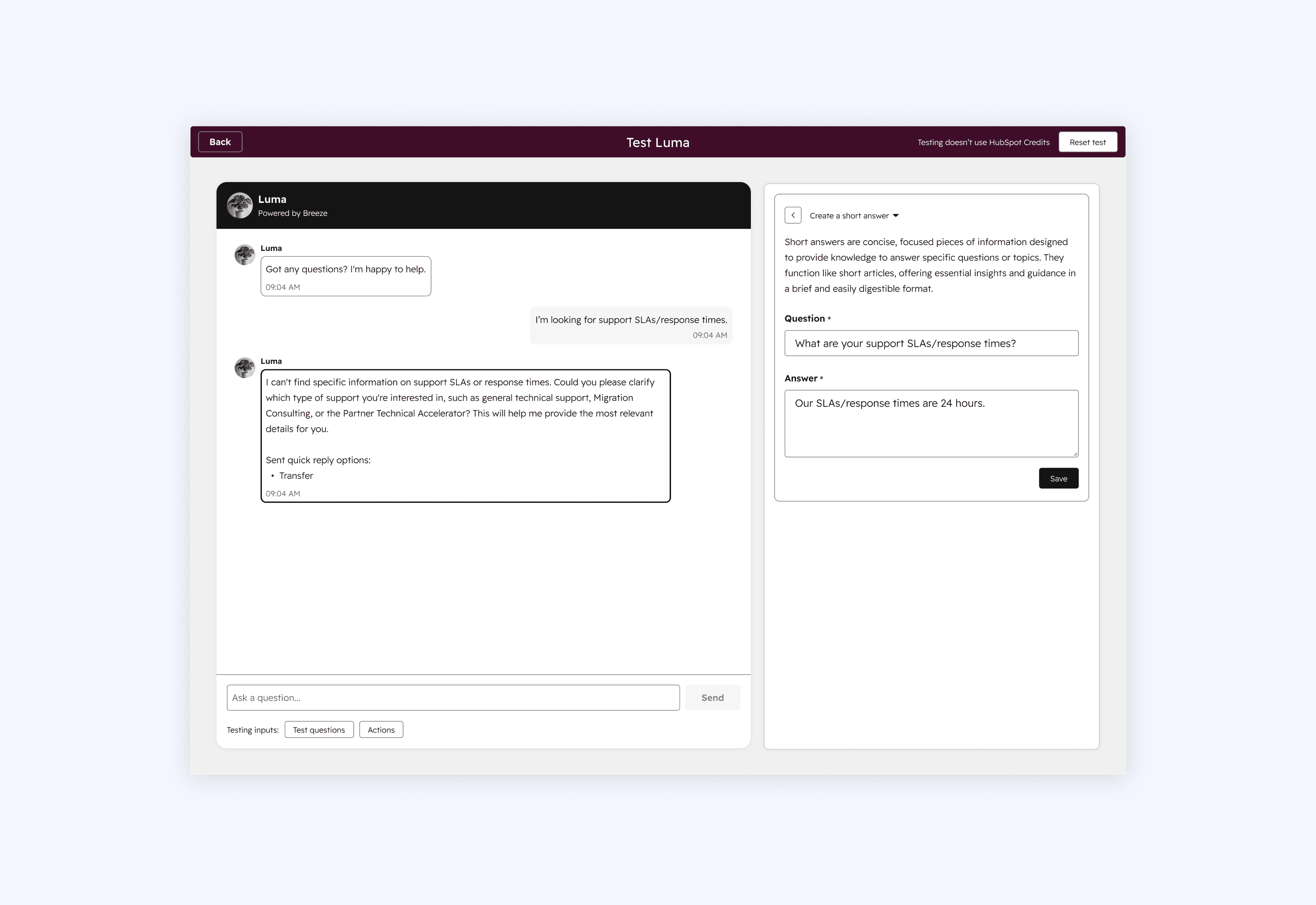
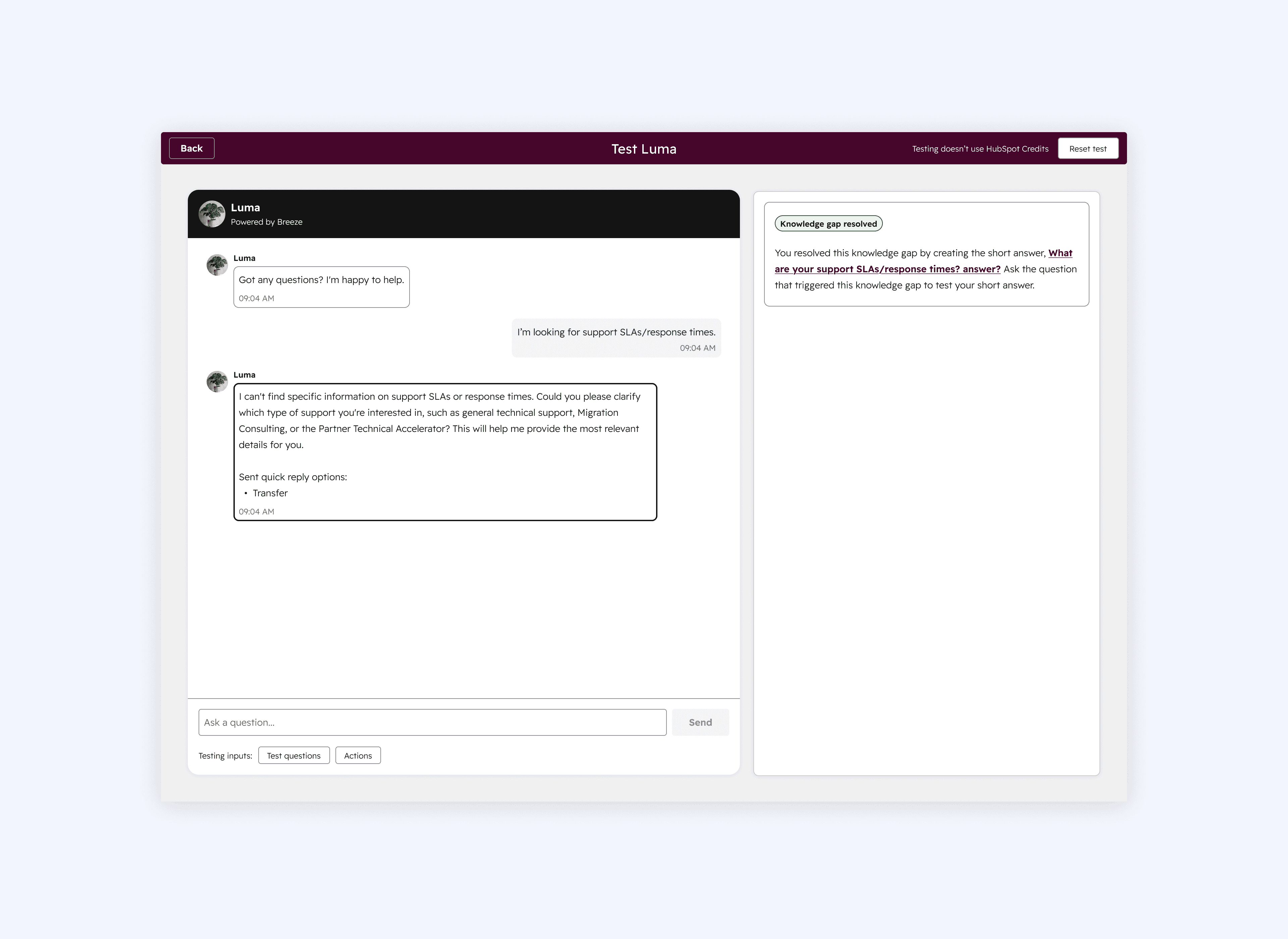
Flow 1: Resolving a Knowledge Gap
We brought Knowledge Gaps into the testing experience so users could identify and resolve them before deployment. Users could quickly create short answers that became part of the agent's content sources, improving future responses.


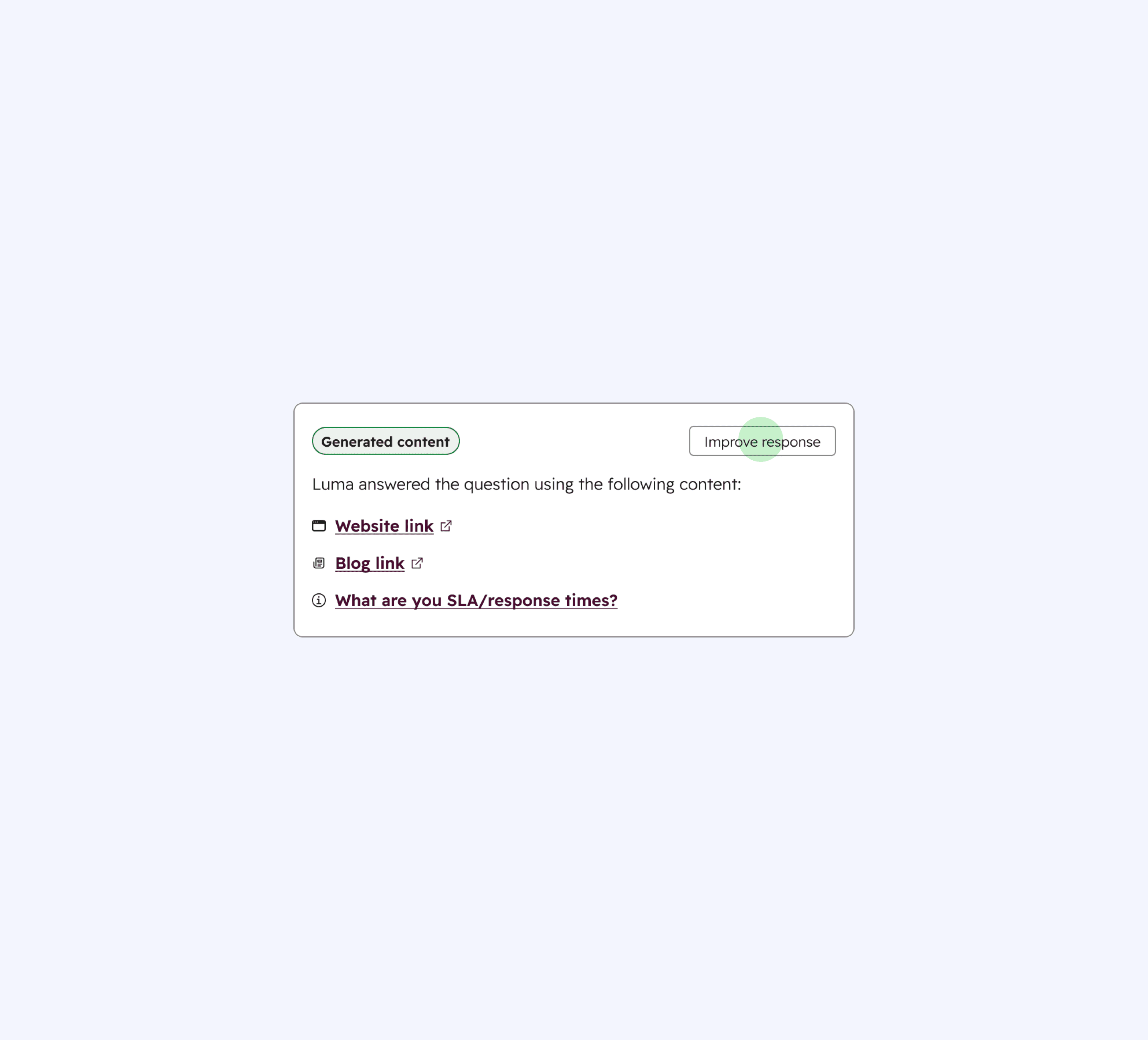
Flow 2: Refining a correct response
Not every coaching opportunity came from a bad response. Even when the Customer Agent answered correctly, users often wanted a way to make the response better. This flow focused on helping users refine already successful responses and build confidence in their agent's performance. When users clicked "Improve response," we defaulted to creating a short answer but also provided other options like "Manage sources." Because the Customer Agent is only as good as the content it relies on, improving or removing sources was often one of the most effective ways to improve future responses. We kept editing intentionally lightweight, allowing users to quickly update short answers or navigate to the underlying knowledge source when deeper changes were needed.


Removing a source presented an interesting design challenge: users were taking action on a single response, but the change affected the entire Customer Agent. We debated sending users to the content sources page, where the impact would be more apparent, versus keeping the workflow lightweight. We ultimately chose the modal shown below, making it clear that removing the source would affect all future responses. In hindsight, I would have used a destructive treatment for the action to better communicate its significance.


Scalable system
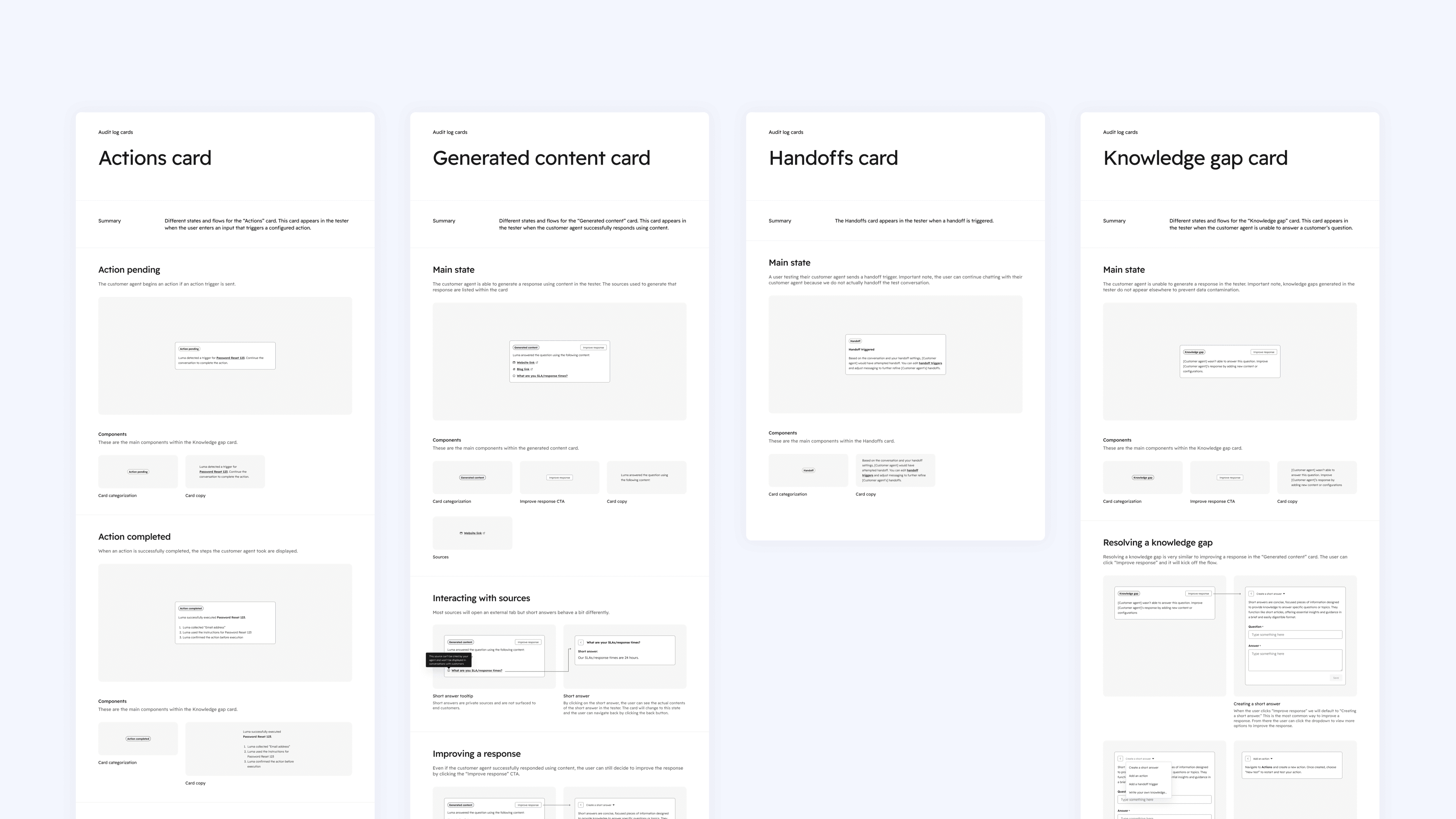
Rather than designing a separate interface for every type of insight, I created a shared pattern through a system cards. Each card follows the same structure but surfaces different information depending on what the agent did, whether that was generating content from a source, detecting an action trigger, initiating a handoff, or flagging a knowledge gap. This design made the insight layer scalable, so as new Customer Agent features are built out, new cards can slot right in without having to rethink the design from scratch.
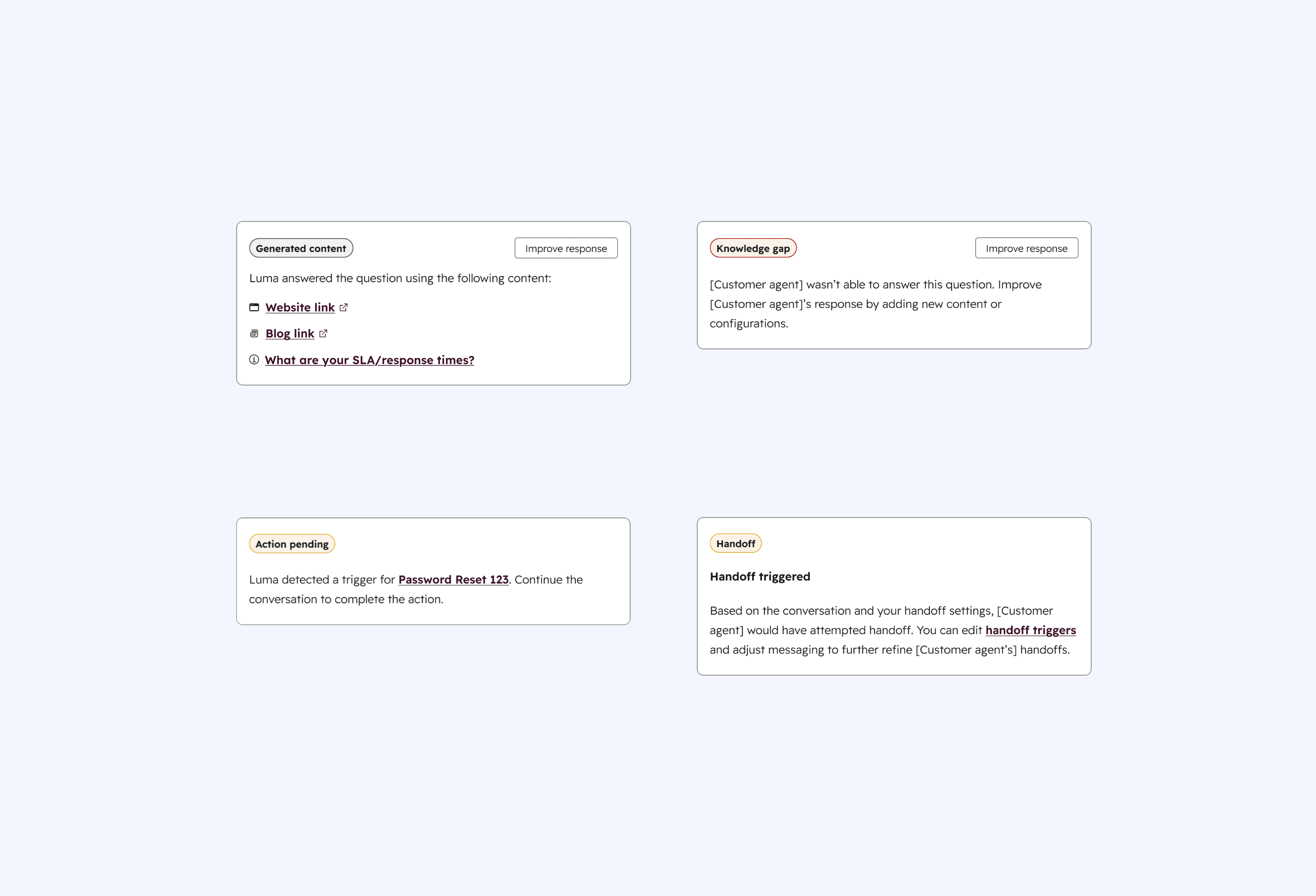
Design system
These screenshots show the documentation I put together for the different types of message insights cards. It was designed for the broader team to reference and to help engineers and designers understand how each card was structured and when it would appear.
Thinking ahead
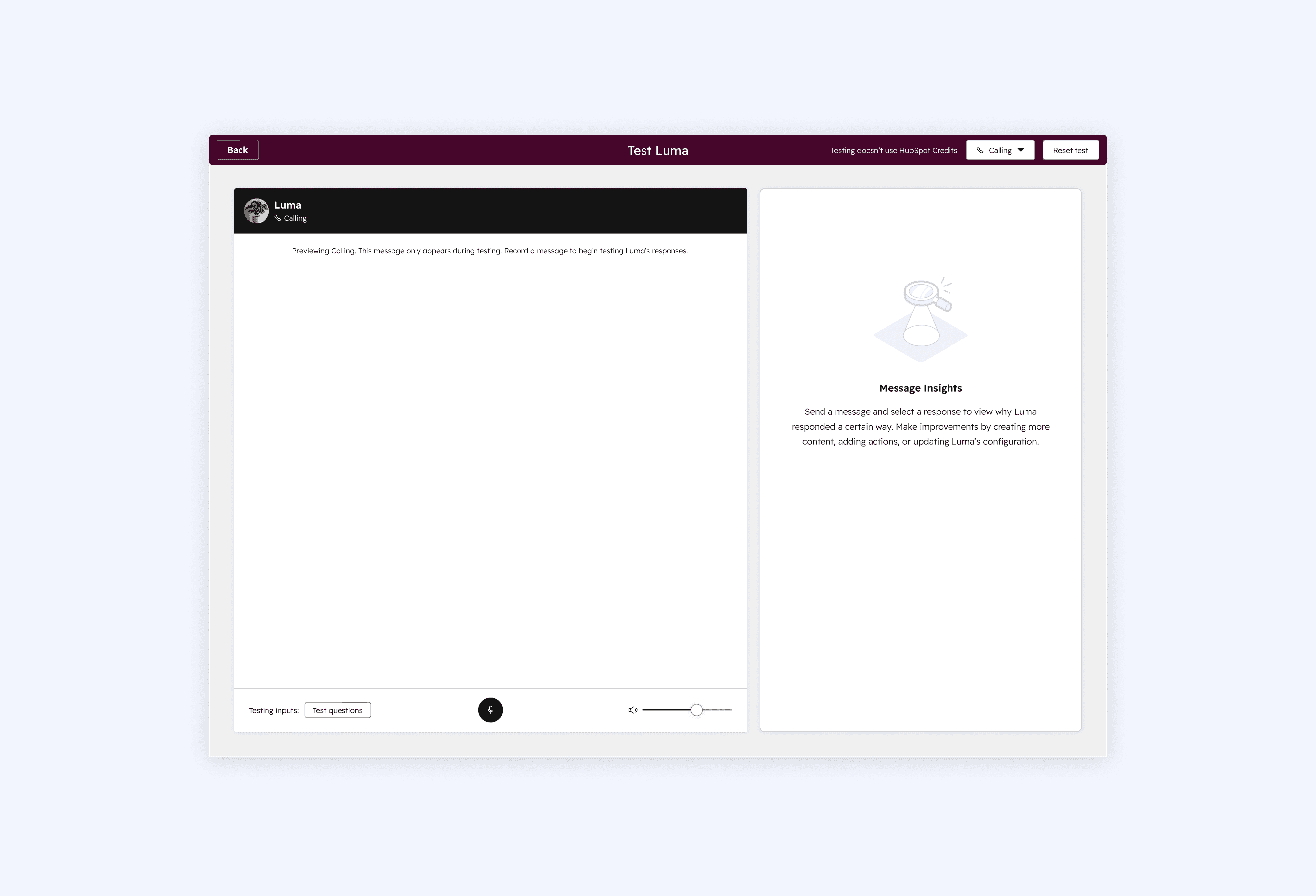
The screens below explore some future thinking around the calling and email channels, two of the most requested features from users. While the Calling team and Customer Agent growth team weren't quite there yet, it was important for me to get ahead and explore how these channels could be incorporated into the tester once they were ready.

Another future feature we explored was surfacing an "Agent Reasoning" component into the tester. This was separate from our reasoning in the tester and something the Breeze AI team was actively working on for the larger Breeze AI feature. They had started showing agent reasoning in a different part of the platform and I worked closely with their designer to see how we could bring that component into the tester experience. The screen below shows that exploration, including how the message insights card could be incorporated alongside the agent reasoning view.
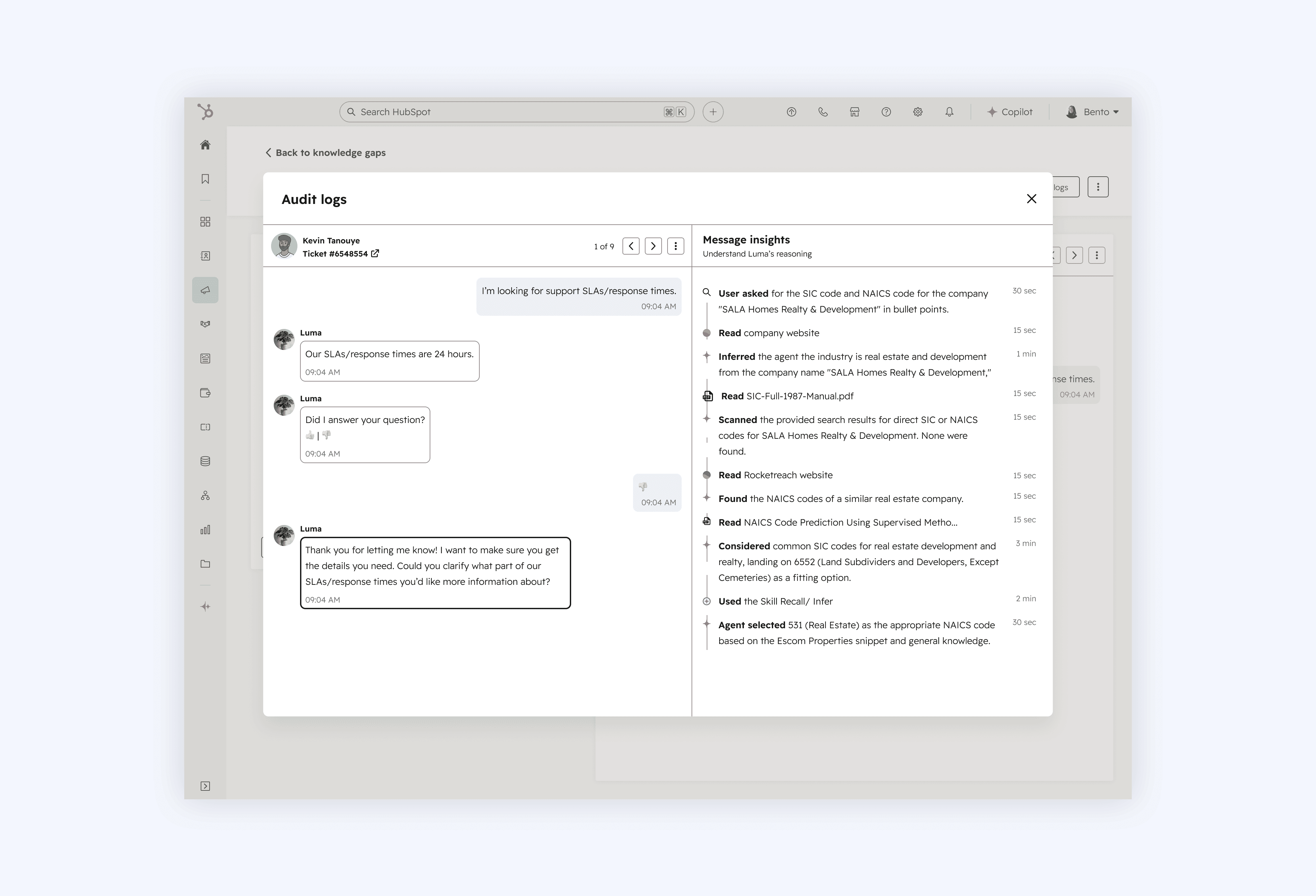
Another direction I explored was giving customer service reps the ability to manually flag the Customer Agent's responses. This screen shows what that could look like, with the agent reasoning component incorporated into the design as well. The idea here was to take the message insights panel out of the testing environment and bring it into an actual live conversation between the Customer Agent and an end customer. We could begin bringing our Customer Agent coaching feedback loop in to other parts of the platform!
Conclusion
Impact & outcomes
The Customer Agent Tester was designed to address a key barrier: users’ lack of confidence in their Customer Agent prior to rollout. While overall adoption of the Customer Agent is influenced by many factors, the engagement data from the tester provides clear signals that users were actively refining and improving their agents.
Within the first 4 months of launch (July [Alpha release] - October 2025):
The "Improve response" button was clicked 6,717 times, showing frequent refinement activity.
2,300 short answers were created, transforming Knowledge Gaps into reusable responses and 43 existing short answers were edited.
240 handoff triggers were executed, enabling users to test escalation flows in context.
~ 18 sources were removed, meaning users were refining their knowledge sources and keeping them up to date.
These metrics demonstrate that users actively engaged with the Customer Agent Tester, iteratively testing and refining responses, which aligns with the user goal of building confidence pre-deployment. By addressing the three R's, the testing experience helped teams make informed deployment decisions, reduced the friction around rollout, and set the foundation for broader Customer Agent adoption in the future.
Scalability of short answers?
One thing worth calling out is the role of short answers in this project. In practice, they felt less like a true knowledge source and more like a workaround for adding information to the Customer Agent. Unlike knowledge base articles, short answers lacked metadata such as authorship, update history, and audit trails, making them difficult to search, maintain, and manage at scale.
I saw two potential paths forward. The simplest was adding metadata directly to short answers. The more interesting opportunity emerged through conversations with the knowledge base team, who were building an AI-powered tool for generating knowledge base articles. I explored using that system to convert short answers into full knowledge base articles, giving them the structure, attribution, and maintainability they were missing. Unfortunately, a major migration on the knowledge base team paused further exploration before we could meaningfully pursue the idea.
What I learned
One thing I'd do differently is spend more time educating our new AI stakeholders on how Help Desk worked. My team came from a ServiceHub background and deeply understood the product, but many stakeholders had little familiarity with Help Desk workflows or customer use cases. I often referenced existing patterns and system constraints when making design decisions, assuming a shared understanding that didn't exist.
The lesson for me was that tribal knowledge doesn't transfer automatically when teams and missions change. As a designer, it's my responsibility to bridge that gap. Had I done a better job grounding stakeholders in the Help Desk experience, we likely could have avoided some of the confusing user feedback we later received, including around the welcome message.
Reflection
Looking back, I'm really proud of what my team and I were able to deliver in such a short time and in a brand new space. We designed an experience that helped users feel confident deploying their Customer Agent by addressing the three Rs: risk, refinement, and reasoning. Beyond that, we introduced a scalable system that allows the tester to grow as new Customer Agent features come online, and we laid the groundwork for the broader Customer Agent coaching mission the team will continue to build on.
Thank you
If you've made it this far, thank you so much for reading this insanely long case study, I hope you enjoyed it much more than I did writing it 😵💫.
© 2026 Kevin Tanouye